
Pros: A very attractive iPod docking clock radio system that supports Apple’s Universal Dock standard, includes a dual-alarm mechanism with loud buzzers and iPod playback, clean button integration, and a decent remote control. Good iPod audio performance for the price, which is very reasonable overall.
Cons: Front clock screen is very bright, even by past iPod clock standards, and cannot be turned down enough to satisfy some users; similarly, quickly powerful buzzer sound may be too loud for light sleepers. AM and FM radio reception and tuning are not stellar by standards of best we’ve seen. Bass is not as exaggerated as some buyers of low-end speaker systems will prefer.
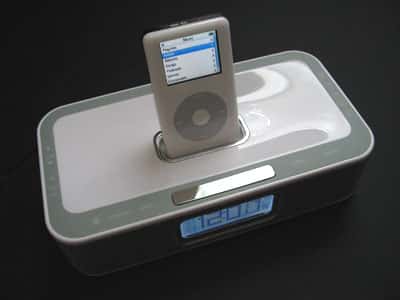
This impressively sleek new iPod docking alarm clock does away with virtually all conspicuous top buttons – except a silver metal snooze button – by embedding them in its top edging. A large white backlit LCD clock is found on front between speakers housed in a metal grille; you can set two separate alarms, and also tune AM and FM stations on the display. An included remote control and buttons on iWake’s top both enable you to control the docked iPod. SRS WOW technology is included for “optimal sound quality,” and Apple’s Universal Dock standard is supported with a collection of 3G, 4G, and mini adapters. Black and white versions are available.
iHome’s iH5 (iLounge rating: A-) made a huge splash when it arrived last year; as the first dedicated clock radio for iPods, it was a natural, smart pairing of features iPod owners wanted, at a price point that many people found irresistable. In fact, it was bound to inspire competition, and in 2006, that’s happened – companies such as iLuv and Memorex have emerged with their own clock radios, similar in design and appeal to iH5. Each is now available in both glossy white and black versions, to match today’s iPod and nano colors.
iWake ($80) takes strong stabs at all of iH5’s obvious weaknesses: it sells for $20 less, incorporates Apple’s Universal Dock standard, always includes a remote control – which have been less consistently included with iH5 systems, depending as much on the store you shop at and the price you pay as anything else – and has an even better aesthetic design.
Memorex has designed what looks basically like an oversized Apple dock with a bit more gray and silver, and done away with virtually all of iH5’s conspicuous top buttons and dials. Except for an obvious silver metal snooze button in front of the iPod dock, Memorex has embedded all of the unit’s other buttons in iWake’s gray top edging.

On the left, you have radio tuning and volume control; the front left has power, iPod/Line-in, and AM/FM buttons. The right has time set buttons for hours and minutes, plus alarm set buttons for alarms 1 and 2. Buttons to actually activate and deactivate both alarms are on the front right. A dimmer switch (low/high only) and a daylight savings time toggle switch are on the unit’s back, alongside power, line in, and headphone output ports. iWake’s front has a large LCD-based clock that’s easier to read from a distance than iH5’s, though its ancillary information (alarms and system on/off status) is basically invisible unless you’re up close.


Aesthetics aside, the questions that face iPod clock radio makers today are basically four in number: how does the system sound with an iPod, how does it work as an alarm clock, how does it work as a regular clock, and how does it work as a radio? iWake’s answers are generally, but not universally positive ones. As an iPod docking speaker system, it does at least as good a job for $80 as iH5 does for $100. We haven’t seen nano or 5G-specific adapters for either system – Memorex only includes 3G, 4G and mini inserts – but iWake’s chrome-edged Universal Dock is compatible with the Dock Adapters Apple includes wih today’s iPods, and they fit properly. iPod control is handled either with the iPod’s Click Wheel, or with the remote, which has volume, track, and play/pause buttons, plus a mode button to switch to the radio, which can be tuned with the track buttons.
The remote works from a distance of ten feet under optimal lighting conditions, less under tough lighting, which is unimpressive in an absolute sense but appropriate to the maximum volume level iWake is capable of reaching. It has a belt clip built into its back, and is comfortable enough in your hand.


Bolstered by SRS Wow technology, iWake’s sound quality is pretty good. It actually has a bit less amplifier noise than iH5 at high volumes, reaches the same maximum volume, and has less audible distortion at its peak. That said, iHome’s system intentionally emphasizes bass to a greater extent than iWake does, which at low volumes means a bit less low-end bump in iWake, though at high volumes, it beneficially leads to much less bass distortion. We preferred iWake’s sound overall, finding it crisper, but others – particularly the many bass-obsessed speaker buyers out there – may like iH5’s balance better. Neither system is a model of clarity or detail for the dollar, and neither offers the sort of bass or treble controls we’d prefer.

iWake’s biggest issues relate to its performance as an alarm clock, standard clock, and radio. On the bright side, its alarm buzzer is loud, quickly graduating from a low level to a higher tone that has a better chance of waking sound sleepers than iH5’s. The flip side of that, though, is that you’ll surely wake someone else if they’re slumbering in the same room; there’s no apparent way to limit the piercing top volume. It’s also not too hard to set the alarms with the iWake’s buttons, though you can only move in one direction (forward in time), while iHome’s dials permit you the ability to turn the clock setting backwards if you miss the right time.
However, one of the most serious, repeated complaints about iH5 – and one we initially didn’t feel as acutely as some of our readers – was that its front clock face was too bright for dark bedrooms, even at its minimum brightness level.











