
iLoungeiLounge
  • News
    • Apple
      • AirPods Pro
      • AirPlay
      • Apps
        • Apple Music
      • iCloud
      • iTunes
      • HealthKit
      • HomeKit
      • HomePod
      • iOS 13
      • Apple Pay
      • Apple TV
      • Siri
    • Rumors
    • Humor
    • Technology
      • CES
    • Daily Deals
    • Articles
    • Web Stories
  • iPhone
    • iPhone Accessories
  • iPad
  • iPod
    • iPod Accessories
  • Apple Watch
    • Apple Watch Accessories
  • Mac
    • MacBook Air
    • MacBook Pro
  • Reviews
    • App Reviews
  • How-to
    • Ask iLounge
Font ResizerAa
iLoungeiLounge
Font ResizerAa
Search
  • News
    • Apple
    • Rumors
    • Humor
    • Technology
    • Daily Deals
    • Articles
    • Web Stories
  • iPhone
    • iPhone Accessories
  • iPad
  • iPod
    • iPod Accessories
  • Apple Watch
    • Apple Watch Accessories
  • Mac
    • MacBook Air
    • MacBook Pro
  • Reviews
    • App Reviews
  • How-to
    • Ask iLounge
Follow US

Reviews

Reviews

Review: Mecrets Password Manager v1.0.1 by NormSoft, Inc.

Last updated: May 16, 2021 5:07 pm UTC
By Jesse Hollington
Review: Mecrets Password Manager v1.0.1 by NormSoft, Inc.

This review originally appeared within iLounge’s iOS Gems series within the compilation article, iPhone Gems: All 22 Wallet Apps, Reviewed. Additional details may be found in the original article.


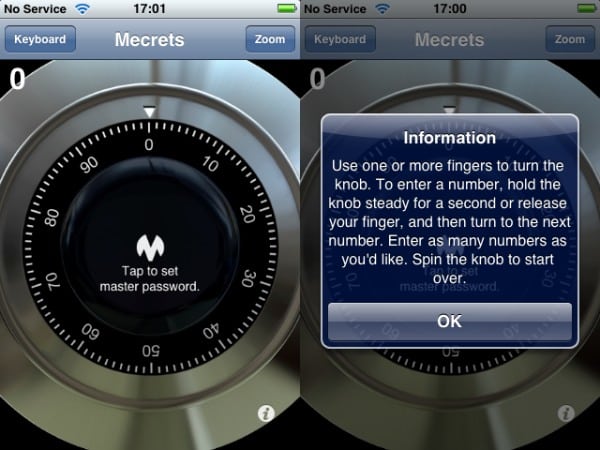
Mecrets Password Manager ($10) is one of the more expensive App Store wallet offerings. The most distinguishing feature of Mecrets is that it offers a choice of using a standard password or a graphical login option in the form of a combination dial that you manipulate via the touch screen.
Review: Mecrets Password Manager v1.0.1 by NormSoft, Inc.

This combination dial log in seems like more of a gimmick than a practical feature, however, as the dial is quite sensitive and its far too easy to enter the wrong numbers and have to start over again. Although you can switch to a normal text-based password entry, it’s important to note that if you have specified a password using the combination dial, the text-based version of that password is not simply the numbers but actually the numbers and punctuation that is normally displayed when you are dialling in a password.


For instance, a combination dial password of 40, 30 and 20 would be entered as “40, 30, 20” and not “403020.” This does not appear to be documented anywhere in the application.


Review: Mecrets Password Manager v1.0.1 by NormSoft, Inc.

Like other wallet apps, Mecrets offers basic storage of different types of information, although its design appears to be more focused on storing passwords, with basic field categories for login, password, URL and note on most items, and other fields such as credit card numbers simply being added as generic additional fields as required.


Review: Mecrets Password Manager v1.0.1 by NormSoft, Inc.

Field types themselves are either text, password, or note, and in all cases are text-only, with the only difference being that a “password” field offers the ability to automatically generate a password, and the note field is a multi-line text field. Password fields can also be masked by selecting the “Hide Password” option when using a password-type field.


Review: Mecrets Password Manager v1.0.1 by NormSoft, Inc.

A basic top-level folder structure is provided to organize items into groups, with some initial defaults provided. These can be renamed or deleted and new groups can be added.


Note that deleting a group does not delete any of the items it contains—they will simply revert to the default “Unfiled” group.


Review: Mecrets Password Manager v1.0.1 by NormSoft, Inc.

Mecrets also offers another somewhat unique feature compared to other apps in the form of a password generator. Tapping “Generate Password” on a password type field will automatically fill it in with a randomly generated password. You can specify the number and type of characters that the password generator will use through the Mecrets configuration panel found in the iPhone’s main “Settings” app.


Review: Mecrets Password Manager v1.0.1 by NormSoft, Inc.

The settings screen also provides the option to save the Mecrets password so you will not be prompted for it each time you log on. This is a useful feature if you want to store your information without using a password, although perhaps defeating the purpose of a secure app.


Review: Mecrets Password Manager v1.0.1 by NormSoft, Inc.

Mecrets is a reasonable enough app, but its only distinguishing features are a password generator that only some users will find useful, and a graphical login screen that most users will likely find annoying once the novelty wears off.



Latest News
The 14-inch MacBook Pro with M5 Chip 16GB RAM/512GB is $250 Off
1 Min Read
Noise and Static on AirPods Pro 3 Still Unfixed
1 Min Read
New iMac with 24-inch OLED Display May be Brighter With 600 Nits
1 Min Read
The 15-inch M4 MacBook Air 256GB Is $250 Off
1 Min Read
Internal Kernel Debug Kit from Apple Reveals Tests for a MacBook with A15 Chip
1 Min Read
Apple Currently In Talks With Suppliers for Chip Assembly & Packaging of iPhones in India
1 Min Read
Apple Allows Easier Battery Replacement For M5 MacBook Pro with 14-inch Display
1 Min Read
The Apple Watch SE 3 44mm GPS is $50 Off
1 Min Read
20th Anniversary iPhone May Launch in Two Years
1 Min Read
Better Image Generation Capabilities and Apple Music Integration Coming to ChatGPT
1 Min Read
A20 Pro Chip Coming to Next Gen iPad Mini OLED
1 Min Read
Amazon has the AirTag 4 Pack Marked $29 off
1 Min Read

iLounge logo

iLounge is an independent resource for all things iPod, iPhone, iPad, and beyond. iPod, iPhone, iPad, iTunes, Apple TV, and the Apple logo are trademarks of Apple Inc.

This website is not affiliated with Apple Inc.
iLounge © 2001 - 2025. All Rights Reserved.
  • Contact Us
  • Submit News
  • About Us
  • Forums
  • Privacy Policy
  • Terms Of Use
Welcome Back!

Sign in to your account

Lost your password?








