
iLoungeiLounge
  • News
    • Apple
      • AirPods Pro
      • AirPlay
      • Apps
        • Apple Music
      • iCloud
      • iTunes
      • HealthKit
      • HomeKit
      • HomePod
      • iOS 13
      • Apple Pay
      • Apple TV
      • Siri
    • Rumors
    • Humor
    • Technology
      • CES
    • Daily Deals
    • Articles
    • Web Stories
  • iPhone
    • iPhone Accessories
  • iPad
  • iPod
    • iPod Accessories
  • Apple Watch
    • Apple Watch Accessories
  • Mac
    • MacBook Air
    • MacBook Pro
  • Reviews
    • App Reviews
  • How-to
    • Ask iLounge
Font ResizerAa
iLoungeiLounge
Font ResizerAa
Search
  • News
    • Apple
    • Rumors
    • Humor
    • Technology
    • Daily Deals
    • Articles
    • Web Stories
  • iPhone
    • iPhone Accessories
  • iPad
  • iPod
    • iPod Accessories
  • Apple Watch
    • Apple Watch Accessories
  • Mac
    • MacBook Air
    • MacBook Pro
  • Reviews
    • App Reviews
  • How-to
    • Ask iLounge
Follow US

Reviews

Reviews

Review: Meal Splitter and Meal Splitter v2 by iHarwood

Last updated: May 13, 2021 7:32 am UTC
By Charles Starrett
Review: Meal Splitter and Meal Splitter v2 by iHarwood

This review originally appeared within iLounge’s iOS Gems series within the compilation article, iPhone Gems: All 30 Tip Calculators + Meal Splitters, Reviewed. Additional details may be found in the original article.


Though we really like the functionality Meal Splitter ($1) and Meal Splitter v2 ($1) from iHarwood, we really do not like the fact that the developer—rather than giving early customers a free upgrade—has split these two virtually identical applications into two separate paid options.
Review: Meal Splitter and Meal Splitter v2 by iHarwood

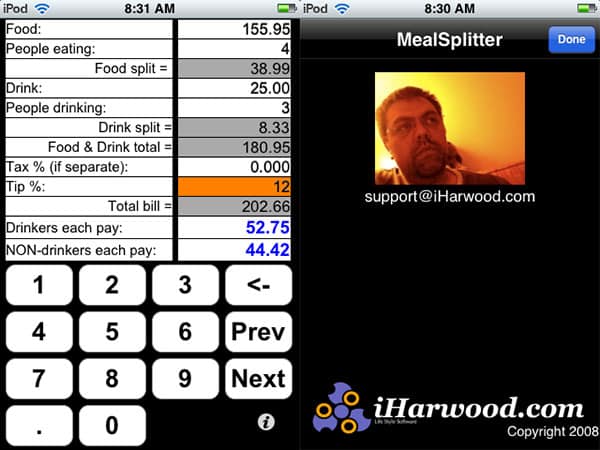
Like Catamount’s CheckPlease, the original Meal Splitter provides a one-screen interface for entering numbers, splitting the bill, and calculating tips. It even goes further, letting you separately account for drinks and the number of people who drank, a really smart and useful idea for non-drinkers to avoid getting stuck with higher bills.


Review: Meal Splitter and Meal Splitter v2 by iHarwood

The major bummer here is that the developer created a “v2” of Meal Splitter that does all of the above, increases the size of the otherwise unattractive keypad numbers, and adds the ability to include tax in the final tally, a significant omission from the original Meal Splitter. While the resulting calculations done by version 2 are amongst the most useful we’ve seen in an app of this sort, we’re not impressed that the developer is keeping two apps in the Store rather than updating the original one and giving away the update to prior buyers—especially given that Meal Splitter’s interface is one of the least attractive we’ve seen.



Latest News
The Apple Watch Series 11 42mm GPS is $100 Off
1 Min Read
Apple Launching A New Education Hub In India Teaching Robotics and Swift Programming
1 Min Read
Women’s and Men’s Golf Added to Apple Sports
1 Min Read
Apple Adding Civilization VII and Other Games To Apple Arcade
1 Min Read
AirPods 4 ANC Is $59 Off
1 Min Read
Apple Using 2NM Process For Their M6 and A20 Chip
1 Min Read
iPhone 18 Models Will Not Have a Big Redesign
1 Min Read
Launch of MacBook Pro M5 Pro and M5 Max Models is Approaching
1 Min Read
Get the iPad Mini 7 256GB Wi-Fi at $99 Off
1 Min Read
Mozilla Now Allows Turning AI Features Off
1 Min Read
Barcelona Passeig de Gràcia Apple Store Temporarily Closing
1 Min Read
Apple’s Plans to Enter the Smart Glasses Market is Changing the Industry
1 Min Read

iLounge logo

iLounge is an independent resource for all things iPod, iPhone, iPad, and beyond. iPod, iPhone, iPad, iTunes, Apple TV, and the Apple logo are trademarks of Apple Inc.

This website is not affiliated with Apple Inc.
iLounge © 2001 - 2025. All Rights Reserved.
  • Contact Us
  • Submit News
  • About Us
  • Forums
  • Privacy Policy
  • Terms Of Use
Welcome Back!

Sign in to your account

Lost your password?








