
iLoungeiLounge
  • News
    • Apple
      • AirPods Pro
      • AirPlay
      • Apps
        • Apple Music
      • iCloud
      • iTunes
      • HealthKit
      • HomeKit
      • HomePod
      • iOS 13
      • Apple Pay
      • Apple TV
      • Siri
    • Rumors
    • Humor
    • Technology
      • CES
    • Daily Deals
    • Articles
    • Web Stories
  • iPhone
    • iPhone Accessories
  • iPad
  • iPod
    • iPod Accessories
  • Apple Watch
    • Apple Watch Accessories
  • Mac
    • MacBook Air
    • MacBook Pro
  • Reviews
    • App Reviews
  • How-to
    • Ask iLounge
Font ResizerAa
iLoungeiLounge
Font ResizerAa
Search
  • News
    • Apple
    • Rumors
    • Humor
    • Technology
    • Daily Deals
    • Articles
    • Web Stories
  • iPhone
    • iPhone Accessories
  • iPad
  • iPod
    • iPod Accessories
  • Apple Watch
    • Apple Watch Accessories
  • Mac
    • MacBook Air
    • MacBook Pro
  • Reviews
    • App Reviews
  • How-to
    • Ask iLounge
Follow US

Reviews

Reviews

Preview: Marware Remote Docking Station / iPod Dock with Remote

Last updated: May 16, 2021 12:52 am UTC
By Jeremy Horwitz
Preview: Marware Remote Docking Station / iPod Dock with Remote

This black iPod dock comes with an infrared remote control, standard USB-to-USB cable, AV cable, and folding AC wall adapter. You can use the AV cable with the dock to output iPod audio and video to your home entertainment system, and control the docked iPod from a distance with the remote. Alternately, you can connect the USB cable to the dock and your computer for data synchronization and/or charging, or to the dock and the wall adapter for charging.


No sizer inserts are included for the dock, which is advertised as compatible with the iPod mini, nano, 4G and 5G.
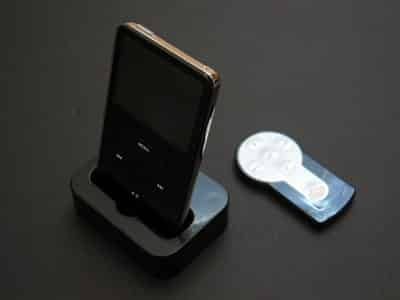
Preview: Marware Remote Docking Station / iPod Dock with Remote

pic

Brief testing of the Docking Station revealed easily-heard noise in its audio signal when the power supply was connected without an iPod; the noise thankfully disappeared when the iPod was connected. Our test iPods fit in the dock without an issue regardless of thickness, and performed audio and video without a hitch. Charging also worked properly, as did the remote control, which isn’t up to the standards of Apple’s official Remote, but works fine within the dock’s line of sight.


Besides the standard five buttons (play/pause, track forward/backward and volume up/down, which adjusts the dock’s variable line-out level), there’s a remote power button to turn off the dock, which as previously noted you’ll want to do when your speakers are on and the iPod’s not docked. A bright blue light can be seen through the dock’s top; it’s intended to be viewed and filtered by a small circular lens on the dock’s front, and flashes when the remote is used.

pic

Also note: the dock isn’t made to be compatible with 3G iPods, and will neither charge nor remote control them. Audio can be heard through the dock, however, the iPod’s controls won’t work properly, if at all.



Latest News
The Apple Watch Series 11 42mm GPS is $100 Off
1 Min Read
Apple Launching A New Education Hub In India Teaching Robotics and Swift Programming
1 Min Read
Women’s and Men’s Golf Added to Apple Sports
1 Min Read
Apple Adding Civilization VII and Other Games To Apple Arcade
1 Min Read
AirPods 4 ANC Is $59 Off
1 Min Read
Apple Using 2NM Process For Their M6 and A20 Chip
1 Min Read
iPhone 18 Models Will Not Have a Big Redesign
1 Min Read
Launch of MacBook Pro M5 Pro and M5 Max Models is Approaching
1 Min Read
Get the iPad Mini 7 256GB Wi-Fi at $99 Off
1 Min Read
Mozilla Now Allows Turning AI Features Off
1 Min Read
Barcelona Passeig de Gràcia Apple Store Temporarily Closing
1 Min Read
Apple’s Plans to Enter the Smart Glasses Market is Changing the Industry
1 Min Read

iLounge logo

iLounge is an independent resource for all things iPod, iPhone, iPad, and beyond. iPod, iPhone, iPad, iTunes, Apple TV, and the Apple logo are trademarks of Apple Inc.

This website is not affiliated with Apple Inc.
iLounge © 2001 - 2025. All Rights Reserved.
  • Contact Us
  • Submit News
  • About Us
  • Forums
  • Privacy Policy
  • Terms Of Use
Welcome Back!

Sign in to your account

Lost your password?








