
iLoungeiLounge
  • News
    • Apple
      • AirPods Pro
      • AirPlay
      • Apps
        • Apple Music
      • iCloud
      • iTunes
      • HealthKit
      • HomeKit
      • HomePod
      • iOS 13
      • Apple Pay
      • Apple TV
      • Siri
    • Rumors
    • Humor
    • Technology
      • CES
    • Daily Deals
    • Articles
    • Web Stories
  • iPhone
    • iPhone Accessories
  • iPad
  • iPod
    • iPod Accessories
  • Apple Watch
    • Apple Watch Accessories
  • Mac
    • MacBook Air
    • MacBook Pro
  • Reviews
    • App Reviews
  • How-to
    • Ask iLounge
Font ResizerAa
iLoungeiLounge
Font ResizerAa
Search
  • News
    • Apple
    • Rumors
    • Humor
    • Technology
    • Daily Deals
    • Articles
    • Web Stories
  • iPhone
    • iPhone Accessories
  • iPad
  • iPod
    • iPod Accessories
  • Apple Watch
    • Apple Watch Accessories
  • Mac
    • MacBook Air
    • MacBook Pro
  • Reviews
    • App Reviews
  • How-to
    • Ask iLounge
Follow US

Reviews

Reviews

Review: Marbotic Smart Letters for iPad

Last updated: May 19, 2021 9:22 pm UTC
By Phil Dzikiy
Review: Marbotic Smart Letters for iPad

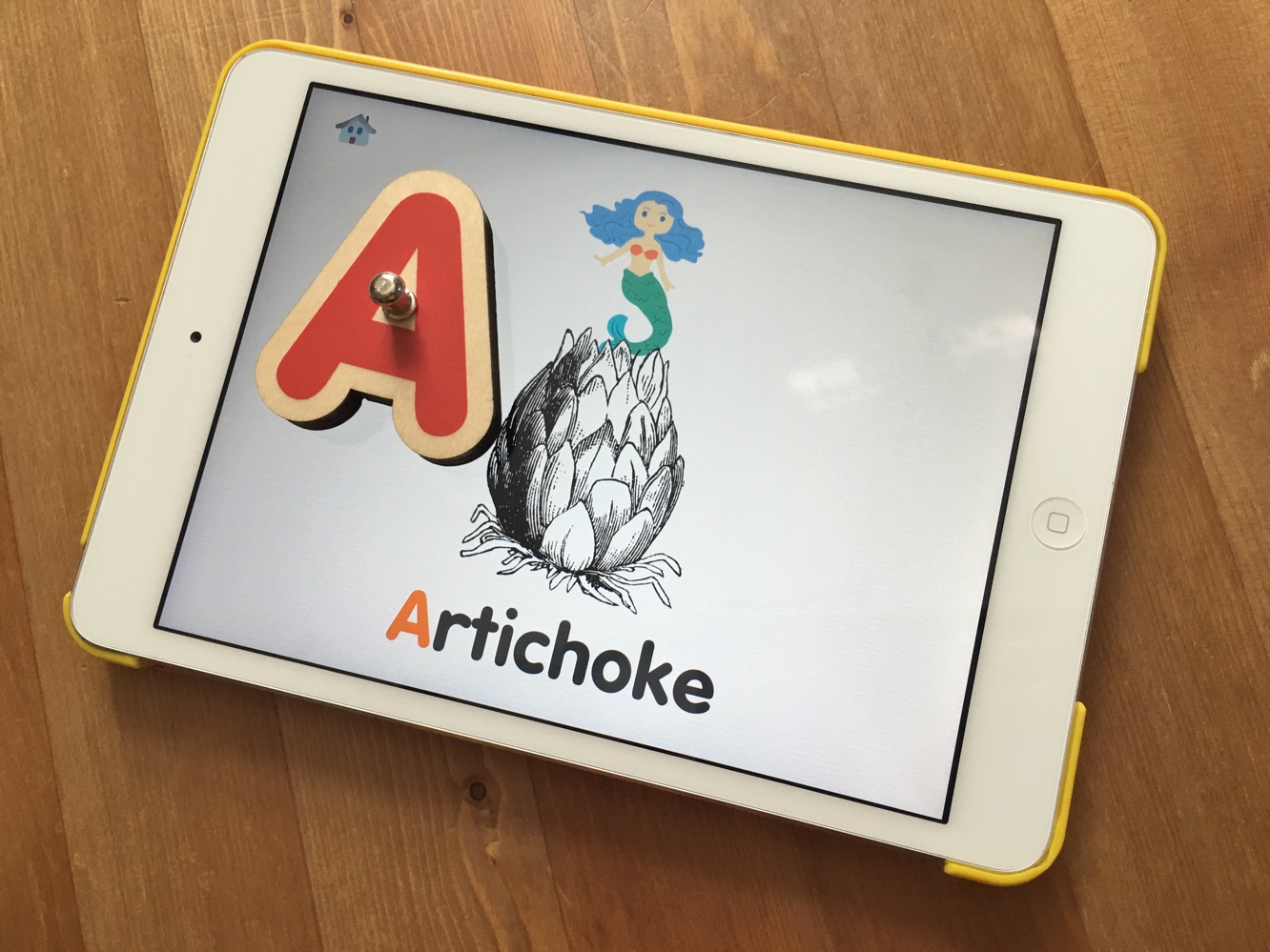
We’ve seen a few iPad-based children’s toys over the years, and Marbotic has entered that still mostly-ignored market with Smart Letters ($50), a physical set of letters designed to be used on an iPad. The wooden letters interact with Marbotic’s own apps — three different compatible apps are currently available. In conjunction with those apps — which are free when you buy Smart Letters — the letters work on any iPad, with the exception of the original iPad. The Smart Letters are passive pieces which use static electricity, so they can be used without Wi-Fi, Bluetooth, or batteries. A full alphabet’s worth of letters is included in the $50 package. Marbotic also offers a Smart Numbers package for $35.


Review: Marbotic Smart Letters for iPad

Review: Marbotic Smart Letters for iPad

The Smart Letters themselves are wooden, with a small metal piece used to pick up each letter and hold it.

Soft pads are found on the back of each letter — these pads are used to communicate with the iPad, and to ensure the screen isn’t scratched up. A light press is all it takes for the letters to register on one of Marbotic’s apps, and not once did we see the wrong letter identified. We appreciate that these letters act as physical toys, as well, but at this price, the main appeal comes from how the Smart Letters communicate with the available apps.


Review: Marbotic Smart Letters for iPad

Marbotic offers three apps that are compatible with Smart Letters — Alphamonster, Bla Bla Box, and Vocabubble. You can also buy the non-Smart Letter compatible versions of the apps for $3 each — you drag onscreen letters in those cases, which doesn’t have the same appeal as using the wooden letters. All of the apps are well-designed, with fun noises and charming illustrations.

Review: Marbotic Smart Letters for iPad

Alphamonster is probably the best app, overall. Users can match capital letters to lowercase (and lowercase cursive) equivalents, try to figure out the first letter in a word, or even match a letter to a sound, which is recited over and over.


Some of the sounds can be a bit confusing at first, but it’s still a great way to get children to associate sounds with letters. Bla Bla Box is for kids who are ready to start putting letters together — you can make letter combinations, and the iPad will vocalize the words (or sounds) onscreen. It’s very cool. Vocabubble is probably the most basic app, as it, like many other apps, shows young users a number of vocabulary words for each letter. All three apps have their own special aim, and together, they make for a great crash course in the ways of the alphabet.

Review: Marbotic Smart Letters for iPad

If you were to buy Marbotic’s apps and a separate, unrelated set of high-quality letter blocks, you’d probably be paying about half as much. And we’d understand going in that direction.



Latest News
The Apple Watch Series 11 46mm GPS Is $100 Off
1 Min Read
Clamshell Style iPhone Being Looked Into By Apple
1 Min Read
Foldable iPhones May Have the Largest Battery Ever
1 Min Read
Apple and TSMC’s 10-Year Collaboration May Be Ending
1 Min Read
The 13-inch M5 iPad Pro 256GB Wi-Fi Is $149 Off
1 Min Read
M5 Pro and M5 Max Chips for the MacBook Pro could Roll Out with macOS 26.3
1 Min Read
Mac Ordering Process Revamped
1 Min Read
Check Signed By Steve Wozniak and Steve Jobs Sold For $2.4 Million
1 Min Read
The Anker 140W 4-Port GaN USB-C Charger is $35 Off
1 Min Read
No iPhone Air 2 This Year, according to Latest Report
1 Min Read
New Report Corroborates Split iPhone Release Dates
1 Min Read
Apple Losing More Researchers As They Plan To Release 2 Siri Versions
1 Min Read

iLounge logo

iLounge is an independent resource for all things iPod, iPhone, iPad, and beyond. iPod, iPhone, iPad, iTunes, Apple TV, and the Apple logo are trademarks of Apple Inc.

This website is not affiliated with Apple Inc.
iLounge © 2001 - 2025. All Rights Reserved.
  • Contact Us
  • Submit News
  • About Us
  • Forums
  • Privacy Policy
  • Terms Of Use
Welcome Back!

Sign in to your account

Lost your password?








