
iLoungeiLounge
  • News
    • Apple
      • AirPods Pro
      • AirPlay
      • Apps
        • Apple Music
      • iCloud
      • iTunes
      • HealthKit
      • HomeKit
      • HomePod
      • iOS 13
      • Apple Pay
      • Apple TV
      • Siri
    • Rumors
    • Humor
    • Technology
      • CES
    • Daily Deals
    • Articles
    • Web Stories
  • iPhone
    • iPhone Accessories
  • iPad
  • iPod
    • iPod Accessories
  • Apple Watch
    • Apple Watch Accessories
  • Mac
    • MacBook Air
    • MacBook Pro
  • Reviews
    • App Reviews
  • How-to
    • Ask iLounge
Font ResizerAa
iLoungeiLounge
Font ResizerAa
Search
  • News
    • Apple
    • Rumors
    • Humor
    • Technology
    • Daily Deals
    • Articles
    • Web Stories
  • iPhone
    • iPhone Accessories
  • iPad
  • iPod
    • iPod Accessories
  • Apple Watch
    • Apple Watch Accessories
  • Mac
    • MacBook Air
    • MacBook Pro
  • Reviews
    • App Reviews
  • How-to
    • Ask iLounge
Follow US

Reviews

Reviews

Review: Magic Touch by Nick Drabovich

Last updated: May 13, 2021 6:55 am UTC
By Charles Starrett
Review: Magic Touch by Nick Drabovich

This review originally appeared within iLounge’s iOS Gems series within the compilation article, iPhone Gems: Top Photography and Image Manipulation Apps. Additional details may be found in the original article.


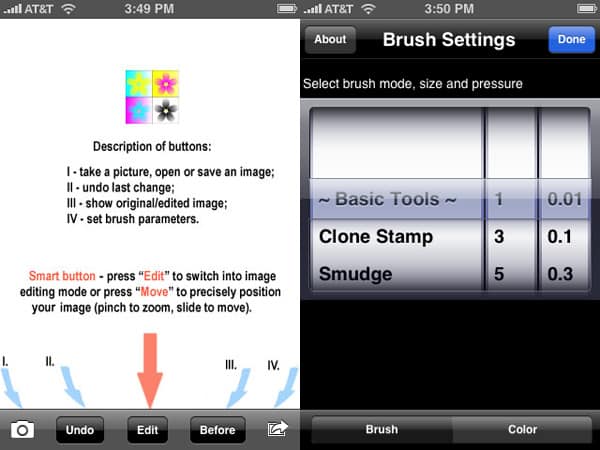
Magic Touch ($5) is a very ambitious image editing application for the iPhone and iPod touch. Offering a number of basic image adjustment tools, a color palette of over 200 colors, 18 color blending tools, undo, and the ability to take pictures from inside the app, it’s loaded to the gills with functionality. Unfortunately, this functionality is hampered somewhat by the interface. The main view offers five buttons at the bottom: a camera button for taking a picture, opening a saved image, or saving the current image, an undo button — users can also shake to undo all changes — a before button that shows the original, unedited image, an action button for setting brush parameters, and a centrally-placed smart button that toggles between edit and zoom/move modes.

Review: Magic Touch by Nick Drabovich

Images opened from the photo library will often appear cropped on the screen, requiring adjustment to be able to see the full image.

The brush parameter selection is where the app’s interface troubles lie. Instead of offering the user some visual feedback of brush size, transparency, and effect, the app simply presents all three options on selector wheels, with size listed as pixels — full is also an option — and transparency given an alpha value between 0.01 and 1. A button at the bottom lets the user set a color for the brush, if desired. Unfortunately, we found the results from the brushes to be less than reliable — for instance, we ended up tapping repeatedly in an area to add brightness instead of moving our finger over it like one would when using a Photoshop brush, as the latter resulted in nasty over-brightening. The app really works best when using the full image brush size, but doing so undermines the idea of varying brush sizes.


Magic Touch was also hindered by repeated low memory warnings, which sometimes resulted in a crash. Adding to the disappointment was the app’s maximum output resolution: 1024×768, which is less than the maximum allowed on the iPhone, and thus a little low for an app this powerful.


Review: Magic Touch by Nick Drabovich

It’s fair to say that while we are generally impressed with the myriad of options available in Magic Touch, it still needs quite a bit of work. We disagree with the decision to leave out any sort of graphic-based brush preview in the parameter screen, as it makes things overly-complicated. Yes, some would argue that the ability to specify their adjustments on this level is worth the trial-and-error, but on a handheld device, it’s close to being overkill. A more graphical and intuitive way to select and define brush parameters, improved memory handling, and additional polish would go a long way to improve this app, which has terrific potential.



Latest News
The AirPods Pro 3 is $20 Off
1 Min Read
Exynos 2600 Chip 2nm Process Revealed by Samsung
1 Min Read
New Celebrity Ad Campaign Featuring Travis Scott Released by Beats
1 Min Read
Australia Getting Hypertension Notification Feature
1 Min Read
The 14-inch MacBook Pro with M5 Chip 16GB RAM/512GB is $250 Off
1 Min Read
Noise and Static on AirPods Pro 3 Still Unfixed
1 Min Read
New iMac with 24-inch OLED Display May be Brighter With 600 Nits
1 Min Read
The 15-inch M4 MacBook Air 256GB Is $250 Off
1 Min Read
Internal Kernel Debug Kit from Apple Reveals Tests for a MacBook with A15 Chip
1 Min Read
Apple Currently In Talks With Suppliers for Chip Assembly & Packaging of iPhones in India
1 Min Read
Apple Allows Easier Battery Replacement For M5 MacBook Pro with 14-inch Display
1 Min Read
The Apple Watch SE 3 44mm GPS is $50 Off
1 Min Read

iLounge logo

iLounge is an independent resource for all things iPod, iPhone, iPad, and beyond. iPod, iPhone, iPad, iTunes, Apple TV, and the Apple logo are trademarks of Apple Inc.

This website is not affiliated with Apple Inc.
iLounge © 2001 - 2025. All Rights Reserved.
  • Contact Us
  • Submit News
  • About Us
  • Forums
  • Privacy Policy
  • Terms Of Use
Welcome Back!

Sign in to your account

Lost your password?








