
iPads, iPhones, and iPods have benefitted over the last few years from many wireless external storage options, each letting you boost the quantity of media you can carry around without having to shell out for a higher-capacity device. Macally is the latest company to release wireless storage solutions, with the new WIFIHDD Mobile Wi-Fi Hard Drive Enclosure ($80) and WIFISD Mobile Wi-Fi Pocket Drive ($80) predicated on the same basic concepts. WIFIHDD opens up to hold a self-provided 2.5″ hard drive — versions with drives preinstalled are available at a higher price — while the other uses ports compatible with SD cards, USB flash drives, and USB hard drives. Either accessory lets you wirelessly beam content directly to a compatible iOS device, with the ability to choose just how much storage space you need.
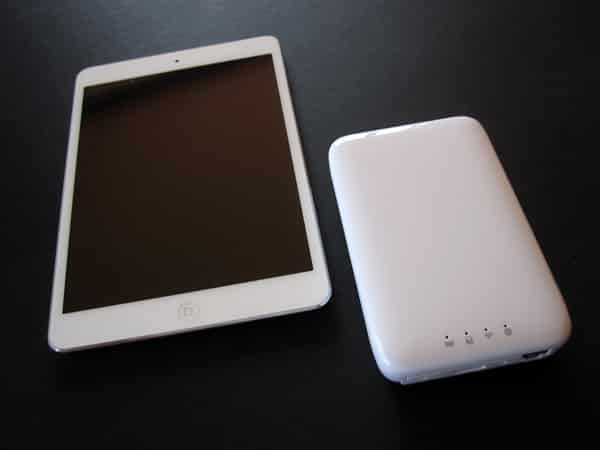
Although they’re significantly different sizes, the drives share common design language. Both are glossy white plastic rounded boxes with a smattering of ports, buttons, and LED indicators. WIFISD is the smaller of the two, compact enough to pop in your pocket at roughly 4” wide, 3” deep, and less than 3/4” tall. Despite the full plastic construction, it doesn’t feel cheap. One edge includes a power button, reset switch, Micro-USB charging input, and full-sized USB connector.
That last port can be used to connect a flash drive or hard drive, and also to charge a device. There’s also a door on the back that opens to reveal an SD card slot, and four status indicators sit in a black box on the top.


WIFIHDD looks like a larger version of WIFISD. It’s a little over 3” wide, 5” long, and over 3/4” tall. This one only has two ports—Ethernet and USB 3.0—along with power and reset controls. The big difference is that it arrives in pieces, with the lid unattached. A metal tray, four screws, and four rubber stoppers are included, allowing you to fit your own drive in place. Installing and formatting the drive is quite easy, especially if you’re using a Mac. Once it’s fully set up, the lid snaps on. Users will want to make special note of Macally’s warning that “once the top and bottom covers are closed, you cannot remove the internal hard drive without causing any damages to the enclosure.” This is a surprising limitation, considering that WIFIHDD is a bring-your-own-drive solution; it’s not designed to let you swap drives in the event that you fully assemble it.
On the flip side, we appreciated that WIFIHDD can be used as a full desktop hard drive solution in addition to its portable functionality; you simply toggle the power off when connecting to your Mac or PC.

Both drives use the same iOS-universal app, WiFiStor, to connect to your iPad, iPhone, or iPod touch; we were able to have three devices streaming content at once. In a modest inconvenience, you must first connect WIFISD or WIFIHDD directly to the device by toggling your Wi-Fi network to the one established by the drive, and can then use the app to get the drive on your home network. The app has tabs for “My Device” and “My WiFiDisk.” Through a somewhat unintuitive series of taps, you can move content to folders for documents, movies, music, and photos, while the iPad/iPhone/iPod photos folder accesses your camera roll. Switching over to the other option gives you access to the media on your storage device. WiFiStor has basic music and video playback functionality, although iTunes protected movies and TV shows can’t be played, which isn’t surprising. You can also access documents, although the only sharing option is email; there’s no way to open them in compatible apps. There’s a one or two second lag when playing content, but it’s nothing unacceptable, and while the app isn’t the prettiest we’ve seen, it has the necessary core functionality to get the job done.


Of these two solutions, we preferred WIFISD: the flexibility it offers in using the swappable storage media of your choice, combined with its size, is impressive. We like knowing that if a card or drive isn’t large enough, it can simply be replaced on the fly for whatever is necessary. That’s the key reason it was awarded a Best of Show Finalist designation at the 2013 CES.











