
Pros: First of a new breed of “cordless” headphones offering a simple, unique, useful design; Well-constructed; Not limited to use with iPod shuffle; Compact when folded; Mostly comforatble
Cons: Average sound quality worse than equally priced (though not iPod-specific) headsets
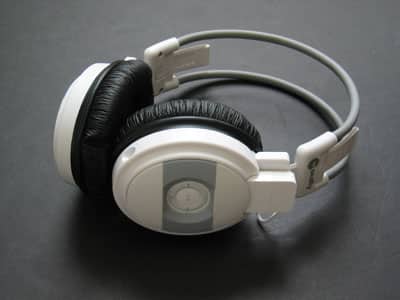
Cordless headphones have always been burdened with some sort of compromise. With IR or even radio-frequency headphones, one generally sacrifices audio quality in exchange for a reasonable price. With Bluetooth headphones, the tradeoff is typically reversed. In any of these, one is required to remain within some finite range between the headphones and the listening source, and one has to keep the headset’s battery charged or buy replacement batteries often.
With MacAlly’s latest “mTune Cordless Stereo Headset for iPod shuffle”, they effectively sidestep most of these limitations by entirely avoiding the typical technical sophistication that a “cordless” headset usually implies. That is, the mTune doesn’t need any wires or batteries to operate, and no audio needs to be transmitted over-the-air either, since the source itself is integrated into the left earpiece – a neat design made possible by the iPod shuffle’s small size. In many ways, the mTune is simply a professionally-executed version of user modifications conducted shortly after the iPod shuffle’s release.
Design
MacAlly’s mTune Headset consists of white and grey circumaural (around the ear) earpieces with black leather pads, bound by two springy, rubberized headband beams, in a design highly similar to their prior Noise Reduction Headphones (iLounge Review). As in the Noise Reduction Headphones, each of the earcups can be individually adjusted for various head sizes, and can rotate up and into the headband, making the mTune quite compact for travel.
The assembly as a whole feels quite well constructed.

The headset is of the “semi-closed” variety, meaning that it attempts to create some degree of noise isolation—both in and out—when worn. At moderate indoor listening volumes, minimal sound leakage out of the headset was noticed, but isolation from ambient noise was less than profound.
We found the headset generally comfortable, although finding the perfect size and position for a perfect fit was a minor challenge: the ‘contact point’ of the inward pressure from the earpieces seemed to rest too high on the ear, with the bottom of the earpieces seeming to be loose, slightly bowing outward. However, several of our family members found the headset both very comfortable and easy to fit properly. As with all comfort issues, your mileage may vary significantly.
The iPod shuffle is inserted upside down into the left earpiece, connecting to a fixed male headphone plug inside the headset. Once inserted, the iPod shuffle’s controls are exposed for easy access, though they’re upside down. While it initially feels awkward to adjust volume upward by pushing the lower button, for example, the orientation is easy to get used to, and doesn’t pose a major problem.
For listening to audio sources other than the iPod shuffle, MacAlly includes a 4-foot miniplug-to-miniplug cable, of which one end plugs into the bottom of the left earpiece.

Audio Performance
Although we didn’t find the MacAlly headset’s bass response to be extraordinarily powerful, it was understandably much more profound than Apple’s packed-in earbuds.
However, the rest of the audio spectrum—the mids and highs—actually sounded noticeably muddier. We’d characterize the MacAlly’s audio performance as “upper-mediocre” at best: certainly listenable in situations where the portability is a requirement, but not by any means amazing.
We couldn’t notice any difference in audio quality when we used the iPod shuffle versus when we plugged in an alternate iPod.
Regarding the choice between sources, there is no switch on the mTune governing which audio source is active. In fact, should you so desire, both the iPod shuffle and cable input can be used at the same time, creating a mix of sorts. However, if an iPod shuffle is installed into the slot (and turned off) while you’re using the cable input, the volume from the cable input is decreased by approximately 50% relative to its volume if the shuffle were to be removed from its mount. We don’t suspect that this will represent any major problem for most users, as if you plan to use the external cable with a different iPod, you can simply remove the iPod shuffle first.
Conclusions
For some, the deciding factor against purchasing the mTune will be style. While we personally wouldn’t wear these outside the house simply because of their size, we don’t let our style concerns impact our grading.
However, what we will say is this: the MacAlly mTune is a slick, clever design that is flat-out convenient.











