
iLoungeiLounge
  • News
    • Apple
      • AirPods Pro
      • AirPlay
      • Apps
        • Apple Music
      • iCloud
      • iTunes
      • HealthKit
      • HomeKit
      • HomePod
      • iOS 13
      • Apple Pay
      • Apple TV
      • Siri
    • Rumors
    • Humor
    • Technology
      • CES
    • Daily Deals
    • Articles
    • Web Stories
  • iPhone
    • iPhone Accessories
  • iPad
  • iPod
    • iPod Accessories
  • Apple Watch
    • Apple Watch Accessories
  • Mac
    • MacBook Air
    • MacBook Pro
  • Reviews
    • App Reviews
  • How-to
    • Ask iLounge
Font ResizerAa
iLoungeiLounge
Font ResizerAa
Search
  • News
    • Apple
    • Rumors
    • Humor
    • Technology
    • Daily Deals
    • Articles
    • Web Stories
  • iPhone
    • iPhone Accessories
  • iPad
  • iPod
    • iPod Accessories
  • Apple Watch
    • Apple Watch Accessories
  • Mac
    • MacBook Air
    • MacBook Pro
  • Reviews
    • App Reviews
  • How-to
    • Ask iLounge
Follow US

Reviews

Reviews

Review: Macally MCDOCKL Charge & Sync Dock for Lightning Devices

Last updated: May 16, 2021 8:04 pm UTC
By Nick Guy
Review: Macally MCDOCKL Charge & Sync Dock for Lightning Devices

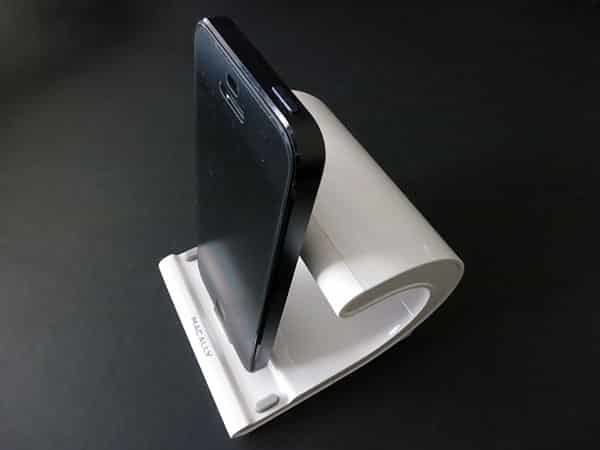
There have been surprisingly few docks for Lightning-based iOS devices. Macally’s MCDOCKL Charge & Sync Dock for Lightning Devices ($50) is one of the most stylized, and also universally compatible with Lightning-equipped iPads, iPhones, and iPods. The wave-shaped plastic dock is equipped with a Lightning plug at the bottom, which is flexible to suit whichever device you may be using, although not particularly well suited for all of them. You have the choice of connecting to a computer for syncing and charging with the included micro-USB cable, or up to 2.5A charging through an included wall adapter.

Review: Macally MCDOCKL Charge & Sync Dock for Lightning Devices

Having covered many Macally products, MCDOCKL’s glossy plastic construction is quite familiar. It’s solidly built, although the material and seams prevent us from being able to call it a premium accessory. On the underside of the 3.5” deep, 3.5” wide base are two strips of rubber that keep the dock in place. The base extends into a C-shaped support, coming to a total height of about 3.5” off your desk or table, and terminating in a matte plastic cap.

It feels like an unusual shape for an accessory, but it makes practical sense as a natural way to hold your device in place.


Review: Macally MCDOCKL Charge & Sync Dock for Lightning Devices

Unsurprisingly and unfortunately, case compatibility is an issue. With its contradicting instructions for how large openings should be on cases, and how large the material should be around Lightning plugs, Apple has virtually ensured that most accessories will not work with most cases; this one is no exception. If you’re not using a case, any Lightning device will easy connect to the plug, and grey rubber feet at either end of the dock will help support an iPad or iPad mini, although iPods and iPhones don’t reach that far. To support an array of devices, the plug flexes back and forth, with its natural resting position all the way towards the front. This actually ends up being a small issue with the seventh-generation iPod nano and fifth-generation iPod touch, which don’t have enough weight to push it back. They’ll fit, and charge, but won’t rest against the back of the dock.


The same goes for the iPhone 5, but it at least has a bit of mass to push it back a bit further. Both the fourth-generation iPad and iPad mini go all the way back.


Review: Macally MCDOCKL Charge & Sync Dock for Lightning Devices

Review: Macally MCDOCKL Charge & Sync Dock for Lightning Devices

As mentioned, you can either charge via a USB port on your computer, or from the wall. If you choose the former option, charging speeds are limited to 1-Amp, which is suitable for iPods and iPhones, but not iPads. Connecting to an outlet gives full-speed charging to even the fourth-generation iPad. We like having the option, rather being limited to one or the other.


Review: Macally MCDOCKL Charge & Sync Dock for Lightning Devices

Belkin’s Charge + Sync Dock for iPhone 5 is the closest competitor to MCDOCKL, although both excel in different areas.



Latest News
The 14-inch MacBook Pro with M5 Chip 16GB RAM/512GB is $250 Off
1 Min Read
Noise and Static on AirPods Pro 3 Still Unfixed
1 Min Read
New iMac with 24-inch OLED Display May be Brighter With 600 Nits
1 Min Read
The 15-inch M4 MacBook Air 256GB Is $250 Off
1 Min Read
Internal Kernel Debug Kit from Apple Reveals Tests for a MacBook with A15 Chip
1 Min Read
Apple Currently In Talks With Suppliers for Chip Assembly & Packaging of iPhones in India
1 Min Read
Apple Allows Easier Battery Replacement For M5 MacBook Pro with 14-inch Display
1 Min Read
The Apple Watch SE 3 44mm GPS is $50 Off
1 Min Read
20th Anniversary iPhone May Launch in Two Years
1 Min Read
Better Image Generation Capabilities and Apple Music Integration Coming to ChatGPT
1 Min Read
A20 Pro Chip Coming to Next Gen iPad Mini OLED
1 Min Read
Amazon has the AirTag 4 Pack Marked $29 off
1 Min Read

iLounge logo

iLounge is an independent resource for all things iPod, iPhone, iPad, and beyond. iPod, iPhone, iPad, iTunes, Apple TV, and the Apple logo are trademarks of Apple Inc.

This website is not affiliated with Apple Inc.
iLounge © 2001 - 2025. All Rights Reserved.
  • Contact Us
  • Submit News
  • About Us
  • Forums
  • Privacy Policy
  • Terms Of Use
Welcome Back!

Sign in to your account

Lost your password?








