
Next to cases and simple chargers, mounting solutions have become some of the most common and widely demanded iPad accessories over the past two years: virtually every major accessory maker has created at least one product designed to hold the iPad and/or iPad 2 upright. Today, we’re looking at five new iPad mounts that use very different approaches; three are tabletop stands, and two others are cabinet and wall mounts. They are Choiix’s Wave Aluminum Stand ($40), iKit’s NuVu Rotating Stand for iPad 2 ($40), Just Mobile’s Horizon ($50), Macally’s MagStand2 ($40), and Thought Out’s Stabile Pro ($85-$100). This review looks at Horizon and MagStand2.
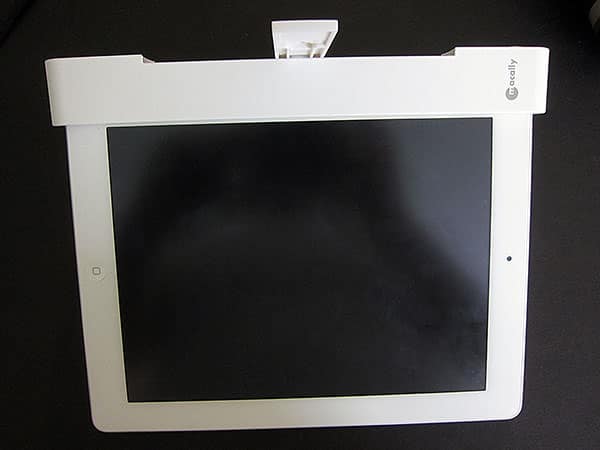
Unlike many tablet mounting solutions we’ve reviewed in the past, Horizon and MagStand2 are designed for a very specific niche of iPad owners: people who don’t use cases, or don’t mind pulling them off and putting them on with frequency. Both accessories require you to have a nearly naked iPad—screen film’s okay, but no case is allowed—and you have to want to hang your tablet up somewhere rather than placing it on a desk, table, or counter. This makes sense if you want to turn your iPad into a wall-mounted display device or use it in a kitchen with limited counter space, though neither of these solutions offers any sort of iPad security features; once installed in Horizon or MagStand2, an iPad can be pulled right out with a one- or two-handed tug.

Horizon is an aluminum and black rubber wall mount that holds a bare iPad or iPad 2 in portrait or landscape orientation.
Featuring a minimalist, boxy design by Just Mobile’s Danish partner Tools, it looks like a silver bar 7.7” wide by 0.9” tall and 1” deep, with a black rubber dot centered on the front, and a Dock Connector cable-sized hole centered on the bottom. Sleeker and pill-shaped, MagStand2 is a magnetized plastic mount that holds an iPad 2 solely in landscape mode upside down under a cabinet, or more awkwardly upright as a viewing stand. It’s made from matte white plastic, measuring roughly 10” wide by 1.25” tall and 0.85” deep, and has a bar in the center that rotates to let the cabinet-mounted iPad 2 be viewed on different vertical angles, without any adjustability for horizontal ones.
Installed properly, both Horizon and MagStand2 will hold your iPad securely. They’re each packaged with Philips head screws that go into mounting brackets; you then slide and lock the iPad holder into place, attaching and removing your iPad as needed. Horizon includes two plastic screw anchors, two long, wall-ready screws, and an aluminum mounting bracket, using a central ball bearing to lock in the aluminum iPad holder, which has a rubber lining inside; you swap liners depending on whether you’re using the original iPad or iPad 2. MagStand2 uses four shorter cabinet-depth screws and a plastic mounting bracket, plus two keyhole-shaped pegs that similarly lock the plastic iPad 2 mount in place.

Of the two designs, MagStand2 is more impressive because of the way that it leverages magnets to create a dead-simple alternative mounting solution for iPad 2 users: you just walk up to it, insert your iPad 2 in the hard plastic sculpted slot, hear a click, and start using the device, turning it to the angle you prefer. While MagStand2 doesn’t work with the original iPad, it’s so simple to use with the iPad 2 that it’s easy to imagine as a popular kitchen accessory. The side of the iPad 2 it grabs is not used for anything else, and access to the screen, ports, and other controls is in no way inhibited by the design. Only its lack of broader tilting capabilities and case support can be considered limitations that might turn some users off; that said, despite the marketing, we wouldn’t recommend it as a desktop stand given its relatively poor versatility in that position.
Horizon is a different story. On positive notes, the design looks nice, the rubberized insert uses the aforementioned front dot as a fully functional pass-through for the Home button when the iPad or iPad 2 is in vertical orientation, and the use of inserts will almost certainly enable Horizon to be forward-compatible with future iPad iterations. There’s also just enough room in the Dock Connector hole to accommodate Apple’s cables, enabling Horizon to be placed right above a power outlet and used as a very clean mounting solution for, say, digital paintings or video playback in a place that isn’t concerned about iPad theft.











