
By year’s end, iOS keyboard accessories will evolve again: Apple will shrink the full-sized iPad’s form factor, breaking physical compatibility with past keyboard cases while challenging developers to shoehorn similar functionality into the smaller footprint. To hedge against this possibility, we’ve continued to strongly recommend the Apple Wireless Keyboard, but there haven’t been many other device-agnostic options marketed specifically to iOS users. For instance, Apple never released a sequel to the 2010 iPad Keyboard Dock, and third-party developers have focused on selling (or reselling) device-specific keyboard cases, instead. So Macally’s release this month of the IKEYLT Full-Size Keyboard With Lightning ($60) is actually newsworthy. Compatible with iPads, iPhones, and even iPod touches with Lightning connector ports, it’s one of very few iOS keyboards to eschew Bluetooth wireless connectivity in favor of a wired connection. It’s even more unusual in that it goes beyond the functionality of Apple’s own keyboards, thanks to a larger size.
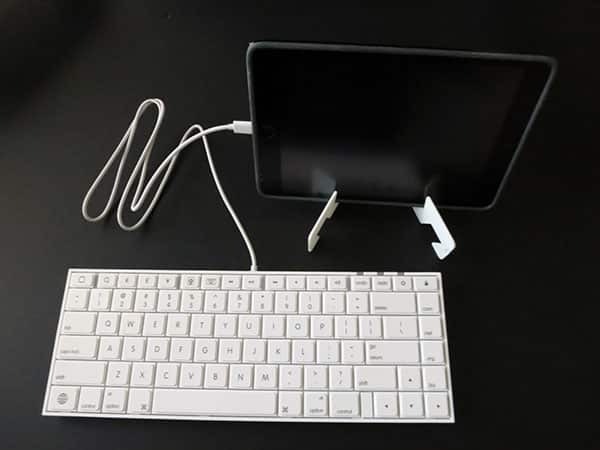
Physical real estate has been the single most limiting factor for iOS keyboards: few developers have dared to create typing surfaces larger than the roughly 11” wide by 5” deep Apple Wireless Keyboard, and almost all have stuck well within the current iPad’s narrower 9.5” width. Macally instead crafted IKEYLT as a 12.25” wide by 4.5” deep by 0.6” tall alternative, though those numbers don’t tell the full story of the keyboard’s size.
Unlike Apple, which placed its “island-style” keys at some distance from one another, Macally’s are larger and packed tightly together, eliminating the need for a second top surface to separate the keys from one another. The keyboard’s extra size reduces its portability factor by a small amount—not enough to matter to most people, though space-obsessed users will find virtually every other option to be more compact.

This extra space enabled Macally to offer something rarely seen in iOS keyboards: more keys than Apple. In addition to including all of the Apple Wireless Keyboard’s keys, IKEYLT has a taller top row of function keys and an additional column of keys on the right side. New keys include dedicated undo, redo, and international keyboard toggle buttons, as well as Euro, Pound, and Yen characters, plus .com, .net, .org., and .biz macro keys. Many users may find these keys to be of questionable value, and the latter four sit directly next to delete, return, and arrow keys, occasionally triggering accidental presses until you adjust to their presence. Macally also includes a camera aperture-based icon that turns out to be a one-touch iOS screenshot button—a feature we’ve never seen on an iOS keyboard before—as well as more typical Home, Lock, Photos app, and media control keys. None of these “extra” keys is strictly necessary, but some people will really like at least some of them.

Aside from the modest learning curve attributable to the new keys, typing on IKEYLT is largely intuitive.
We were able to type at nearly full speed within minutes of first connecting the keyboard, and composing nearly trouble-free sentences within less than half an hour. The biggest issue we noticed isn’t a serious one: the keys have a certain plastic and rubbery springiness that takes a little time to adjust to. By contrast with the physical and functional compromises we’ve noted in numerous other keyboards, this is trivial, but a reason some people may prefer Apple’s keyboard instead.

A thin border runs around the edge of the key set, including power/iOS battery, initial connectivity acknowledgement, and caps lock lights at the top right edge. Macally’s cable is centered on the back, running around 37” long from end to end before the Lightning plug, which has a small enough housing to be compatible with virtually all device cases. Two small feet flip out from the bottom of the keyboard, adding around a quarter-inch of additional height to the back. Everything feels plasticky in a just-better-than-cheap way—sturdy enough, but not as seemingly bulletproof as Apple’s substantially metal keyboards. Macally’s decision to include a very simple plastic fold-out stand to hold your iPad upright is similarly functional but less than thrilling aesthetically.

IKEYLT’s choice of a Lightning connector rather than Bluetooth or USB has several advantages and disadvantages.











