
Ever since the FCC began a campaign to reign in too-powerful FM transmitters last year, and manufacturers quietly began to change their accessories to comply with the agency’s threats, we’ve been reluctant to make any definitive statements on these devices: as hard as it was last year to know for sure how well a given transmitter would work in a given car, new differences from unit to unit now increase that difficulty. But while the FCC has limited the power of these devices, it hasn’t stopped companies from improving on them in other ways, so today we’re looking at five different in-car iPod accessories with FM transmitters inside. Our standard disclaimers — quickly, that your car’s antenna location, the iPod and transmitter’s location, and local radio airwave congestion can radically affect your results — still apply.
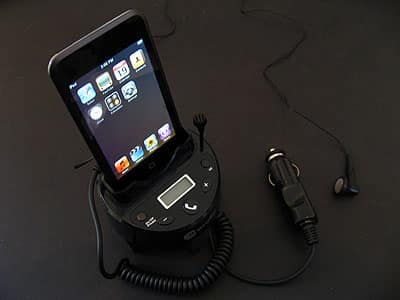
The five accessories come from three companies and break down into two categories. Belkin’s TuneBase FM with ClearScan ($90) and Macally’s BTCup ($100) both combine an FM transmitter with an iPod car mount and car charger, but vary considerably from there. Kensington’s Liquid FM ($80), Liquid FM Plus ($70), and Liquid FM Deluxe are cables that offer only the FM transmitter and car charger features, leaving you to mount the iPod on your own.

All five of these accessories have three things in common. They’re all made substantially from black plastics, although each has silver and/or gray accents. Their FM transmitter performance was universally good in our testing, with only small variations from unit to unit. And they are all a little more restricted in frequency tuning than the best pre-2007 devices we tested: all tune from 88.1FM to 107.9FM, rather than up to 87.7 or 87.9FM.
This is an issue only in that the latter station has consistently been better than any other in our prior testing—it’s almost always empty in the United States because major broadcasters aren’t allowed to use it.
Like Macally’s earlier $60 FMCup, BTCup places an iPod dock and a manually-tuned FM transmitter in an spring-loaded, automatically expanding cupholder mount with a detachable car charging cable. You put FMCup or BTCup in any of your car’s cupholders, plug the charging cable into the car’s cigarette lighter/power adapter, fit the right included adapter into the dock, and drop your iPod inside. Both devices take over your chosen FM radio station with iPod audio, using a blue-backlit LCD screen and two built-in buttons for station selection. An on/off button and a preset-toggling quick channel switch button are also included.

New in BTCup are several additional features that initially sound extremely appealing in light of the iPhone’s release in June. First, BTCup includes a built-in microphone. Second, it has Bluetooth wireless technology. And third, it includes an optional earpiece, which can be connected to an audio-out port behind the iPod dock. If you pair BTCup with your Bluetooth cell phone, it will automatically interrupt your iPod’s music to let you hear your callers through your car’s speakers, and talk with them through the built-in microphone.
If you prefer to have privacy, you can connect the earpiece to the audio-output port, and listen to your callers that way.
There is absolutely no doubt that Macally has a great idea on its hands. Who wouldn’t want to use the car’s stereo and a supplemental microphone as a handsfree option, rather than wrestling with the phone itself for calls? And blending these features with an iPod dock? We’d call this ingenious if there hadn’t already been similar, if less complete implementations of the same concept by companies such as Lenntek.

The only problems with BTCup are in its handling of these features. On a positive note, the unit’s FM transmitter now sounds great on available local stations, and callers sound incredibly good through a car’s speakers. We had no problem hearing them while we drove, even in a noisy car cabin. But the microphone doesn’t appear to benefit in any way from echo-cancellation technology, and you’re at the mercy of its location in your cupholder rather than up closer to your mouth. Callers described the experience of hearing us as fair to poor, specifically telling us that the sound was not good or great due to echoing noises; the quality of BTCup’s sound is highly dependent upon the volume level of your speakers—callers say the echoes get worse at higher volumes—as well as the place where the microphone is located.
On a comparatively minor note, though BTCup does switch properly between iPod and phone audio sources, allowing you to hang up on or answer calls with its built-in telephone button, it also lets your iPod’s music keep on playing rather than pausing it while you’re taking calls.











