
Logitech has been on a roll with iOS keyboard accessories over the past two years, enabling users of 9.7″ iPads to type far better than they ever would have expected in transitioning from desktop or laptop PCs. But as smaller tablets grow in popularity, keyboard accessory developers are facing a critical challenge: making the most of a shrinking surface area. Small physical keyboards can be as difficult to type on as the on-screen virtual keyboards they’re designed to replace, particularly when a developer makes poor choices as to key size, location, and functionality. So when Logitech announced the Ultrathin Keyboard mini ($80, aka Ultrathin Keyboard Cover for iPad mini), a much smaller sequel to its successful Ultrathin Keyboard Cover for the full-sized iPad, our biggest question was just how compromised its much-reduced typing surface would be.
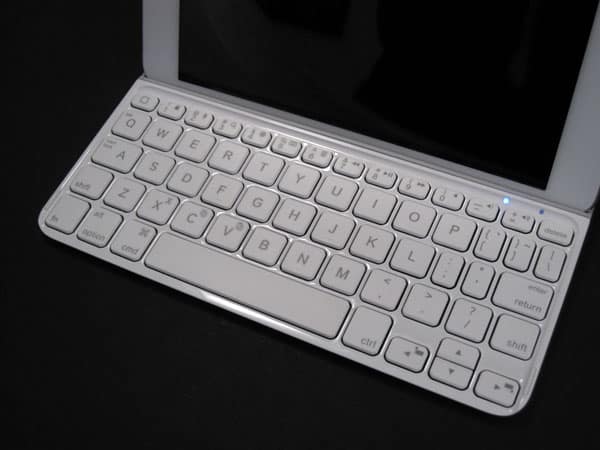
Like the Ultrathin Keyboard Cover for current iPads, the Ultrathin Keyboard mini elegantly combines three features in a single, impressively thin accessory: it has a metal bottom that serves as a protective cover for the iPad’s screen, a battery-powered plastic wireless keyboard, and a narrow tray that holds the iPad on a laptop screen-like recline when you’re typing. Thanks to an Apple Smart Cover-styled magnetic hinge on its edge, it attaches to the iPad mini’s left side and flips open when you want to use it, though you’ll need to pull the iPad off the hinge and manually seat it inside the tray for typing. Magnets hidden in the tray and the edge of the keyboard keep the iPad mini stably in place, and also enable the Ultrathin Keyboard mini to automatically unlock the mini’s screen when the lid’s opened.

If you’ve been following the iPad’s development since the iPad 2, these features aren’t surprising, but they collectively work like magic. And the fact that the Ultrathin Keyboard mini matches the footprint and thickness of the iPad mini itself near-exactly is even more impressive, enabling you to snap the accessory on and hold the mini as a magnetically-bound clamshell, tossing both into a bag with ease. There’s one huge issue, however: like its predecessor, the Ultrathin Keyboard mini hasn’t been designed to work with iPad mini cases, which means that both it and the iPad will be highly susceptible to scuffs, scratches, and dents.
Assuming that you want to pair it with an encased iPad, you’ll be lucky if the side hinge attaches at all, and you’ll certainly have to remove the iPad from its case to use it in the tray. Some users will like the Ultrathin Keyboard design so much that they’ll be willing to give up a case to use it; others won’t.

So how small is the Ultrathin Keyboard mini? Roughly 7.8” wide plus the 0.4” moving hinge, as well as 5.2” deep and 0.25” thick. Yet the actual keyboard typing area is much smaller because of the iPad mini mounting tray. Logitech had to figure out how to fit 11 inches worth of regular key width and 4 inches worth of depth into a reduced area of less than 8 inches of width and around 3 inches of depth. It also had to leave room for a rechargeable battery—hidden behind and under the tray—plus a Micro-USB recharging port, power switch, and Bluetooth pairing button, all found on the right edge adjacent to the tray. Logitech’s battery offers three months of power per charge, assuming two hours of use per day, and while that’s lower than the run time of Logitech’s latest full-sized keyboards, it’s completely acceptable. A Micro-USB cable is included for recharging, but you won’t have to use it very often. Initial Bluetooth wireless pairing is simple, and re-pairing thereafter is amazingly quick.


As was obvious from Zagg’s Mini 7, shrinking a keyboard to match the iPad mini’s footprint is no easy feat—it’s all about choosing what stays and what goes.
Yet rather than making questionable key compromises like Mini 7, which merged the apostrophe and colon keys, as well as the question mark and period keys, Logitech made the wiser choice to keep the punctuation keys discrete and eliminate other keys, instead. Comparatively few users will mind that the tab and caps lock buttons have become secondary features of the Q and A keys, or that the function key row has merged into the number row. All of the rest of the alphanumeric and symbol keys work pretty much as expected; they’re just smaller, while tiny but legible icons indicate their secondary features.


This isn’t to say that Ultrathin Keyboard mini’s compromises are all painless; they’re most certainly not. Unlike the best iPad keyboards we’ve tested, which were so similar to MacBook keyboards that we were start typing at nearly full speeds instantly, the Ultrathin Keyboard mini has at least a one-day learning curve—possibly longer for users with larger hands. The keys are obviously smaller and closer together than on full-sized keyboards, and your fingers will need to learn the sensation of touching the abnormally wide A/caps lock key, the right place to hit the little apostrophe key, and so on. During the learning process, our initial attempts to touch type normally led to errors – accidental S’s instead of A’s, the occasional missed key here or there, and in the event of a mistake, quite a bit of fidgeting and re-learning to locate the delete and/or arrow keys. Users with large hands will need to seriously consider whether they’d be better off choosing a full-sized wireless keyboard to carry around separately from the iPad mini. Logitech’s just-released Bluetooth Easy-Switch Keyboard is more expensive, but a particularly impressive option.

Having noted those very real issues, it’s hard not to appreciate what Logitech has accomplished with the Ultrathin Keyboard mini.











