
iLoungeiLounge
  • News
    • Apple
      • AirPods Pro
      • AirPlay
      • Apps
        • Apple Music
      • iCloud
      • iTunes
      • HealthKit
      • HomeKit
      • HomePod
      • iOS 13
      • Apple Pay
      • Apple TV
      • Siri
    • Rumors
    • Humor
    • Technology
      • CES
    • Daily Deals
    • Articles
    • Web Stories
  • iPhone
    • iPhone Accessories
  • iPad
  • iPod
    • iPod Accessories
  • Apple Watch
    • Apple Watch Accessories
  • Mac
    • MacBook Air
    • MacBook Pro
  • Reviews
    • App Reviews
  • How-to
    • Ask iLounge
Font ResizerAa
iLoungeiLounge
Font ResizerAa
Search
  • News
    • Apple
    • Rumors
    • Humor
    • Technology
    • Daily Deals
    • Articles
    • Web Stories
  • iPhone
    • iPhone Accessories
  • iPad
  • iPod
    • iPod Accessories
  • Apple Watch
    • Apple Watch Accessories
  • Mac
    • MacBook Air
    • MacBook Pro
  • Reviews
    • App Reviews
  • How-to
    • Ask iLounge
Follow US

Reviews

Reviews

Review: Logitech Ultrathin Keyboard Cover for iPad Air (2014)

Last updated: May 16, 2021 7:56 pm UTC
By Nick Guy
Review: Logitech Ultrathin Keyboard Cover for iPad Air (2014)

Since the days of the iPad 2, Logitech has been making keyboard covers for Apple’s tablets; they’ve been greatly refined with the introduction of the Ultrathin line. Now the company is back with the 2014 edition of Ultrathin Keyboard Cover for iPad Air ($100), an update to the version we reviewed in December of last year. While the concept is the same — that is, a magnetically-attached lid with a keyboard inside — the quality has been raised to a truly impressive level. What we’ve considered a very good accessory since its inception can now easily be called great, with only one major flaw limiting its appeal.

Review: Logitech Ultrathin Keyboard Cover for iPad Air (2014)

Ultrathin comes in two color options: one matches Space Gray iPads, the other, Silver. It’s only about 0.25” thick and weighs less than 0.71 pounds. That means when it’s attached to an iPad Air, it comes just shy of doubling the depth, and only adds a little over 70 percent to the weight. It feels like even less than that in use. The outside of the lid, which serves as the underside in typing mode, is a sheet of flat metal, with two small nubs of rubber plus a longer strip that help hold it in place on your desk or table. When viewed from this position, there’s a single port and two controls along the edge at the back right corner.


The input is Micro-USB for recharging the three-month battery, alongside a power switch and a Bluetooth pairing button.


Review: Logitech Ultrathin Keyboard Cover for iPad Air (2014)

Review: Logitech Ultrathin Keyboard Cover for iPad Air (2014)

Flip Ultrathin over to the other side, and you’ll find the plastic keyboard, in either black or white. Along the top is the connection point for when the accessory is being used as a protective lid. Instead of a protruding magnetic spine resembling the one found in Apple’s original iPad Smart Cover, which is what it used on the last edition, Logitech built in a plastic clip that hides away when not in use. It smartly uses magnets to automatically lift when the iPad is near, and then latch on when it touches. When connected, the fit is absolutely perfect, with the edges lining up completely square. It’s so precise, it looks like something that could’ve come out of Jony Ive’s studio. Of course, it automatically wakes the iPad Air when opened.


Review: Logitech Ultrathin Keyboard Cover for iPad Air (2014)

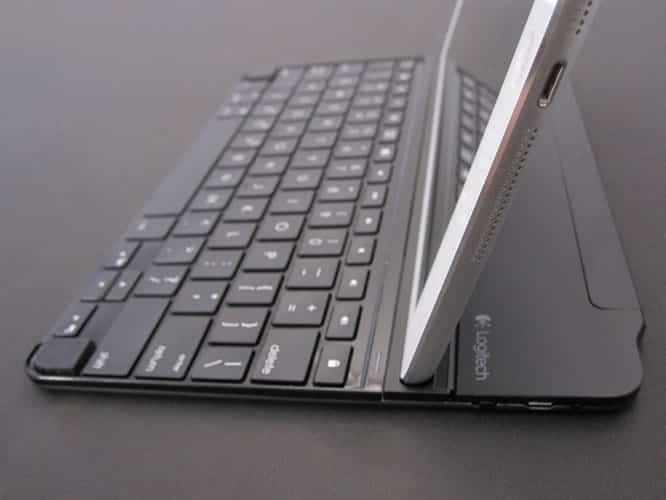
Above the keyboard, there’s a ridge running the length of the accessory. This is where the tablet fits, with its left edge nestling in, and magnets helping to hold it in place.

The ridge is further back than on previous models, thanks to an extra row of keys. For the first time, it’s adjustable. It can be positioned at 70 degrees in its standard position, or pushed back to a 48 degree angle. The feature is implemented without adding any extra bulk or giving up any stability.


Review: Logitech Ultrathin Keyboard Cover for iPad Air (2014)

Review: Logitech Ultrathin Keyboard Cover for iPad Air (2014)

Then we get to the keyboard itself, and it’s truly the star of the show. Simply put, it may be the single greatest iPad keyboard we’ve ever tested next to Apple’s own Wireless Keyboard — and it may actually be better than that. It now contains six rows of keys, rather than the five seen on previous versions. That extra row is a series of function keys, including Siri activation, screenshots, and music tracking, above the number keys. The majority of the keys are 0.57” square, which is to say about 0.03” smaller than Apple’s. They don’t feel small though, and thankfully, they have a full, proper layout that makes touch-typing an absolute breeze.



Latest News
The 14-inch MacBook Pro with M5 Chip 16GB RAM/512GB is $250 Off
1 Min Read
Noise and Static on AirPods Pro 3 Still Unfixed
1 Min Read
New iMac with 24-inch OLED Display May be Brighter With 600 Nits
1 Min Read
The 15-inch M4 MacBook Air 256GB Is $250 Off
1 Min Read
Internal Kernel Debug Kit from Apple Reveals Tests for a MacBook with A15 Chip
1 Min Read
Apple Currently In Talks With Suppliers for Chip Assembly & Packaging of iPhones in India
1 Min Read
Apple Allows Easier Battery Replacement For M5 MacBook Pro with 14-inch Display
1 Min Read
The Apple Watch SE 3 44mm GPS is $50 Off
1 Min Read
20th Anniversary iPhone May Launch in Two Years
1 Min Read
Better Image Generation Capabilities and Apple Music Integration Coming to ChatGPT
1 Min Read
A20 Pro Chip Coming to Next Gen iPad Mini OLED
1 Min Read
Amazon has the AirTag 4 Pack Marked $29 off
1 Min Read

iLounge logo

iLounge is an independent resource for all things iPod, iPhone, iPad, and beyond. iPod, iPhone, iPad, iTunes, Apple TV, and the Apple logo are trademarks of Apple Inc.

This website is not affiliated with Apple Inc.
iLounge © 2001 - 2025. All Rights Reserved.
  • Contact Us
  • Submit News
  • About Us
  • Forums
  • Privacy Policy
  • Terms Of Use
Welcome Back!

Sign in to your account

Lost your password?








