
With the release of its Ultrathin Keyboard Cover for iPad ($100), the latest in its series of non-case Bluetooth wireless keyboards for Apple’s tablets, Logitech has crossed a very important psychological threshold: it has developed a typing accessory that looks like it could have come from Apple’s own labs. And depending on how you personally use your iPad 2 or third-generation iPad — do you keep its back and sides completely bare, as Apple suggested with the iPad Smart Cover — it may be the most impressively minimalist typing and stand solution you’ve ever seen. Only users who value iPad body protection as much as we do will have issues with the design, which costs as much as the top combined iPad keyboard cases we’ve reviewed, without providing a case.
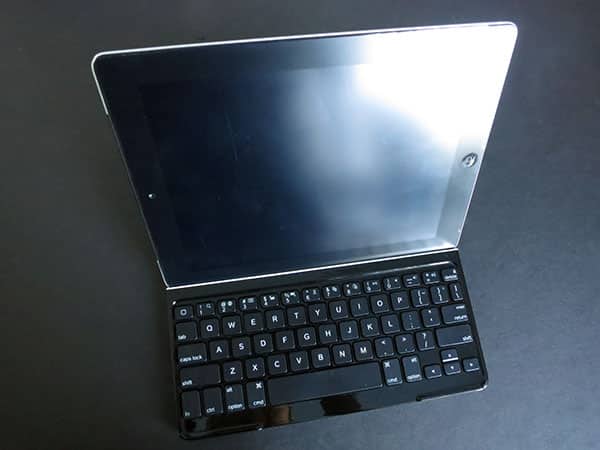
Attached to the two current iPad models using an iPad Smart Cover-style magnetic rail, the silver aluminum-backed lid perfectly matches the backs of Apple’s tablets: once it’s on an iPad, you can very easily see how Apple could offer two-piece “MacBook Touch” laptops if it wanted to corner the transforming tablet market. With the Ultrathin Keyboard Cover in place and closed with a tabless magnetic seal, the iPad’s screen is completely and securely covered, while the rest of its body is exposed, just like any MacBook computer—except this combination is a bit thicker than the MacBook Air. Viewed from a notebook computer orientation, the left side features a micro-USB charging port alongside an on-off switch and a Bluetooth pairing button; there’s also a white-rimmed hole on both sides that we’ll discuss in a moment. Logitech promises that the Ultrathin Keyboard Cover can run for six months on a single battery charge if used for two hours per day—that’s around 360 hours of active typing—so you won’t need to use the included micro-USB cable too often. A cleaning cloth is included, as well.

Though the Ultrathin Keyboard Cover’s aluminum exterior won’t benefit much from that cloth, the black plastic interior might. Run your finger against the edge and the cover will open to reveal a black, chiclet-style keyboard with a white stripe above the keys; this stripe is the reason for the holes on the closed Cover’s left and right sides.
You’ll hear two clicks as you pull your bare iPad off of the magnetic rail and rest it in landscape orientation inside the stripe; the first click is the automatic unlocking of your iPad’s screen, and the second indicates that your iPad’s being securely held in place with additional magnets, reclining so that you can use your tablet’s screen while typing. If you prefer to use the iPad in portrait orientation, that works as well, albeit without any magnetic assurance. Logitech doesn’t recommend using the iPad that way, and all things considered, we preferred the landscape orientation’s magnetic lock for peace of mind.

So much of this experience feels right—the intuitive attachment mechanism, the auto screen unlocking and locking feature, the reclining magnetic stand, and the overall look and feel of the Ultrathin Keyboard—that it’s hard to criticize Logitech’s approach here. There are so many tangible improvements over last year’s Keyboard Case for iPad 2 that the two designs seem as if they came from completely different designers, despite their very obvious conceptual similarities. It’s as if Logitech learned from almost all of Zagg’s mistakes and radically classed up the Keyboard Case’s design without compromising much on its features.

There are compromises, however, both in comparison with the Keyboard Case and with other same-priced rivals. They start with some good and modestly bad news about the keyboard itself.
The good news is that typing on the Ultrathin Keyboard is really very solid; in fact, the experience is so similar to using a very modestly smaller MacBook Air keyboard that users can expect nearly flawless touch typing from moment one, with only very brief moments of adjustment to get used to slight differences in key spacing and positioning. There’s now a tiny delete key, which you’ll need to notice and adjust your backspacing to accommodate. And other arguably rarely used keys, such as the backslash, tilde, and back quote, have been moved around to positions that won’t be completely intuitive at first.
Most users will have no problem adjusting to these changes, but programmers and other math-focused typists may have issues with these changes.

A bigger potential issue is that the entire row of function keys has deliberately been removed, then combined with half-height number buttons on the top row. You need to hold down the “fn” key on the bottom left of the keyboard before pressing a number to activate the functionality, including iOS-specific search, cut, paste, and audio playback keys. This change will obviously impact frequent function key users more than others, but then only to the extent that occasionally holding down “fn” is considered a serious inconvenience.

During testing, we found the key compromises to be entirely acceptable to achieve the accessory’s unique size, feel, and shape. Logitech’s tweaks were strategic, enabling the Ultrathin Keyboard the ability to fit its reclining iPad stand above respectably sized letter keys and a nearly full-height bottom row, including a tall space bar, and properly positioned arrow cursor keys. All things considered, the company gave up very little and achieved a great form factor.

The only serious issue we had with the Ultrathin Keyboard Cover was case compatibility. Despite Apple’s pitch of the iPad Smart Cover as a caseless protective and stand solution for recent iPads, many people—including us—don’t want to scratch, dent, or otherwise damage the tablets’ bodies, which has led to a huge number of Smart Cover-compatible rear shells, Smart Cover-like full body cases, and of course many traditional cases without Smart Cover features. Because of the Ultrathin Keyboard Cover’s magnetic stand system, these cases don’t work, even if they’ve been otherwise designed to support attachment of Smart Cover-style magnetic rails to their left sides. In other words, if you want to protect the rest of your iPad, you’ll need to pull the case off to use it with this accessory’s stand.











