
iLoungeiLounge
  • News
    • Apple
      • AirPods Pro
      • AirPlay
      • Apps
        • Apple Music
      • iCloud
      • iTunes
      • HealthKit
      • HomeKit
      • HomePod
      • iOS 13
      • Apple Pay
      • Apple TV
      • Siri
    • Rumors
    • Humor
    • Technology
      • CES
    • Daily Deals
    • Articles
    • Web Stories
  • iPhone
    • iPhone Accessories
  • iPad
  • iPod
    • iPod Accessories
  • Apple Watch
    • Apple Watch Accessories
  • Mac
    • MacBook Air
    • MacBook Pro
  • Reviews
    • App Reviews
  • How-to
    • Ask iLounge
Font ResizerAa
iLoungeiLounge
Font ResizerAa
Search
  • News
    • Apple
    • Rumors
    • Humor
    • Technology
    • Daily Deals
    • Articles
    • Web Stories
  • iPhone
    • iPhone Accessories
  • iPad
  • iPod
    • iPod Accessories
  • Apple Watch
    • Apple Watch Accessories
  • Mac
    • MacBook Air
    • MacBook Pro
  • Reviews
    • App Reviews
  • How-to
    • Ask iLounge
Follow US

Reviews

Reviews

Review: Logitech Solar Keyboard Folio for iPad 2/iPad (3rd-Gen)

Last updated: May 17, 2021 10:02 am UTC
By Nick Guy
Review: Logitech Solar Keyboard Folio for iPad 2/iPad (3rd-Gen)

Logitech has produced some of the most distinctive iPad keyboard cases over the past few years; its new Solar Keyboard Folio ($130) follows suit, designed for the iPad 2 and the third-generation iPad. Novel here are the solar cells integrated into the faux leather cover, which help to ensure an all but guaranteed charge. Just as important are the keys themselves, which are about as close to great as these things come. The case is a bit bulky thanks to the rechargeable battery, though, and we found a serious problem with the folio’s magnetic locking feature.

Review: Logitech Solar Keyboard Folio for iPad 2/iPad (3rd-Gen)

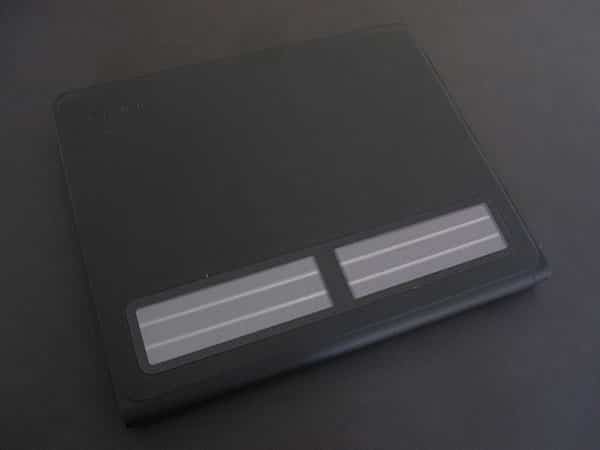
Solar Keyboard Folio is pretty plain looking from the outside, with the exception of the solar cells. The only openings in the black material are one for the iSight camera, and an array of 13 small holes for the speaker. Your iPad is held by a hard rubber frame, which is molded to the curves of the tablet with tight cutouts for the ports and buttons, and there are two small feet at the left corners. Those with oversized headphone or Dock Connector plugs will have issues getting them to fit because of just how small the holes are. Most of the tablet’s back is left uncovered, but in a case like this that’s not really a problem. We found it quite easy to insert and remove the iPad.


Review: Logitech Solar Keyboard Folio for iPad 2/iPad (3rd-Gen)

The keyboard, battery, and underside of the solar cells are all on the inside of the front cover.

The base is about 9.5” inches deep, which is a bit more than some other cases, and means you’ll have to have a significant amount of desk space when typing. Like many other cases these days, Solar Keyboard Folio has magnets designed to automatically lock and unlock the iPad’s display when the case is opened and closed. Unfortunately, we found them to be less than reliable. On more than one occasion they failed to turn the tablet off properly, leaving the screen on and the battery to drain. For users who rely on the convenient feature, this could potentially be a big problem. 


Review: Logitech Solar Keyboard Folio for iPad 2/iPad (3rd-Gen)

Logitech makes some impressive claims about the battery. It says that users should be able to type for two hours a day, every day, for two years before the battery runs dry. Even still, it recommends keeping the battery charged with exposure to natural or artificial light. Unusually, no USB cable is included with the Solar Keyboard Folio; light-based recharging is required. A full charge takes about six hours.


Review: Logitech Solar Keyboard Folio for iPad 2/iPad (3rd-Gen)

Review: Logitech Solar Keyboard Folio for iPad 2/iPad (3rd-Gen)

The keyboard layout is among the best we’ve seen. All of the keys are just where one would expect them, allowing touch typists to dive right in without having to learn a different setup. Although they’re smaller than those on a laptop or Apple’s Wireless Keyboard, the keys are large enough to type without feeling cramped. As with the Ultrathin Keyboard Cover, Logitech chose to spread out iOS-specific functions over existing keys rather than add a row of dedicated buttons, particularly along the top row.


Review: Logitech Solar Keyboard Folio for iPad 2/iPad (3rd-Gen)

We were wowed by one really cool feature: when you move the iPad to the viewing angle, the playback controls along the bottom row of keys automatically take over. This allows you to adjust volume, skip back and forth between tracks, pull up the onscreen keyboard, and more, without manually toggling anything. Additionally, the keyboard only works for standard typing when the iPad is in the right position; move it away and the keys don’t do anything. We’re not quite sure what kind of proximity sensor Logitech is using, but it’s pretty cool.


Review: Logitech Solar Keyboard Folio for iPad 2/iPad (3rd-Gen)

There are some real advantages to Solar Keyboard Folio.


Latest News
The Apple Watch Series 11 42mm GPS is $100 Off
1 Min Read
Apple Launching A New Education Hub In India Teaching Robotics and Swift Programming
1 Min Read
Women’s and Men’s Golf Added to Apple Sports
1 Min Read
Apple Adding Civilization VII and Other Games To Apple Arcade
1 Min Read
AirPods 4 ANC Is $59 Off
1 Min Read
Apple Using 2NM Process For Their M6 and A20 Chip
1 Min Read
iPhone 18 Models Will Not Have a Big Redesign
1 Min Read
Launch of MacBook Pro M5 Pro and M5 Max Models is Approaching
1 Min Read
Get the iPad Mini 7 256GB Wi-Fi at $99 Off
1 Min Read
Mozilla Now Allows Turning AI Features Off
1 Min Read
Barcelona Passeig de Gràcia Apple Store Temporarily Closing
1 Min Read
Apple’s Plans to Enter the Smart Glasses Market is Changing the Industry
1 Min Read

iLounge logo

iLounge is an independent resource for all things iPod, iPhone, iPad, and beyond. iPod, iPhone, iPad, iTunes, Apple TV, and the Apple logo are trademarks of Apple Inc.

This website is not affiliated with Apple Inc.
iLounge © 2001 - 2025. All Rights Reserved.
  • Contact Us
  • Submit News
  • About Us
  • Forums
  • Privacy Policy
  • Terms Of Use
Welcome Back!

Sign in to your account

Lost your password?










