
After a highly successful string of new product releases, Logitech’s Pure-Fi Dream ($200) is a disappointment. Designed by the company to be a “premium bedroom music system for iPod,” Dream is positioned in audio horsepower as a step below the superb Pure-Fi Elite, and above the excellent portable Pure-Fi Anywhere — a clock radio with serious speakers inside. Like the company’s Squeezebox Boom Internet radio, you get twin 0.75″ tweeters and twin 3″ full-range drivers, both a step under the parts found in Elite, as well as a front-mounted clock and an Infrared remote control. But there’s a big difference: Pure-Fi Dream is designed to be an alarm clock.
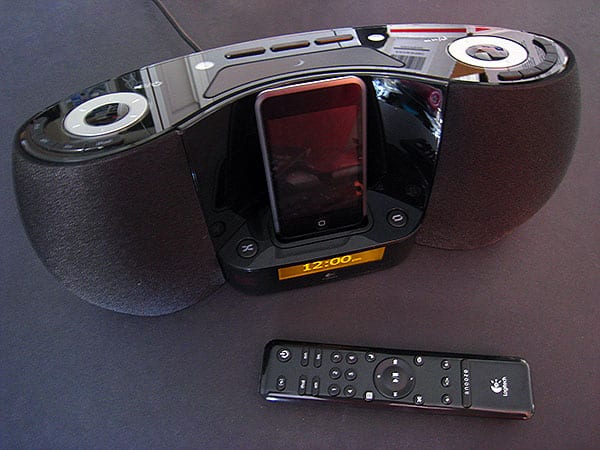
It’s here that Dream runs into its major problems. When we first saw the unit a year ago, we told Logitech that we weren’t fond of the design, which had an odd shape and placed a little amber-colored clock below the iPod dock rather than using a larger or brighter screen. Though we spent a week testing Dream in hopes that some hidden elements of the design’s genius might become evident, it didn’t: the unit’s curved front, complete with fabric speaker grilles, may be nice but doesn’t seem right for a bedside clock radio—the system is several inches wider than iHome’s and Sony’s clocks, a bit deeper than the Sony, and taller than all of them. This shape might be okay for a typical Bose SoundDock clone, but doesn’t work for a clock radio.

Similarly, Dream’s amber screen uses digits that are amongst the smallest we’ve seen on a dedicated clock radio; they’re smaller than Sony’s, and seemingly half the height of iHome’s.
We found them difficult to see at night with the system in its most natural nightstand position. Logitech apparently picked the screen because it was similar to the ones in its Pure-Fi Elite and AudioStation systems, but smaller, offering a greater ability to display text and menu options. XtremeMac’s since-discontinued Luna also went with a programmable screen, but had a much nicer display; iHome’s and Sony’s screens are lower-tech but are much easier to see.

On a related note, while Dream provides dual alarms—each able to be set to a buzzer, or an AM station, FM station, or a given iPod playlist of your choice at a specific volume—the alarm feature otherwise isn’t as sophisticated as in iHome’s clocks, which now offer weekend, weekday, and all-week alarms; there’s also no calendar date here. Logitech includes on both the unit and the remote six buttons that can be used to select preset stations—6 AM, 12 FM across two FM bands—or iPod playlists, but leaves off the unit two remote buttons, namely a sound field expander and a “Menu” button to adjust the system’s bass, treble, brightness, snooze, and motion detection features. While these features are all welcome, having an obvious button on the unit to activate them would have been nice, too; it turns out that you need to hold down a large right-sized button on the system’s top for the menu features.

Having said all of the above, there are some pretty cool things about Pure-Fi Dream’s design that may excite some users. The system’s top uses two easy to spin, ratcheting silver dials for tuning and volume adjustments, as well as buttons that are neatly arrayed in curves around and between the dials.
Logitech has also included motion-activated backlighting for the controls, as well as backlit buttons on the Infrared remote, which work well even if we really don’t like their amber coloration. Because of the motion feature, you can wave your hand above the top surface to activate the lights, which turn off automatically when motion isn’t being sensed; the remote control’s lights activate whenever you press a button. The system’s screen can also dim or brighten depending on the room’s ambient light, a feature we’ve previously seen in systems such as JBL’s On Time.

And then there are the speakers. As with the Pure-Fi Elite, we like what Logitech has done with its treble and bass drivers, a combination that not surprisingly delivers noticeably better sound than the less expensive clock radios we’ve tested; when directly compared, iPod music is clearer and smoother than leading but less powerful $100 Sony and iHome units, with the ability to adjust both bass and treble levels to create a sound signature that you’ll like. The maximum volume level is a bit higher, and the sound is lower in distortion at the peak; Dream sounds full-bodied when the two-driver units are straining to avoid shrieking. However, it’s yet another unit that sounds similar to the Bose SoundDock, only $100 cheaper; the $200 Boston Acoustics Horizon Duo-i is in the same price and performance category, and offers somewhat superior bass performance, as well as a better clock screen.


There’s one other sort of nice thing about Dream: there aren’t any external radio antennas. Instead, the back has a single audio port, designed for auxiliary audio input, and the only things you need to connect are the power supply—which is quite large, but designed with a cable-style plug—and one of the twelve included Dock Adapters for use with your iPod.











