
We were thrilled when Logitech released Pure-Fi Anywhere last year: as the second iteration of mm50, a great-sounding portable iPod speaker with an integrated rechargeable battery, Pure-Fi Anywhere improved on the earlier design with better looks and a superior remote control. But, like every other speaker on the market at the time, Pure-Fi Anywhere lacked full support for Apple’s interference-generating iPhone, which added a droning buzz whenever it communicated with cell phone towers. Thus, Logitech has introduced Logitech’s Pure-Fi Anywhere 2 ($130), also known as Pure-Fi Anywhere for iPod/iPhone, as an iPhone-shielded replacement.
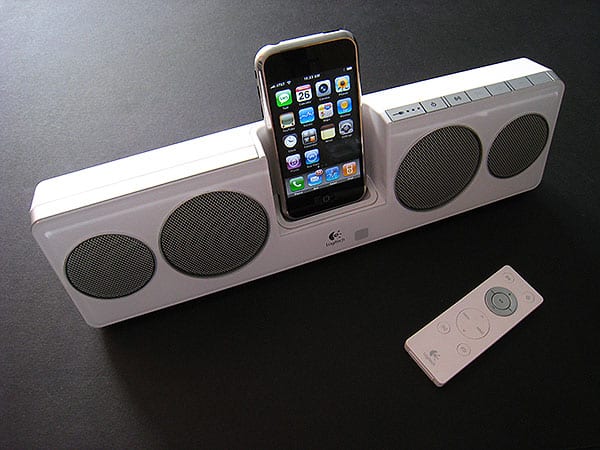
If you’re familiar with Pure-Fi Anywhere, you pretty much know what to expect from the sequel. Logitech bundles four speaker drivers, an iPod or iPhone dock, and a 10-hour rechargeable battery in a 13.25” wide by 3.7” tall by 1.6” deep white or black plastic enclosure; a layer of clear plastic on the front makes each model resemble Apple’s since-discontinued fifth-generation iPods and original iPod nanos. The speakers stand on a gentle recline with two flip-out metal feet, which fold inwards for storage in an included carrying case. An Infrared remote control and power supply are also packed in, storing conveniently along with Pure-Fi Anywhere 2 inside the carrying case, and Logitech includes the largest collection of Dock Adapters we can recall seeing in a third-party accessory box—12, or one for the iPhone and every iPod except for the 2003 third-generation model.

Our comments on Pure-Fi Anywhere 2’s audio performance remain generally unchanged from last year’s model. The system remains the best-sounding portable speaker in its price class, with comparatively outstanding, balanced sound and one of the only faux 3-D spatializers that actually creates the impression of a big sound stage.
At its maximum volume level, which is enough to fill the typical bedroom or be heard easily outdoors, the system continues to sound great, as it does even at low volumes, delivering enough combined treble, midrange, and bass detail to outstrip all of its peer-priced competitors. While there aren’t many iPhone-compatible portable options in the same price and performance category as Pure-Fi Anywhere 2, it manages to produce fuller-bodied sound than JBL’s $170 On Stage IIIP, which comes across as comparatively treble-heavy—a sharper sound that can sound cleaner on some tracks, but bass-deficient on others. For the higher price, On Stage IIIP should have sounded better, but Pure-Fi Anywhere 2’s larger body design pays sonic dividends.

Obvious changes from Pure-Fi Anywhere to Pure-Fi Anywhere 2 are few in number. Apart from the iPhone TDMA shielding, which works as well as with most of the iPhone-ready speakers we’ve tested—slight hints of noise are evident in pure silence if you get really close to the speakers—Logitech has made one notable internal change and one external change. Thanks to its use of an Apple authentication chip, Pure-Fi Anywhere 2 now scales its volume upwards and downwards with the built-in volume controls, the ones on the remote, or for the first time, with the ones on your iPod. Called volume mirroring, this minor feature worked on iPod models, but not on the iPhone, and enabled the Pure-Fi Anywhere 2 to reach a slightly higher maximum volume than its predecessor.
The external change is in the unit’s carrying case, which was previously a semi-hard shell, and now is a soft mesh and neoprene carrier of the same general size and shape.
This is good news from one standpoint—the original Pure-Fi Anywhere carrying case experienced a complete zipper failure shortly after we published our review, and the new case’s zipper feels stronger and more durable. But the softer case otherwise doesn’t do as much for us as did the prior design; we preferred the hard body shell.

On a more negative note, quality control appears to be a continued concern for the Pure-Fi line, as our remote control—physically almost identical to its predecessor, complete with iPod and iPhone track, volume, play/pause and menu navigation buttons, shuffle and repeat controls, 3-D spatializer and power buttons—arrived with a dead battery. We had to supply our own CR2025, at which point the remote worked perfectly, though its battery compartment felt a little softer than the one in the original Pure-Fi Anywhere. An e-mail request to Logitech regarding similar issues with other Pure-Fi Anywhere 2 remote units went unanswered.

This remote issue recalled a concern raised late last year by a reader, who noted that the unit’s lack of a user-replaceable battery could limit its longevity to however long the supplied 10-hour rechargeable battery would last. However, in that case, Logitech noted that its post-warranty period policy is to supply a complete replacement at half the original unit’s MSRP. Since the warranty on Pure-Fi Anywhere 2 lasts for two years, which is longer than Apple’s warranty on iPods or iPhones, you’ll be safe for a reasonable period of time.











