
Technology writers often use “early days” as shorthand to explain how new product categories launch with obvious major issues — problems due to initial developer uncertainty are predictable. Even so, we’re hesitant to blame inexperience for the issues we’re seeing in new Apple-approved iOS game controllers. The earliest Apple-certified game controller was released more than a year ago, and the companies releasing new iPhone-specific options this month are experienced console game accessory companies. Despite their track records, however, MOGA’s $100 Ace Power was pretty close to a complete train wreck, and now Logitech has released an only somewhat better alternative called the PowerShell Controller + Battery ($100). While PowerShell actually works properly with its supported devices — something we no longer take for granted after testing Ace Power — it’s larger, does less, and supports fewer devices than MOGA’s controller. As a result, PowerShell still falls short of meriting our recommendation, but rates a little higher merely by virtue of doing generally what it’s supposed to do.
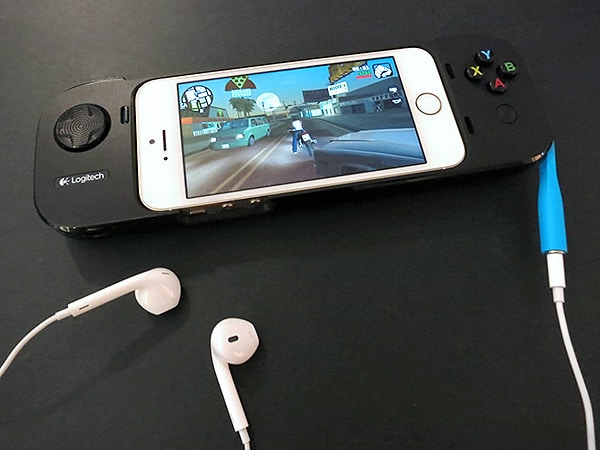
From a specifications standpoint, PowerShell includes only a subset of Ace Power’s features. Unlike Ace Power, which uses Apple’s “extended Lightning controller” reference design, PowerShell is a “standard” Lightning controller with fewer joysticks and buttons. You’ll find a digital directional pad with four colored action buttons on the front, plus two shoulder triggers on the top — a control configuration similar to the Nintendo Super NES and later Sega Genesis controllers of the early 1990’s. You’ll also find a somewhat unwieldy switch-style Sleep/Wake button trigger and concave pause button on the left and right front sides, respectively, while the left edge holds a silver power switch, micro-USB port, and space for attachment of a wrist strap, which is not included. The right side has a deep recess for connection of an included blue rubber headphone port extender.

Putting aside any criticisms of PowerShell’s limitations for a moment, the controller design isn’t bad; it actually makes a positive first impression.
The front is largely matte black plastic, with reasonably-sized controls, and glossy plastic elements on the sides look nice, too. Unlike MOGA’s design, which used thick, contoured hard plastic to create hand-friendly grips, Logitech achieves similar results in its much thinner shell by using soft, textured rubber on the back. PowerShell isn’t the most comfortable or versatile game controller we’ve ever used, but it feels nice enough to achieve its intended purpose.

Rather than promising universal compatibility with iOS devices, PowerShell is specifically designed to hold certain recent-model iPhones and iPod touches in the center, placing new physical buttons alongside the screen while permitting access to the device’s existing touch and physical controls. Logitech opted to support the iPhone 5 and 5s, but not the iPhone 5c, which is physically just a little too large to fit within the controller’s central recess. PowerShell supports the fifth-generation iPod touch using an included blue rubber pad, which properly enables the noticeably thinner iPod to fit and connect electronically without any issues. Once you’ve inserted the iPhone or iPod touch atop the Lightning plug inside PowerShell, a gap on the controller’s bottom edge lets you access the iOS device’s volume buttons and ringer switch. A large hole on the back provides camera access. Logitech also packs-in a blue micro-USB cable to recharge PowerShell’s built-in battery.

It’s worth noting that the battery is 1500mAh, smaller than MOGA’s 1800mAh cell, and that Logitech provides neither specific performance guidelines for its charging capabilities, nor a granular battery level indicator. A G logo on the unit’s back briefly flashes blue to indicate that the battery power has been turned on, and red to indicate that power is low, but that’s it. We were able to get a 66% recharge with a connected and powered on but unused iPhone 5s, which is right in line with the performance of similarly low-capacity batteries we’ve previously tested; most standalone iPhone 5 battery cases ship with larger capacity cells.
For some reason, we could not get PowerShell to bring a completely discharged iPhone 5 back to life.

Apart from that issue, PowerShell otherwise worked exactly as expected. Although still very few in number, iOS games with controller support responded more or less appropriately to button inputs. We tested 2-D titles such as Sonic the Hedgehog 2, which performed totally fine with PowerShell, responding at pretty much the same pace we would have expected from a standard game console or handheld controller. The buttons are respectably firm and clicky, but Logitech’s D-pad is only okay. It isn’t soft or squishy, but it’s also not the most responsive we’ve ever tested, neither clicking nor providing strong physical evidence of locking into cardinal directions.

By contrast with 2-D titles, recently-released 3-D iOS games such as Grand Theft Auto: San Andreas and Tomb Raider were predictably somewhat spotty. Since console developers began to include analog joysticks with controllers during the 32-bit era in the mid-1990s, many 3-D titles were designed to measure granular analog directional input for movement rather than using on-off digital directional input. Consequently, unless developers of iOS games make under-the-hood adjustments, characters controlled with digital D-pads such as PowerShell’s may seem to be stuck walking rather than the sneaking, walking, and running they’re capable of, and vehicles will steer hard left or hard right rather than in softer degrees of motion.

Another way to put this is that PowerShell’s biggest problem isn’t what it does, but what it lacks. There are no analog joysticks on the face, so motion in 3-D gaming will always be as constrained as described above. You won’t find a second set of pressure-sensitive triggers on the top, so acceleration and braking will be either on or off during driving and flying games.











