
iLoungeiLounge
  • News
    • Apple
      • AirPods Pro
      • AirPlay
      • Apps
        • Apple Music
      • iCloud
      • iTunes
      • HealthKit
      • HomeKit
      • HomePod
      • iOS 13
      • Apple Pay
      • Apple TV
      • Siri
    • Rumors
    • Humor
    • Technology
      • CES
    • Daily Deals
    • Articles
    • Web Stories
  • iPhone
    • iPhone Accessories
  • iPad
  • iPod
    • iPod Accessories
  • Apple Watch
    • Apple Watch Accessories
  • Mac
    • MacBook Air
    • MacBook Pro
  • Reviews
    • App Reviews
  • How-to
    • Ask iLounge
Font ResizerAa
iLoungeiLounge
Font ResizerAa
Search
  • News
    • Apple
    • Rumors
    • Humor
    • Technology
    • Daily Deals
    • Articles
    • Web Stories
  • iPhone
    • iPhone Accessories
  • iPad
  • iPod
    • iPod Accessories
  • Apple Watch
    • Apple Watch Accessories
  • Mac
    • MacBook Air
    • MacBook Pro
  • Reviews
    • App Reviews
  • How-to
    • Ask iLounge
Follow US

Reviews

Reviews

Review: Logitech Keyboard Folio for iPad 2, iPad (3rd/4th-Gen)

Last updated: May 17, 2021 2:35 am UTC
By Nick Guy
Review: Logitech Keyboard Folio for iPad 2, iPad (3rd/4th-Gen)

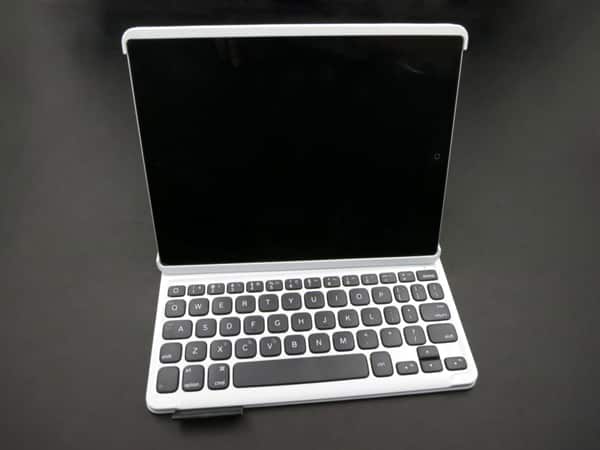
Logitech has released a number of unique iPad keyboards in the past, and its new Keyboard Folio ($100) continues the strategy of offering something a little different from the masses. While its name is similar to many recent options, Keyboard Folio is actually bulkier than most of its rivals, with a pink, yellow, blue, or black canvas exterior. It stands out from rivals thanks to bigger-than-average keys, and a cool use of magnets. A Micro-USB cable is packed-in for recharging, and Logitech promises that you can type two hours a day for three months before running out of power.

Review: Logitech Keyboard Folio for iPad 2, iPad (3rd/4th-Gen)

Rather than a hard plastic shell or a less flattering pocket, Keyboard Folio uses a foam-backed rubber frame to cradle your second-, third-, or fourth-generation iPad. Because the materials are pliable, they can be flexed during the installation process. Unfortunately, this design leaves the top and bottom edges completely exposed except for the corners, while adding extra thickness. It would have been easier to accept the case’s added size if the edges were properly protected, but on a positive note, all of the buttons and ports are readily accessible.


Rather strong magnets hold the case shut when not in use.


Review: Logitech Keyboard Folio for iPad 2, iPad (3rd/4th-Gen)

Review: Logitech Keyboard Folio for iPad 2, iPad (3rd/4th-Gen)

When it comes time to type, the left edge of the holder lifts away from the rear cover, and magnetically attaches to a plastic surface above the keyboard with a reassuring click. Unlike Belkin’s Ultimate Keyboard Cover Case, which also uses magnets to hold the typing position, there’s only one angle here, and the physical connection doesn’t magically turn the keyboard on. Instead, that’s manually handled with a switch along the iPad and keyboard’s bottom edge, in between the Micro-USB port and Bluetooth pairing button.


Review: Logitech Keyboard Folio for iPad 2, iPad (3rd/4th-Gen)

Keyboard Folio includes keys that are mostly the same size and with similar spacing as Apple’s Wireless Keyboard, while shaving 1.75 inches off the width. Each of the letter keys is about 5/8 of an inch wide and tall, with rounded corners. The numbers, some of the punctuation, and other keys that are used less often are a bit smaller.

Rather than having flat or even concave surfaces, they’re slightly convex, rising up towards the center. It’s a different feel than we’re used to, but not bad once you get used to it.


Review: Logitech Keyboard Folio for iPad 2, iPad (3rd/4th-Gen)

Review: Logitech Keyboard Folio for iPad 2, iPad (3rd/4th-Gen)

To accommodate the particularly large keys, Logitech chose to adjust the layout a bit. Most noticeably, the tab and caps lock keys have been merged with the Q and A keys, respectively, and are accessible by hitting them simultaneously with the function key. This threw us off just a little bit at first, as we’re used to an extra column of keys along the left edge. Other than that, the only other real difference compared to most keyboards is there’s no control key on the left side; instead, it takes the place of the command and option keys on the right. There are iPad-specific function keys, but they’re merged with the row of numbers as secondary functions, a common compromise of iPad keyboards.


Review: Logitech Keyboard Folio for iPad 2, iPad (3rd/4th-Gen)

Once you get used to the layout, typing on Keyboard Folio ranks up there as one of today’s best iPad typing experiences. The large keys are comfortable to use, and provide a pleasant tactile feedback thanks to their scissor type keys.



Latest News
The 14-inch MacBook Pro with M5 Chip 16GB RAM/512GB is $250 Off
1 Min Read
Noise and Static on AirPods Pro 3 Still Unfixed
1 Min Read
New iMac with 24-inch OLED Display May be Brighter With 600 Nits
1 Min Read
The 15-inch M4 MacBook Air 256GB Is $250 Off
1 Min Read
Internal Kernel Debug Kit from Apple Reveals Tests for a MacBook with A15 Chip
1 Min Read
Apple Currently In Talks With Suppliers for Chip Assembly & Packaging of iPhones in India
1 Min Read
Apple Allows Easier Battery Replacement For M5 MacBook Pro with 14-inch Display
1 Min Read
The Apple Watch SE 3 44mm GPS is $50 Off
1 Min Read
20th Anniversary iPhone May Launch in Two Years
1 Min Read
Better Image Generation Capabilities and Apple Music Integration Coming to ChatGPT
1 Min Read
A20 Pro Chip Coming to Next Gen iPad Mini OLED
1 Min Read
Amazon has the AirTag 4 Pack Marked $29 off
1 Min Read

iLounge logo

iLounge is an independent resource for all things iPod, iPhone, iPad, and beyond. iPod, iPhone, iPad, iTunes, Apple TV, and the Apple logo are trademarks of Apple Inc.

This website is not affiliated with Apple Inc.
iLounge © 2001 - 2025. All Rights Reserved.
  • Contact Us
  • Submit News
  • About Us
  • Forums
  • Privacy Policy
  • Terms Of Use
Welcome Back!

Sign in to your account

Lost your password?








