
Although we try to go into every new accessory review with a clean, product-specific slate, it was hard to look at Logitech’s new iOS-ready universal remote control system Harmony Smart Control ($130) without recalling the last few Harmony remotes we’ve covered. The concept is similar to its earlier wall-powered IR blaster Harmony Link, while the components and software look highly similar to what the Harmony Ultimate remote and blaster bundle we reviewed one month ago. Yet Smart Control manages to deliver superior value to both of these predecessors, as well as an improved software experience that’s finally worthy of our recommendation — though not without some caveats of its own.
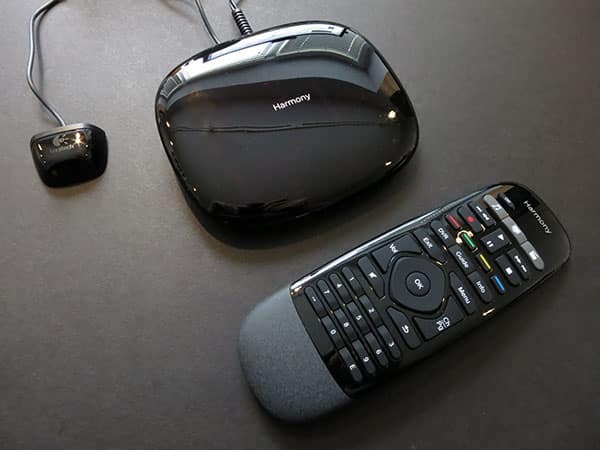
Just like the $350 Harmony Ultimate, the $130 Harmony Smart Control bundles a sleek black remote control with a wall-powered Infrared blaster called a Harmony Hub. The Hub has an 802.11b/g/n Wi-Fi chip inside, as well as Bluetooth 3.0, so it’s capable of receiving commands from both the dedicated remote control and your iOS device, as well as controlling certain game consoles with Bluetooth functionality. Every sub-$100 “universal” remote control accessory we’ve tested for iOS devices has been limited to interacting with common Infrared receivers, and none come with standalone remote controls, so Smart Control’s more capable in both regards.

Smart Control’s Hub looks and feels identical to the one included in the Ultimate package, a glossy black rounded rectangle with two rear ports for attachment of Infrared extender cables, one Micro-USB port for power and optional computer synchronization, and a pairing button. As before, the Hub is capable of controlling most TVs and A/V equipment with its own Infrared hardware, and is required to be within line-of-sight distance from the IR receivers on your devices. Logitech includes one cabled extender in the package for use with equipment you’ve nestled inside a cabinet or other out-of-sight space; you can buy another extender if you need it. Smart Control includes a wall power adapter for the Hub, plus a USB cable should you want or need to connect it to your computer. Readers familiar with Harmony Ultimate will note that only two pack-ins are completely missing here despite the $220 price difference: a wall-powered charging station for the remote control, and that second cabled Infrared extender.

The critical hardware difference between these packages turns out to be a single element of the remote control: Smart Control lacks an integrated touchscreen. Logitech’s prior-generation touchscreen in the standalone Harmony Touch was nicely customizable but a battery killer, requiring the remote to make near-daily visits to its included charging cradle.
Harmony Ultimate featured noticeably improved remote battery life, but even so, it could never have shipped without a recharging solution. Since it lacks the power-hungry touchscreen, Smart Control’s remote requires nothing more than a single CR2032 coin-sized battery, running for roughly a year before easy replacement. From a power consumption standpoint, it’s as worry-free as remote controls get.

Despite losing the screen, Smart Control’s remote has plenty of other features, including the same arrays of dedicated power off, play/pause, record, stop, and backward/forward controls found on the Ultimate remote, plus an identical collection of menu navigation buttons, four Xbox-like colored buttons, dedicated DVR, guide, and info buttons, and a new numeric keypad at the bottom. Minus the touchscreen, Logitech instead lets you map up to six commonly used “activities”—Harmony’s combination of multiple devices for a single purpose, such as watching Apple TV—to three new buttons labeled with musical note, TV, and movie clapper icons. Each button has two different activation levels (tap or hold) which can be programmed to trigger different activities, so you could tap to listen to music on a connected CD player, or hold the same button to access music on an A/V receiver with an integrated radio tuner. Most users will find that the remote has enough buttons for their needs.

There are a few major software differences between Smart Control and its predecessors, one positive, one neutral, and one somewhat unappealing. The most positive change is Logitech’s use of an iOS application called Harmony for both initial Smart Control setup and subsequent iOS control of the Harmony Hub. This free application effectively eliminates an iOS user’s need to go through Logitech’s semi-convoluted Myharmony.com web setup process, using an iPhone, iPad, or iPod to handle everything from bringing the Hub onto your 802.11b/g/n Wi-Fi network to pairing it with the remote and configuring activity buttons. While the app still has a couple of hiccups—we needed to manually stop and restart the app after it added the Hub to our network, and it once again couldn’t transfer our previously-saved Harmony button settings to Smart Control, despite offering to do so—it’s a lot easier than going through Logitech’s web-based setup, which requires Microsoft’s Silverlight and introduces the potential for other hurdles. The app still communicates with Logitech’s web site, and still walks you through a similar array of setup steps, but it’s comparatively speedy, handling everything without the need for USB cables or extra downloads.

The neutral change is Smart Control’s new emphasis on your iOS device as a primary rather than secondary remote control for Harmony Hub.
With Harmony Ultimate, the pitch was that the included and sophisticated touchscreen remote was your primary entertainment system interface, but any iOS device could be used as an backup. Here, Logitech expects that your iOS device’s screen will handle most of the heavy lifting for custom button and activity configurations, and that you’ll fall back to the screenless remote only when necessary. Some users may see this as a purely semantic distinction, and if you’re in that camp, you’re going to love Smart Control. But if you need to have granular access to the widely varying controls of many devices, or advanced macro programmability to coordinate them, you’ll need to keep your iOS device handy. The standalone remote control here can turn on a set of devices and let you control them, but you won’t find, say, a dedicated sleep timer button on the remote… unless you add one yourself.

That’s Logitech’s somewhat unappealing aspect of the Smart Control package. While the iOS app can get some users most of the way to a satisfying universal remote control experience, it’s not yet a complete replacement for the Myharmony web site. For the time being, the app provides no obvious way to turn one of the colored buttons into a sleep timer control. You’ll need to go to Myharmony.com and dig through a few screens to achieve that feat, then re-open the Harmony iOS app and choose the “Sync your Harmony” button to upload the settings to your remote. This was also the way we ultimately resolved issues with the remote’s volume buttons not actually changing the TV’s volume during activities, a problem we also had with Harmony Ultimate when setting up a different TV. As always, the software side of the equation is Logitech’s weak spot, but it’s at least a bit better with Smart Control than it was before.


A couple of other small caveats are worth noting.











