
Keyboard cases have made up a surprisingly large percentage of the iPad Air cases we’ve received since Apple’s newest tablet shipped last month. Some are familiar tweaks of models that have been available in the past, while others are newer designs. We’ve already covered quite a few of them, and today, we’re reviewing five more from three different companies. From Belkin, there’s Qode Slim Style Keyboard Case ($80) and Qode Ultimate Keyboard Case ($130), Logitech has FabricSkin Keyboard Folio ($150) and Ultrathin Keyboard Folio ($100), and finally, there’s ZaggKeys Folio with Backlit Keyboard ($100) from Zagg. Over the past year, we’ve seen very good, and even great, keyboard cases for $100 or less, so it’s somewhat surprising to see two of these options ring up at even higher prices. All of the cases come with micro-USB cables for charging.
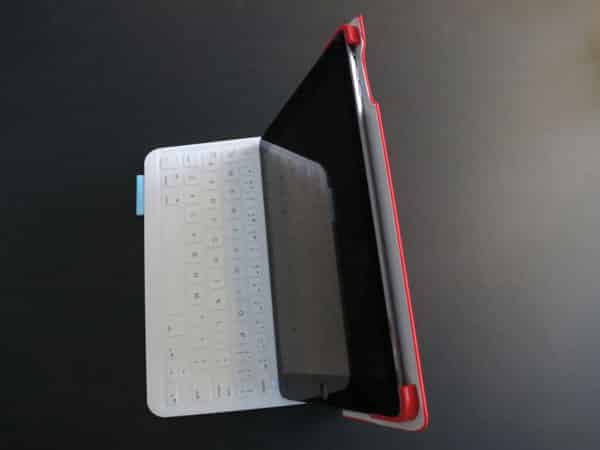
Despite Belkin’s Qode cases sharing a family name, they’re actually rather different from one another. Slim Style is a brand new product, not based on any keyboard cases that’ve come before. As the style almost always necessitates, it’s a folio, with the keyboard fixed inside the front cover, and the iPad Air held on the opposite side. The exterior is a synthetic material that’s on the edge of looking like faux leather, but not quite. Instead of a proper case, the iPad Air is held in place with bands across the top and bottom, attached to the rear panel with elastic. We’re disappointed to see such a generic system in place.

Slim Style moves into a typing position when you lift away the magnetically-attached kickstand, allowing the frame to hold the iPad Air at an angle. The Bluetooth keyboard itself is impressively slim, with a thickness less than that of the micro-USB charging port everywhere except for the top inch or so. As we’ve come to expect, pairing is a quick and painless process. There are six rows of keys, including iOS function keys along the top. The layout, size, and tactility of the keyboard are just about where we want them to be, and we found typing to be a breeze. Only one issue came up, and it’s a surprisingly common one: the apostrophe key isn’t in the right place. Rather than sitting between the colon and enter keys, it’s moved down, immediately to the right of the space bar. This will throw touch-typists off, but the keyboard is otherwise close to excellent.
The battery is said to last for 60 hours of active use per charge, with 60 days of standby time.

Ultimate Keyboard Case is certainly the fancier of Belkin’s options: made of aircraft-grade aluminum alloy, it’s thin and light — certainly the most handsome keyboard case we’ve yet seen for the Air, and probably for any iPad. There’s one fewer row of keys than with Slim Style, but rather than just straps, there’s a proper frame to hold the iPad in place. The tablet snaps into the plastic shell, which holds it snugly, and has holes that are just the right size for the Air’s controls, without offering button protection. Despite Slim Style’s name, the Ultimate Keyboard Case is actually thinner. Neither of the cases automatically locks or unlocks the iPad—a surprisingly common omission amongst early Air cases—but Ultimate does otherwise employ magnets in a very interesting way.

When closed, Ultimate is automatically powered-down; there’s no need for an on/off switch like the one found on Slim Style. It also turns on automatically, and reconnects to your iPad Air, whenever magnets along the left edge of the shell come into contact with one of three surfaces above the top row of keys. This design allows for a greater range of typing angles than many keyboard cases offer, and also is a smart way to save power. With this keyboard, Belkin lists the battery time as 264 hours of active life, or 4,300 hours—179 days—of standby time. The keyboard is just as impressive as Slim Style’s, although instead of the apostrophe being in the wrong place, the colon has been moved this time, which is arguably easier to accommodate. There are still iOS keys, but they’re just available as secondary functions to the numbers.

Logitech’s keyboard cases are based heavily on prior products, especially FabricSkin Keyboard Folio, which is an updated version of its predecessor with the same name. While the company has chosen to keep many of the previously cool aspects intact, it did make one change that’s a let down, especially considering the high price. As the name suggests, the folio is covered in fabric—pretty nice material, really — in three different colors. But instead of a full shell like the one that the prior edition had, there are simply two small pieces of plastic at the iPad’s right corners. The tablet snaps into place, and seems to be held securely, but we’re disappointed that there’s not button coverage other than for the Sleep/Wake controls, or even complete edge protection. It’s a step back from the prior design, likely to increase the chances that the accessory would fit the iPad Air regardless of its final dimensions. Also notably missing is an opening for the Air’s rear microphone.

FabricSkin’s keyboard is almost identical to the prior version, and is quite different from other keyboards on the market. Instead of plastic, scissor-style keys, Logitech uses soft, squishy buttons that are far better than the ones on early iPad keyboard cases. They don’t have the same pleasant tactility of plastic keys, or the clicking noise, but there’s one major advantage: the lack of gaps helps the keyboard to be water-resistant. And the layout is well-suited for typing, too, as the keys are large and in the right positions, including the colon and the apostrophe. To make some room, the tab and caps lock keys have been combined with the Q and A keys, respectively, but we found this to be a far better compromise when typing. We also like that FabricSkin uses a magnetic system similar to that of Belkin’s Ultimate Keyboard Case to turn on and off; it also triggers pairing, and this is one of only two cases in the bunch to support Apple’s magnetic locking and unlocking of the iPad itself. Battery life is rated at three months, based on an average use of two hours per day, which is to say 180 hours per recharge.

In many ways, Ultrathin Keyboard Folio looks a lot like FabricSkin, so it’s kind of odd that there’s such a price gap. Instead of fabric on the outside, though, it’s covered in a material that looks a lot like Belkin’s Slim Style, but has a more rubbery feel. The size and shape are exactly the same as FabricSkin, and inside, you get the same minimalist clip system. What’s different, and arguably better in many ways, is the keyboard itself.

While the key layout and sizing are exactly the same, Ultrathin uses more traditional, hard plastic, scissor-style keys. While we quickly adjusted to FabricSkin’s rubber typing surface, we definitely preferred this one. The tactility is far greater, and it just feels better overall. Sure, there are benefits to keeping water out, but for daily use, better keys trump that rarely used protection. Battery life is the same, although Ultrathin doesn’t support the cool auto-on feature; instead, it has a manual power switch on the side.

ZaggKeys Folio is the last case of the bunch, and highly reminiscent of Zagg’s Folio for iPad mini. It’s the only one here that includes a physical hinge, resulting in a laptop-like look and wide range of angles, while preventing you from folding the lid around to the back and using the iPad Air as a pure tablet. The hard plastic shell is covered in faux leather, and interesting in that it doesn’t leave openings for the speakers along the bottom edge. All three buttons along the edges are exposed, however. This is the second of the two cases in the group that supports magnetic locking and unlocking, but it also requires a traditional on/off switch.











