
So close, Logitech, so close. The company has long been known for its iPad keyboard cases, producing watershed products such as Ultrathin Keyboard Cover, one of the best typing experiences of its time, and notably, the only iPad case solution besides its own that Apple carries in its stores. Now it’s back with FabricSkin Keyboard Folio ($150), a Bluetooth keyboard case that bucks several trends in order to achieve something somewhat different from its rivals. Coming in at a steep premium over current rivals — most very good to great keyboard cases cost $100 or less these days — it maintains the popular folio style, but uses a unique iPad holder and an equally distinctive keyboard. However, it has a physically large body, and it’s not a clear winner over prior alternatives.

FabricSkin’s exterior, at least on the black version we received for review, is listed as “matt leather.” The matte material is actually faux leather that feels like soft-touch rubber, while other colors come in other fabrics, such as cotton. The smooth, soft material wraps around the back of the case to the front, and while it won’t be mistaken for real cowhide under any circumstances, it’s still nice. Other than a hole for the iSight camera, the material is uninterrupted; Logitech’s logo can be found on a tag attached to the upper right corner of the front cover. It’s worth nothing that the cover is held shut with magnets, auto-locking and unlocking the iPad’s display.

We liked almost everything Logitech had to offer with its previous keyboard case, Keyboard Folio, but found that the actual case portion was lacking in protection, as it left the top and bottom edges of the iPad exposed.
FabricSkin swings a bit too far in the other direction. It offers a legitimately great quantity of protection, yet does so with a somewhat bulky plastic and rubber frame. Attached to the back cover, the holder’s edges are flexible enough to allow easy installation, and once inside, the tablet is very well-protected. Its headphone port, microphone and Dock Connector or Lightning port is fully exposed. Audio from the speaker is released through seven small openings, which makes sense as it’s somewhat recessed due to the thickness of the material. The most striking aspect is the button and switch coverage: dedicated rubber protecters over these controls allow unrestricted access, although the Sleep/Wake Button requires just a bit more pressure and isn’t quite as clicky.


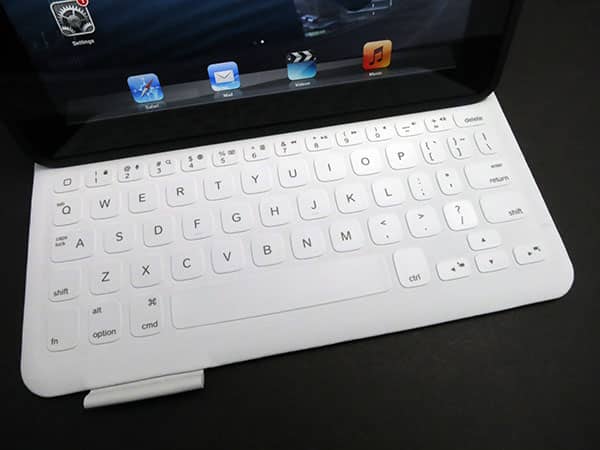
As important as the rest of the case may be, keyboard cases are defined by the quality of their keyboards. It’s here that FabricSkin really sticks out from everything else we’ve seen. Early iPad keyboards were rubber, squishy things that didn’t feel good to our fingers, and gave way to much better plastic, scissor-style keys.
Now Logitech has found a sort of middle ground. Inside, the 10” wide by 8” tall cover is lined with material that feels similar to what’s on the outside, although it has a little more drag and an off-white color. Above the keys is roughly 3.75” inches of empty space, giving the bottom edge of the landscape-orientation iPad a place to magnetically attach while automatically triggering the keyboard to turn on; it’s otherwise in a power-saving mode. Logitech claims of three months of battery life under normal usage conditions, and a Micro-USB cable is included for recharging.

There’s no gap between the keys; the surface of the keyboard is fully covered with material, making the design liquid-repellant. Although the tactile experience is better than early rubber keyboards, there’s still a bit of squishiness to these keys; overall, we like the way they feel. The layout is actually identical to that of Keyboard Folio, and this is a good thing: we were touch-typing right away, and made almost no mistakes attributable to the layout of the keyboard. There’s a full row of number keys, and they double in offering iOS functions. Although it may feel a little strange at first, typing is ultimately a very good experience with FabricSkin.


In the end, FabricSkin has a really good keyboard, and a design that’s unique from most others.











