
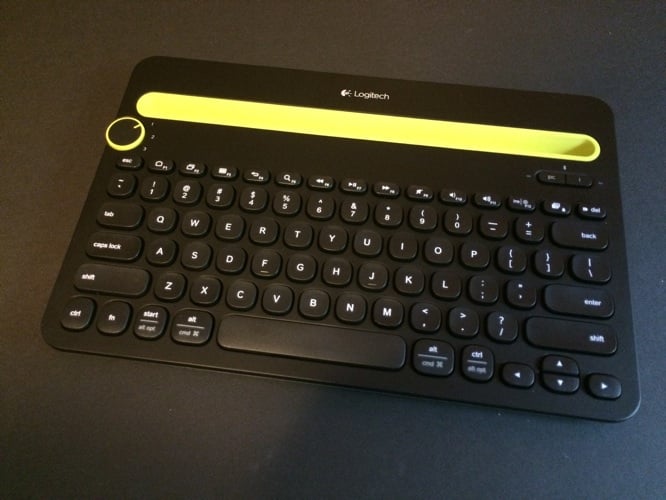
As smartphones and tablets have become increasingly popular alternatives to computers, people have developed needs for stands — and occasionally, more accurate keyboards than the ones built into touchscreens. Logitech’s new Bluetooth Multi-Device Keyboard K480 ($50) is designed to solve this problem, combining a passive tablet and phone stand with a Bluetooth keyboard that can switch between three devices. For half the price of Logitech’s earlier, excellent Bluetooth Easy-Switch Keyboard K811, the K480 grows to include a passive tablet and phone stand while losing several other features. The result is a pretty good typing experience with one major benefit and a couple of other, less exciting characteristics.
If you’re accustomed to opening modern keyboard boxes to find a USB cable and a bunch of instructions inside, you’ll be surprised by K480’s minimalist pack-ins. Rather than including a cable or rechargeable battery, K480 has a small pull-off plastic tab on its bottom that activates two included AAA batteries it uses for power. Logitech promises two years of battery life from those batteries — wonderful if accurate, and much longer than Apple’s Wireless Keyboard. Notably, the keyboard has a bottom-mounted power switch, presumably because it auto-regulates its power consumption; not surprisingly, we had no issues over the course of several days of testing. When the batteries run out, you can slide the bottom compartment off to replace them.

Thanks to an explanatory sticker, pairing K480 to your devices is fairly straightforward.
Unlike the K811, which presumed that you would use three Apple devices together, the K480 is built to accommodate Apple, Android, and Windows devices, a positive or negative depending on your perspective. A dial on the keyboard’s left is turned to position 1, 2, or 3 depending on the device you want to pair, and one of two Bluetooth buttons — “i” for Apple devices, “PC” for everything else — is pressed to initiate pairing. Turn the dial, press the appropriate key, pair each device, then repeat until your computer, tablet, and phone are all connected. Thereafter, switching from one device to the next takes around one second, around the same speed as K811, though K811’s button-based toggling feels a bit more deluxe. Having selected “i” or “PC,” you’ll find that certain function, alt, and start keys change to Mac or PC features, with alternate labels indicating their platform-specific differences. This is a boon for users who aren’t 100% Apple-focused across their computer, phone, and tablet purchases, though it introduces a little extra complexity for people who only use Apple devices.

K480’s all-plastic construction is its biggest sensory detractor. Between the large, concave keys and a hollow-at-edges, heavy-in-center body, the experience of typing on and touching K480 constantly reminds you that you’re not using a fancy keyboard, markedly unlike the K811. While the keys are large and tactile enough to use without major issue, they make a pronounced plasticky clicking sound as you type, and it took a 30-minute initial wear-in session before the space bar and other keys performed as reliably as we’d hoped.
The space bar was initially not 100% responsive, perhaps due to dust inside the package during shipping, but thankfully all of the typing issues disappeared.

The major problems K480 solves are providing keyboard access for multiple devices and keeping two of them upright. A large rubberized nook at the keyboard’s top back has enough space for any iPad and any current iPhone to sit next to each other, even if they’re inside cases — a major plus. All of the screens are right in front of you, hopefully without distracting too much from the computer’s monitor, and we had no issue seeing all three screens in our test environment. That said, the extent to which your tablet visually overlaps your monitor will depend on both the height of your computer’s screen and the orientation of your tablet. It’s possible to rest an iPad mini in landscape mode alongside an iPhone within K480’s nook, but the iPad Air needs to be upright to accommodate another device.

Whether you’re bothered by K480’s design limitations will depend on your day-to-day device charging and keyboard needs. Logitech doesn’t make any attempt to provide integrated or pass-through charging for power-hungry phones or less needy tablets, so if you need to keep your iPhone on a charger while you’re at your desk, you may still want to do so despite K480’s stand functionality. This limitation isn’t a huge surprise given that K480 is a wireless keyboard, but it is being used to hold wire-dependent devices, and doesn’t accommodate them in this regard.











