
Pros: The iPod’s first wired display remote control, featuring a backlit blue LCD screen that allows you to see the song and volume level coming through your headphones, and using a comfortable tube-like shape with simple volume, track, play/pause and hold controls. Available in white and black versions to match new iPods.
Cons: Light clicking sound apparent in audio when remote is connected. Initial remote-to-iPod synchronization process can take 20 seconds or more to complete, interrupting whatever you’re playing in the process, and occasionally not connecting. iPod’s volume controls don’t control Remote’s output level. No iPod menu navigation – shuffle-style forward and backward track movement, only.
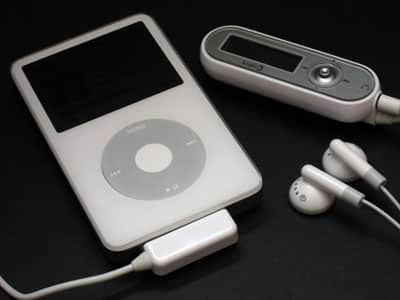
This first-of-kind display remote for Dock Connector iPods allows you to see artist, track, volume, and shuffle/normal playback mode information on a backlit LCD screen. A song title appears in large print on the top line, artist and album information below, and play/pause, volume, and shuffle modes on the third line. Volume, track, and play/pause controls are on the Remote’s face, a hold switch on its top, and a belt clip in the back. The display remains readable when the backlight turns off.
Initial connection to your iPod for synchronization of track details requires a brief pause (“Connecting…”), after which no additional pauses are necessary.
If for no other reason than the fact that true innovation in iPod accessories has become rare, Logic3’s In-Line Remote with LCD Display ($50-60, store dependent) really stands out from the pack. Other music players may have had similar accessories for years, but the In-Line Remote is literally a first-of-kind product for the iPod – a wired display remote that allows you to see the iPod’s artist, track, volume, and shuffle/normal playback mode information on a blue-backlit LCD screen. In other words, you can tuck your iPod into your pocket, plug this into its Dock Connector port, and continue to navigate your music library – shuffle-style, forwards and backwards only – with some visual feedback. Though listed on certain Logic3 web pages as compatible with all Dock Connecting iPods, we found that it worked properly only with 4G, 5G, mini, and nano iPods.
First, the good points: Logic3 has done a pretty good job with the In-Line Remote’s body and screen, creating an accessory that feels pretty good in your hand and generally does what it’s supposed to do. The screen layout is appropriate: a song title appears in large print on the top line, with artist and album information below, and play/pause, volume, and shuffle modes on the third line. And Logic3’s backlight works well, making it easy to read the screen in total darkness; the screen remains readable when the backlight automatically turns off, which unfortunately operates on a 10-second timer you cannot control. Also, two colors of the Remote are available – one white, the other black – while silver and gray are used on the faceplace. Both come with a soft black carrying case that’s large enough to hold your iPod.

Each In-Line Remote is shaped mostly like a small tube, rather than the boxy and somewhat awkward shapes of existing iPod radio remotes, with screen and volume, track, and play/pause controls on the unit’s face, and a small control joystick to the right of the screen.
A hold switch is found on the device’s top if you want to prevent accidental button presses from affecting iPod playback, a feature missing from Logiix’s recent Remote+ (iLounge rating: C-). We strongly prefer Logic3’s tube-like shape, and though it could be further refined, we generally like how this design looks and feels.

Unfortunately, the In-Line Remote also has some touches that won’t thrill all of its potential buyers. First up, and the biggest surprise to us, was sound quality: a light clicking noise can be heard at all times through connected headphones, and though it’s mostly drowned out by whatever music you’re playing, it’s there. This was the single biggest factor in our limited recommendation – the In-Line Remote would have certainly scored higher otherwise.

Additionally, once you’ve connected the Remote to your iPod, the initial connection process forces you to wait more than a few seconds for synchronization – our lowest countdown was 18 seconds for initial connection, with some attempts failing or taking longer. Why? The Remote needs to tell the iPod to switch into a data-sharing mode, which briefly pops up the iPod’s “Do Not Disconnect” and checkmark screens, and displays the word “Connecting…” on the Remote’s screen. Our guess is that Apple has held off on releasing a display remote of its own primarily because of this required pause – it feels like an interruption in the natural flow of turning on the iPod, pressing play, and listening to your music.
Additionally, after the pause, the Remote basically restarts the iPod’s playback, but doesn’t necessarily return you to the song you were originally listening to – it starts playing back all songs. For this reason, the “correct” way to use the remote is to connect it to your iPod, then allow the sync process to complete, then pick your music, at which point the device properly displays all of your track information, and works just as you’d expect it to until the iPod is reset or the remote is disconnected.











