
Once the exclusive domain of serious home improvement and gadget enthusiasts, the iPhone has made many interesting home automation solutions accessible to the average user. Kwikset’s new Kevo ($220) is a smart lock for your front door that effectively turns your iPhone into an electronic key, using Bluetooth LE first to determine when you’re in proximity, then allowing you to unlock your door by touching the lock, rather than fumbling for your keys. Users can also share electronic keys with friends and family using the iPhone app, and a key fob is also included if you want to unlock the door without your smartphone.
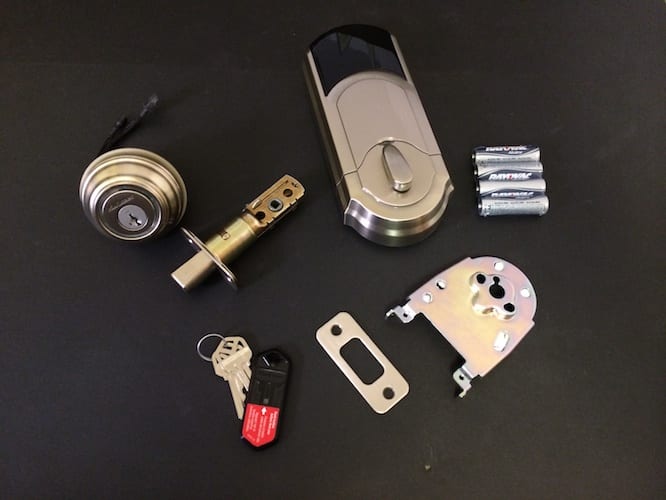
Inside the Kevo package, you’ll find the lock, two traditional physical keys, one Bluetooth key fob, four AA batteries, and standard mounting hardware for the two most common door thicknesses and hole sizes. The included installation instructions are easy to follow, and installation is almost trivial for anybody who has ever installed a simple doorknob or lock before. All you’ll likely need is a Phillips screwdriver, and even people who are completely new to the concept of replacing a lock should have no problem following the instructions. The batteries are good for one year of Kevo wireless use, which is a reasonable length of time for a digital lock of this sort.

Once the lock is physically installed in your door, you just need to insert the four AA batteries—Kevo will start to work right away, as the included fob is already pre-paired with the Kevo and works out of the box. Kwikset does, however, recommend that you calibrate the fob and any smartphones you use in order to enable the “inside-outside” sensors built into the device. This process ensures that your door is only locked and unlocked when the appropriate wireless device is actually outside your door. Under the inside panel on the rear of the Kevo are buttons for calibration, programming, reset, and a small set of DIP switches to set various options.

To use your iPhone or other iOS device—recent iPad and iPod touch models are also supported—you need to download the Kevo app from the App Store and go through a quick pairing process that involves opening the app, pressing a button on the inside of the Kevo and holding your iPhone near the inside of the lock. This sets up your iPhone as the “Owner” key, giving you a non-revocable key with full access to the lock, plus the ability to create and/or revoke additional “eKeys” for your other friends and family members.
To send an eKey, you simply need to select a person from your contacts or enter an e-mail address manually, and the person will be sent a message with instructions for installing the app, creating their own account, and receiving your eKey. After that’s done, they can begin using their own iOS device with your lock.
Two eKey access levels are provided: one “Anytime” key that can only be used to lock and unlock, an an “Admin” key that can be used to issue and manage other eKeys, with the exception of the original “Owner” eKey. While keys can be manually revoked and/or reassigned at any time, there appears to be no way to create an eKey that expires or is restricted to only allowing access during certain hours. Unfortunately, Kwikset also only includes a limited number of eKeys, charging $2 via in-app purchase for each additional eKey. One additional eKey is normally included in addition to the owner key, although the company is currently offering 5 “bonus” keys as a promotion, basically providing seven keys in total. Even though users lucky enough to take advantage of the promotion will probably find seven to be more than sufficient, and eKeys never expire and can be reassigned as often as you like, this charge-per-key policy is an annoying example of nickel-and-diming considering the non-trivial price of the lock itself.

The aforementioned calibration process needs to be performed for each device you intend to use with the Kevo. The process is relatively straightforward; printed instructions are provided for calibrating the fob, while the iOS app will take you through the process right within the app. Essentially, you engage the calibration mode and then stand outside the door and tap the lock three times; the LED ring will glow green for a successful calibration, or red if the process was unsuccessful.
Kwikset notes in the documentation that calibration may take multiple attempts in some cases—in our testing we found the fob calibrated without any difficulty at all, while our iPhone 5s and iPhone 5 each took two or three attempts before we got the green confirmation indicator.

Once you’ve got everything set up, using the lock is a very straightforward process: simply tap the outside edge of the deadbolt, and the lock will confirm that your fob or iOS device is with you via the Bluetooth LE connection, and then either lock or unlock, as appropriate. Otherwise invisible LEDs located around the ring of the cylinder quickly provide visual feedback: they rotate blue as soon as you tap the lock and then flash orange to confirm locking or green to confirm unlocking. Additional colors and patterns are used to indicate situations such as your device being out of range or low battery conditions. Low battery notifications are obvious and should provide more than ample warning to replace batteries. As a backup, Kevo works like a standard lock as well, and includes two physical keys should the “smart” features fail for whatever reason. Unlike its pay-per-use software key solution, Kwikset includes “Smart Re-Key” technology so you can easily re-key the physical lock to work with other existing compatible blanks without requiring the services of a locksmith.

Kevo doesn’t provide any Wi-Fi support, so you won’t be able to do things like remotely lock and unlock your door when away from home. However, this may be a reasonable tradeoff in terms of extending battery life—something we’ve noticed other manufacturers still struggling with as they work to bring their competing products to market. Some users may also appreciate the perceived security benefit of not allowing the lock to be controlled by a remote server somewhere in the cloud. Kwikset has also done a good job of leveraging the Wi-Fi on your iOS device to handle things like notifications and firmware updates; instead of the lock communicating directly to Kwikset’s servers, it communicates through its iOS app, so you can still receive notifications and history logs when other family members lock and unlock the door. The difference is that iPhones sending these details rather than the lock itself.











