
While Apple’s $5 app GarageBand lets iOS devices replicate everything from guitars to sampling keyboards and drum kits — even including automated playback — even the largest-sized iPad screen is a less than ideal surface for actually playing pianos and other musical instruments. Expertly-developed software can approximate pressure sensitivity, but it can’t provide either the raw surface area of piano keys, or the accuracy of actual velocity-sensitive buttons. Thankfully, Korg has delivered an alternative to virtual controls in the form of MicroKEY-25 ($70), a small keyboard that can be connected to any current iPad.
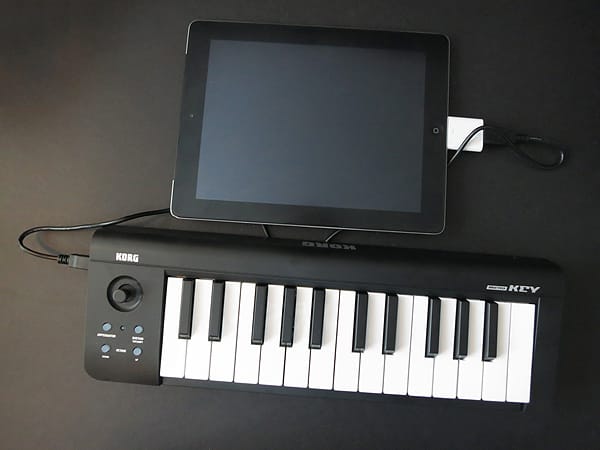
Measuring roughly 15.25” x 5.2” x 1.5” at its largest points, the substantially matte black MicroKEY-25 is Korg’s smallest piano-style keyboard, occupying far less than half the volume of Samson’s Carbon 49—a choice that makes MicroKEY-25 a lot more portable, while compromising on features. MicroKEY-25 is small enough to fit into virtually any backpack or messenger bag, with 25 keys, two octave-switching buttons, two sustain and arpeggiator buttons, and an analog joystick for making realtime tweaks to pitch and modulation. It lacks Carbon 49’s iPad stand, MIDI-out and foot pedal ports, programmability, and roughly half its keys, offering only USB as a connectivity interface.
Korg’s price is also $20 lower, a difference that some users would gladly pay for Carbon 49’s added features, though the two accessories are targeted somewhat differently: MicroKEY-25 is deliberately stripped down so much that it’s all but solely for on-the-go keyboard playing, little more.

Like most of the other musical instrument accessories offering iPad compatibility, MicroKEY-25 has a caveat—it only attaches to your iPad with Apple’s Camera Connection Kit, a $29 accessory that offers photographic syncing functionality as its main selling point. Korg includes a black USB cable that you connect to MicroKEY-25 and the Camera Kit’s USB adapter; no other pieces are packed in the box. Immediately after making the electronic connection, you’ll see a small red light on MicroKEY-25’s face light up, and its four face buttons will be capable of glowing, as well. iPhones and iPods will reject MicroKEY-25 as drawing too much power, a bit of a shame because Apple’s smaller devices would benefit even more from its functionality than iPads.

Korg has tightly engineered MicroKEY-25’s indicators to require little power while clearly communicating what it’s capable of doing. For instance, one Octave button at a time switches between yellow, orange, red, and flashing red to indicate current status—if the “down” button is flashing red, it’s at the lowest possible octave, moving to solid red, then orange, then yellow, then clear as you approach and reach the middle of the scale, then ascending towards flashing red on the “up” button in the other direction.
The arpeggiator button rapidly flashes red to indicate that every key pressed will create a rapid-fire staccato effect, slowing as you tap the sustain button or joystick to change the key repeating rate, with down, trigger, and up arpeggiator settings on the joystick. When the arpeggiator’s not in use, moving the joystick left or right plays with the current note’s pitch, while up and down affect modulation. CoreMIDI support enables the keyboard to be used with most MIDI-based iOS music-making apps, including GarageBand and plenty of others.

And that’s pretty much it for MicroKEY-25 when used with an iPad. Solid and spring-loaded, the keys work exactly as you’d expect, providing the tactile feedback and velocity sensitivity of an actual piano, while enabling you to quickly shift octaves if you need to do so; similarly, the joystick provides real-time access to whammy bar-like twang control over your notes. Like Samson, Korg includes software—here, PC-focused—to let computer users do more with the keyboard, including tweaking settings that the built-in buttons don’t include: transposed keys, velocity curves, and sensitivity range limitations.











