
iLoungeiLounge
  • News
    • Apple
      • AirPods Pro
      • AirPlay
      • Apps
        • Apple Music
      • iCloud
      • iTunes
      • HealthKit
      • HomeKit
      • HomePod
      • iOS 13
      • Apple Pay
      • Apple TV
      • Siri
    • Rumors
    • Humor
    • Technology
      • CES
    • Daily Deals
    • Articles
    • Web Stories
  • iPhone
    • iPhone Accessories
  • iPad
  • iPod
    • iPod Accessories
  • Apple Watch
    • Apple Watch Accessories
  • Mac
    • MacBook Air
    • MacBook Pro
  • Reviews
    • App Reviews
  • How-to
    • Ask iLounge
Font ResizerAa
iLoungeiLounge
Font ResizerAa
Search
  • News
    • Apple
    • Rumors
    • Humor
    • Technology
    • Daily Deals
    • Articles
    • Web Stories
  • iPhone
    • iPhone Accessories
  • iPad
  • iPod
    • iPod Accessories
  • Apple Watch
    • Apple Watch Accessories
  • Mac
    • MacBook Air
    • MacBook Pro
  • Reviews
    • App Reviews
  • How-to
    • Ask iLounge
Follow US

Reviews

Reviews

Review: Koogeek Wi-Fi Enabled Smart Outlet HomeKit Power Strip

Last updated: May 16, 2021 12:13 pm UTC
By Jesse Hollington
Review: Koogeek Wi-Fi Enabled Smart Outlet HomeKit Power Strip

Koogeek is a relative newcomer to the home automation market, first coming to our attention a couple of years ago with its Wi-Fi SmartPlug, which demonstrated the ability of Apple’s HomeKit to act as a “seal of approval” for smaller manufacturers whose products wouldn’t otherwise be worth a second look. Although Koogeek produced competent products as early entries, the pricing and features didn’t really make them stand out from other HomeKit offerings. The company’s latest product, however, piqued our interest as something more unique — a HomeKit-enabled power strip that provides three independently-controlled AC outlets plus three USB charging ports.

Review: Koogeek Wi-Fi Enabled Smart Outlet HomeKit Power Strip

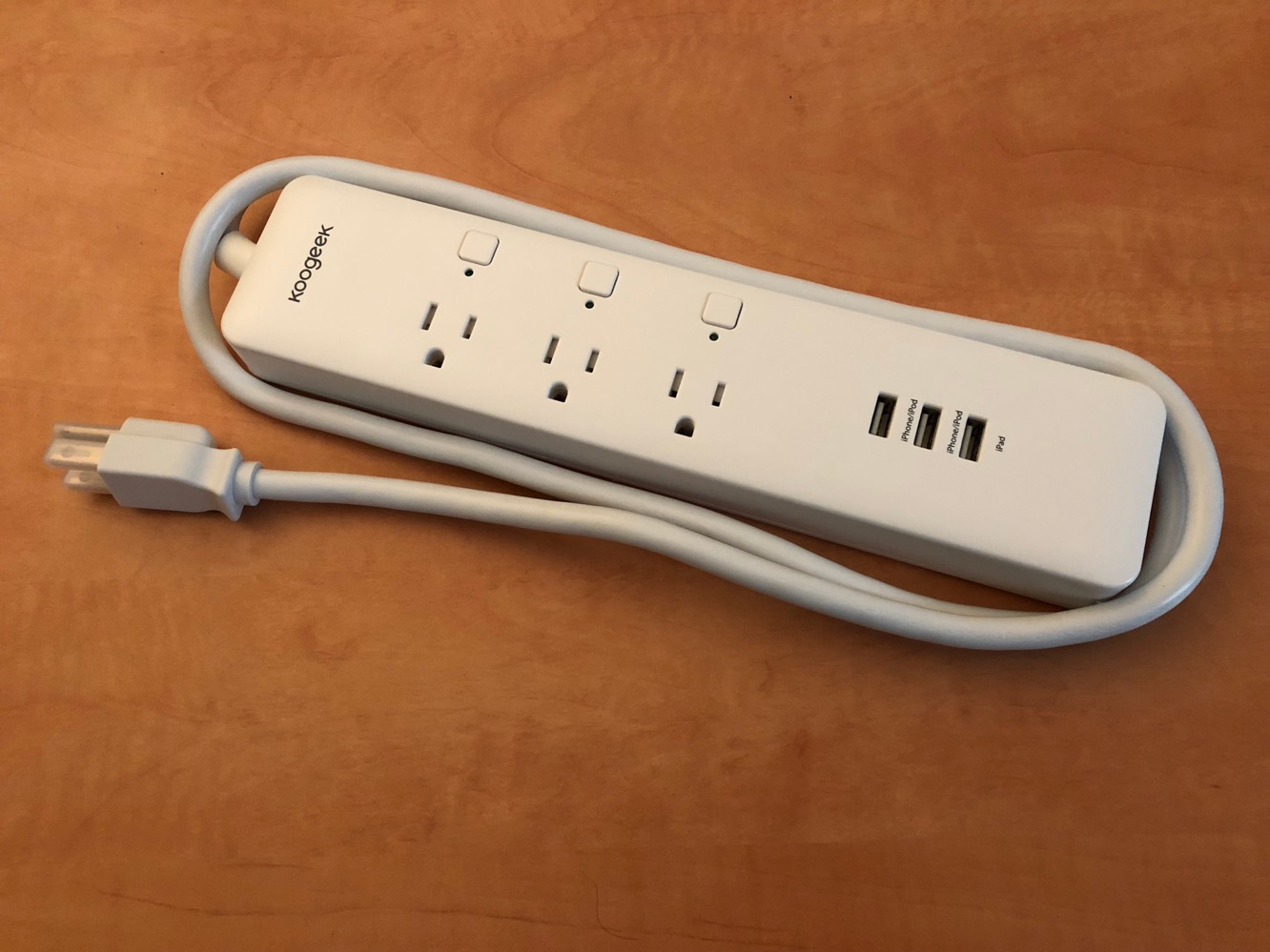
Koogeek oddly names this product the “Wi-Fi Enabled Smart Outlet” which belies the fact that it actually includes three outlets, arranged in a power strip configuration.

The design itself is relatively unremarkable; it includes a five-foot power cord and is slightly larger than a typical “dumb” three-outlet power strip would be, but not excessively so in our opinion, particularly considering that it packs in Wi-Fi HomeKit support and USB charging ports as well.

Review: Koogeek Wi-Fi Enabled Smart Outlet HomeKit Power Strip

Unlike most power strips, each AC outlet here is independently controllable using a corresponding push button above each. Individual LEDs are also includes to allow you to see which plugs are active. On the other hand, the three USB ports are always active, and provide 4.1 amps of charging power across all three of them — 2.1 amps on the single “iPad” port and one amp on each of the other two ports, labelled “iPhone/iPod.” Of course, despite the Apple-centric labels, the ports can be used to charge or power any USB device.


Review: Koogeek Wi-Fi Enabled Smart Outlet HomeKit Power Strip

Setting up the power strip to work with HomeKit works the same as for any other HomeKit device, except that you’ll actually get three outlets appearing in your Home app as part of the deal — one for each outlet on the power strip. As far as HomeKit is concerned, these are mostly independent outlets, and although all three have to be assigned to the same room, you can otherwise interact with them in the same way as you would any other HomeKit smart plugs, creating automation rules, turning them on and off separately, and even assigning them each to different roles — Outlet, Light, or Fan — depending on what you plan to plug into them. This feature is particularly useful for using Siri voice control, as an outlet set to “Light” will be included in commands to “turn off the lights” in a room, for instance.

Review: Koogeek Wi-Fi Enabled Smart Outlet HomeKit Power Strip

Apple’s Home app or just about any third-party HomeKit app can be used to set up and control the Koogeek power strip, but Koogeek also provides its own app that’s necessary for installing firmware updates, and also adds the ability to monitor power consumption, although unfortunately this isn’t available on a per-outlet basis; power consumption is reported as a total of all of the power being drawn across all of the outlets.



Latest News
The Apple Watch Series 11 46mm GPS Is $100 Off
1 Min Read
Clamshell Style iPhone Being Looked Into By Apple
1 Min Read
Foldable iPhones May Have the Largest Battery Ever
1 Min Read
Apple and TSMC’s 10-Year Collaboration May Be Ending
1 Min Read
The 13-inch M5 iPad Pro 256GB Wi-Fi Is $149 Off
1 Min Read
M5 Pro and M5 Max Chips for the MacBook Pro could Roll Out with macOS 26.3
1 Min Read
Mac Ordering Process Revamped
1 Min Read
Check Signed By Steve Wozniak and Steve Jobs Sold For $2.4 Million
1 Min Read
The Anker 140W 4-Port GaN USB-C Charger is $35 Off
1 Min Read
No iPhone Air 2 This Year, according to Latest Report
1 Min Read
New Report Corroborates Split iPhone Release Dates
1 Min Read
Apple Losing More Researchers As They Plan To Release 2 Siri Versions
1 Min Read

iLounge logo

iLounge is an independent resource for all things iPod, iPhone, iPad, and beyond. iPod, iPhone, iPad, iTunes, Apple TV, and the Apple logo are trademarks of Apple Inc.

This website is not affiliated with Apple Inc.
iLounge © 2001 - 2025. All Rights Reserved.
  • Contact Us
  • Submit News
  • About Us
  • Forums
  • Privacy Policy
  • Terms Of Use
Welcome Back!

Sign in to your account

Lost your password?








