
Back in January, Kingston sent over a nearly complete version of what would eventually become MobileLite Wireless ($70) — a handsome gunmetal and black plastic box that was then called “Wi-Drive+” in reference to Kingston’s 2011 accessory Wi-Drive. At that point unpriced and bundled with a micro-USB charging cable, the rechargeable battery-powered wireless accessory served as a Wi-Fi card reader and USB adapter, letting iOS devices wirelessly browse, play, and share content from SD cards and flash drives. Months later, Kingston released a tweaked version under the name MobileLite Wireless, and it’s a legitimately compelling way to add additional part-time media storage to iOS devices — or let them grab photos and videos snapped by standalone digital cameras.
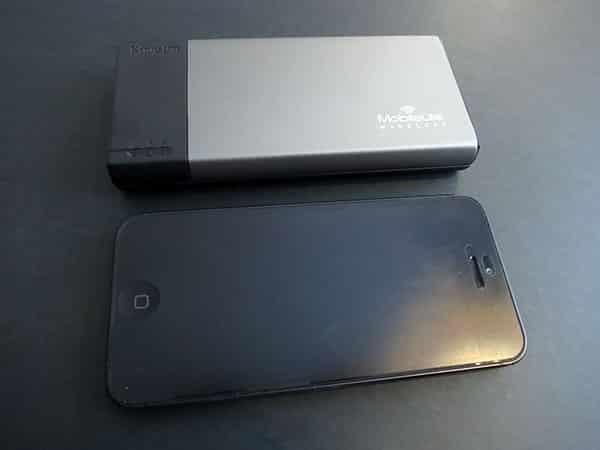
Measuring roughly 4.9” wide by 2.3” deep and 0.55” thick, MobileLite Wireless is as easy to toss in a bag as two iPhone 5s stacked atop one another, with a nearly identical footprint. Three indicator lights are found near the front of its black left edge, right above a power switch—the unit’s only button. Press it in and the first light, a yellow/amber/red battery level indicator, will illuminate, while a third light marked with a globe icon will flash blue to let you know it’s starting up. The second light is a Wi-Fi indicator, becoming solid blue when it’s forming or joining an 802.11g or 802.11n wireless network. Apart from regulatory stickers and four dot-shaped feet, MobileLite Wireless’s bottom has nothing going on.

All of the other functionality is found on its edges. Unlike its beta predecessor, the finished MobileLite Wireless arrives with only three total holes on its left and right sides: the left has one full-sized USB port and one micro-USB port, the first for connecting a USB flash drive and the second for recharging MobileLite’s five-hour rechargeable battery.
(Kingston notes that the full-sized USB port and integrated 1800mAh battery can be used as an “emergency charger” for your device, assuming you self-supply a cable.) A third hole is on the right edge, a spring-loaded SD card slot that can hold one full-sized SD card flush inside; you pop it out with a gentle press of your fingertip when needed. For the final unit, Kingston removed a fourth hole—a dedicated microSD slot—but makes up for it by including a solid-feeling black microSD to SD card adapter, which you can use if needed.

Thanks to the SD card slot and adapter, MobileLite Wireless users can do two things Wi-Drive owners couldn’t do—add as much storage space as they desire, and swap cards at will. This is a big deal because Wi-Drive sold for at least twice MobileLite Wireless’s price despite including only a little extra capacity. As of today, a name brand 16GB SD card can be had for under $9, with 32GB cards going for $21, 64GB cards for under $50, and 128GB cards for under $100. Of course, you can save money by repurposing any old SD card you already have sitting around, and because of the USB port, the same is true for flash drives—just pop any flash drive you have into the USB port, and it’ll become a fully portable wireless device for as long as you need it.

There are a few arguably small hitches, two on the hardware side and one on the software side. Unlike Macally’s WIFISD, MobileLite Wireless isn’t designed to work with traditional hard drives, and wouldn’t display the contents of Mac-formatted drives when we tried to connect them. This isn’t a huge issue for us—and Kingston’s solution has a markedly lower MSRP than Macally’s—but the otherwise similar WIFISD is more broadly compatible in a way that might come in handy for computer users.
WIFISD also has a bigger 2600 mAh battery with up to nine hours of run time, plus less critical power user features such as support for up to five simultaneous users versus Kingston’s three.

The other issue is in Kingston’s software. To access the content of your SD card or flash drive over Wi-Fi, you need to download the free application Kingston MobileLite, which like virtually all of the wireless sharing apps we’ve tested isn’t much to look at: you get a list or grid of files with a preview pane, shown together on the iPad or on separate screens for iPhones and iPod touches. Unfortunately, although Kingston includes separate tabs for “Files,” “Photos,” “Videos,” and “Music,” the latter three tabs are slow to populate with content; the app begins to add files to those specific categories once you’ve opened folders and discovered them using the Files tab. Practically, this means that you won’t see a complete list of the photos on a drive unless you’ve used the Files tab to browse through all of the drive’s folders, after which the app will take notice of them and segregate them into the proper categories. This isn’t ideal.

If you can look past those limitations, MobileLite Wireless does add some seriously welcome capabilities, particularly for photographers. Users of Eye-Fi Cards and Apple’s Lightning to SD Card Camera Reader will find that MobileLite Wireless provides both a more robust photo previewing feature and more granular downloading options: the app’s tab lag is particularly offset by its automated grabbing of gigantic preview images that can be zoomed in on and saved individually to the device’s Photos library. Photographers who don’t want to rely upon tiny iPad thumbnails before saving files—or who can’t transfer photos using Apple’s accessory to their iPhones/iPod touches—will find these features to be particularly useful. On the other hand, MobileLite Wireless doesn’t make batch downloading easy; it’s better for hunting and picking individual images from a large collection.

Additionally, video and audio files on the SD card or flash drive can be played back within the app, as well as copied to your iOS device for viewing within the app.











