
Pros: A do-it-all Universal Dock for the iPod that can charge, sync, and integrate your iPod with a home AV system, including a solid RF remote control that packs 13 face buttons and a rear on-off switch for power management. The most aggressively priced RF dock package we’ve seen to date. Available in white or black.
Cons: Video support is ideosyncratic, with no video cable in the box, and no video output from the dock’s minijack variable line-out port; you’ll need to supply your own S-Video cable or buy a composite cable, connecting the latter to the iPod’s top rather than the dock’s back. Color options aside, aesthetic design is plain and noticeably larger than Apple’s docks.
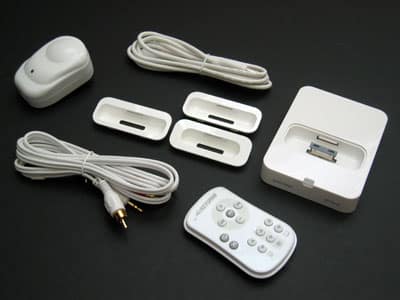
Available in black and white versions, this new combination of an iPod Universal Dock and RF remote control features USB data synchronization, S-Video output, and line-out audio. Three Dock Adapters (mini #3, and iPod 4G #4 and #6) are included, as well as a power adapter, USB cable, and audio cable. In addition to boasting a 60+ foot or wall-piercing broadcasting range, the remote features more buttons than most of the RF controllers we’ve seen, adding the better options from TEN Technology’s old NaviPro EX (songs, albums, playlists, shuffle, repeat) to the standard volume, track, and play/pause controls. A switch on the remote’s back can be flipped off to conserve power, and the Dock can be RF paired to one specific remote.
Since Apple debuted its separate Universal Dock and Apple Remote (iLounge ratings: B+/B) last year, and subsequently decided to package them together with a wall charger, AV cable and USB cable for $99 last year, many companies have released new iPod docks with remote controls.
The majority of them have been like Apple’s, using well-established but decidedly limited Infrared technology as a bridge between their remotes and docks, and many have tried to follow Apple’s lead by offering super simple remote controls. For third-party developers, however, following Apple’s lead isn’t always a good idea: unless the price is dramatically lower, what’s the value in offering the same thing as Apple, months later and in a different package?
Thankfully, Keyspan’s AV Dock for iPod ($80) isn’t just a me-too duplicate of what Apple released last October – it actually diverges from Apple’s existing offerings in four important ways. First, its package – consisting of an iPod Universal Dock, three Dock Adapters (mini #3, and iPod 4G #4 and #6), a remote control, wall power adapter, USB cable, and audio cable – sells for $20 less than Apple’s similar bundle. With these pack-ins, you can charge, synchronize, and/or listen to your iPod’s music through a stereo without making any additional purchases. Second, Keyspan sells the AV Dock in black or white versions, to match your iPod and/or home AV system. Third, the company uses superior radio frequency (RF) broadcasting technology to wirelessly link its dock and remote control, so you can control your iPod at greater distances than with Apple’s Docks, and through walls. Fourth, its remote control is more fully-functioned than Apple’s, with dedicated buttons for all the standards – volume, track backward, forward, and play/pause – plus additional buttons for toggling between repeat, shuffle, playlists, albums, and audiobook chapters.
For this reason, the AV Dock’s remote is roughly the equal of TEN Technology’s old naviPro EX remote control in functionality, only with a much smaller body and superior technology inside. It even has an on/off switch on the back to conserve battery power, something that we haven’t seen on any other iPod remote control to date.

Color options aside, Keyspan’s dock isn’t the sexiest we’ve seen, and it has some technical ideosyncracies: though the Universal Dock in its center is the same as the one in Apple’s current Dock, and still works with the Dock Adapters found in iPod 5G and nano boxes, its large glossy plastic base is about twice the size of Apple’s, and physically more interesting only to the limited extent that there’s a small green light on its front to let you know that button presses are being received. Its back is very simple: there’s a minijack-style variable audio-out port that looks like Apple’s, an S-Video output port like Apple’s, and a mini-USB port. This is actually generally good news: Keyspan’s decision to include a USB port and USB cable in this package sets AV Dock apart from Kensington’s $100 Entertainment Dock 500 (iLounge rating: B+), which also includes a RF remote control, but can only be used with AV systems, and won’t synchronize with your computer. On the flip side, Keyspan doesn’t include any video cable with the dock, so if you want to use the dock to output iPod video or photo content to a TV, you’ll need to buy a cable of your own. (Radio Shack sells S-Video cables for around $5, and separate iPod composite video-ready AV cables sell for $15 and up, in either case less than you’d spend at most stores for a comparably or less-equipped Apple or Kensington dock.) The video cable omission appears to be for an odd reason: unlike’s Apple’s Universal Dock, the AV Dock’s variable audio output port doesn’t carry a video signal, so if you don’t use the S-Video output port, you’ll have to connect an AV cable to the iPod’s headphone port. Other than aesthetics, Keyspan’s unusual handling of video is probably the single biggest knock on AV Dock’s design.

These omissions are greatly overshadowed by the company’s remote control, which completely blows away the Apple Remote under both challenging and typical test conditions.











