
iLoungeiLounge
  • News
    • Apple
      • AirPods Pro
      • AirPlay
      • Apps
        • Apple Music
      • iCloud
      • iTunes
      • HealthKit
      • HomeKit
      • HomePod
      • iOS 13
      • Apple Pay
      • Apple TV
      • Siri
    • Rumors
    • Humor
    • Technology
      • CES
    • Daily Deals
    • Articles
    • Web Stories
  • iPhone
    • iPhone Accessories
  • iPad
  • iPod
    • iPod Accessories
  • Apple Watch
    • Apple Watch Accessories
  • Mac
    • MacBook Air
    • MacBook Pro
  • Reviews
    • App Reviews
  • How-to
    • Ask iLounge
Font ResizerAa
iLoungeiLounge
Font ResizerAa
Search
  • News
    • Apple
    • Rumors
    • Humor
    • Technology
    • Daily Deals
    • Articles
    • Web Stories
  • iPhone
    • iPhone Accessories
  • iPad
  • iPod
    • iPod Accessories
  • Apple Watch
    • Apple Watch Accessories
  • Mac
    • MacBook Air
    • MacBook Pro
  • Reviews
    • App Reviews
  • How-to
    • Ask iLounge
Follow US

Reviews

Reviews

Review: Kensington SecureBack Security Case with 2-Way Stand for iPad 2

Last updated: May 17, 2021 1:14 pm UTC
By Nick Guy
Review: Kensington SecureBack Security Case with 2-Way Stand for iPad 2

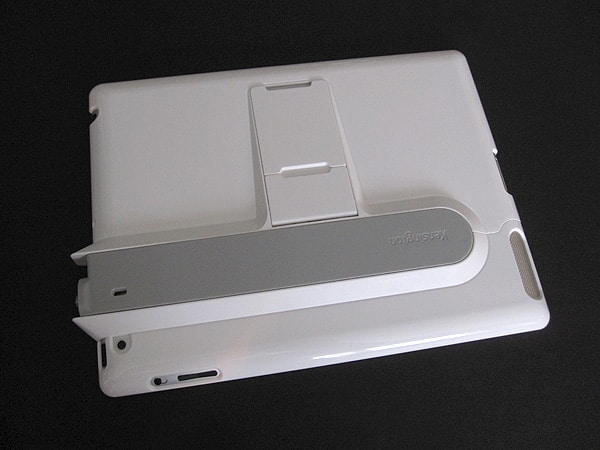
iPads are increasingly prevalent in high traffic areas where they’re at risk of being stolen — as menus, cash registers, and for dozens of other uses. Kensington’s latest iPad 2 case is called SecureBack Security Case with 2-Way Stand ($60), and in a truly distinctive design addresses the risk of theft with only modest compromises to iPad 2 use. While it can function as a standalone case, it’s set apart by a locking mechanism that optimizes it for being tethered to one location without fear of theft.


Review: Kensington SecureBack Security Case with 2-Way Stand for iPad 2

At first glance, SecureBack resembles many other iPad plastic shells, but upon further inspection there are significant differences. The case is actually composed of two pieces, divided by a removable grey beam that holds them together; this is how you insert and remove the tablet. While the hard white plastic doesn’t feel like it would offer fantastic anti-shock protection in the event of a drop, the level of coverage is pretty good, and the material is enough to prevent scratches. We were happy with the case’s impressively well-tailored holes for the buttons and ports along the edge of the iPad 2.


Those around the microphone, Sleep/Wake button, rear camera, side switch and volume rocker, and speaker are tight, while the Dock Connector and headphone ports both have enough room for oversized plugs. SecureBack’s plastic extends over the bezel just a bit to create a nice protective lip for the screen.


Review: Kensington SecureBack Security Case with 2-Way Stand for iPad 2

Review: Kensington SecureBack Security Case with 2-Way Stand for iPad 2

On the top of the grey beam is a metal nub, made to connect to one of the company’s ClickSafe locks—available separately or in a $90 package deal with the case. Since the case is built to accommodate it, the lock simply clicks into place. If you already have a traditional-style laptop lock, or simply prefer one, SecureBack also has a standard Kensington Security Slot on the back. Once attached, both types of locks work the same way: they attach the sliding bar to the plastic case, preventing it from being removed. Either method is very secure.


Review: Kensington SecureBack Security Case with 2-Way Stand for iPad 2

Review: Kensington SecureBack Security Case with 2-Way Stand for iPad 2

The stands suggested by the case’s name are located on the back, one on top of the other.

They both fold down against the back, rising at a slight angle above the bulge created by the security bar. The shorter of the two is just an over an inch long and brings the tablet to a typing angle. There is some give, but it can withstand a fair amount of force during use. For landscape viewing, the longer stand folds out and is reinforced by a thin metal rail between the stand and the case. Both make good use of the raised area that the security system added to the iPad 2’s otherwise slender back. A version of SecureBack without the stands is available for $50—or $80 with the lock— for those who don’t need them.


Review: Kensington SecureBack Security Case with 2-Way Stand for iPad 2

Review: Kensington SecureBack Security Case with 2-Way Stand for iPad 2

SecureBack certainly isn’t a case for everyone, but those who are in the market targeted by Kensington will truly appreciate it.



Latest News
The Apple Watch Series 11 46mm GPS Is $100 Off
1 Min Read
Clamshell Style iPhone Being Looked Into By Apple
1 Min Read
Foldable iPhones May Have the Largest Battery Ever
1 Min Read
Apple and TSMC’s 10-Year Collaboration May Be Ending
1 Min Read
The 13-inch M5 iPad Pro 256GB Wi-Fi Is $149 Off
1 Min Read
M5 Pro and M5 Max Chips for the MacBook Pro could Roll Out with macOS 26.3
1 Min Read
Mac Ordering Process Revamped
1 Min Read
Check Signed By Steve Wozniak and Steve Jobs Sold For $2.4 Million
1 Min Read
The Anker 140W 4-Port GaN USB-C Charger is $35 Off
1 Min Read
No iPhone Air 2 This Year, according to Latest Report
1 Min Read
New Report Corroborates Split iPhone Release Dates
1 Min Read
Apple Losing More Researchers As They Plan To Release 2 Siri Versions
1 Min Read

iLounge logo

iLounge is an independent resource for all things iPod, iPhone, iPad, and beyond. iPod, iPhone, iPad, iTunes, Apple TV, and the Apple logo are trademarks of Apple Inc.

This website is not affiliated with Apple Inc.
iLounge © 2001 - 2025. All Rights Reserved.
  • Contact Us
  • Submit News
  • About Us
  • Forums
  • Privacy Policy
  • Terms Of Use
Welcome Back!

Sign in to your account

Lost your password?








