
iLoungeiLounge
  • News
    • Apple
      • AirPods Pro
      • AirPlay
      • Apps
        • Apple Music
      • iCloud
      • iTunes
      • HealthKit
      • HomeKit
      • HomePod
      • iOS 13
      • Apple Pay
      • Apple TV
      • Siri
    • Rumors
    • Humor
    • Technology
      • CES
    • Daily Deals
    • Articles
    • Web Stories
  • iPhone
    • iPhone Accessories
  • iPad
  • iPod
    • iPod Accessories
  • Apple Watch
    • Apple Watch Accessories
  • Mac
    • MacBook Air
    • MacBook Pro
  • Reviews
    • App Reviews
  • How-to
    • Ask iLounge
Font ResizerAa
iLoungeiLounge
Font ResizerAa
Search
  • News
    • Apple
    • Rumors
    • Humor
    • Technology
    • Daily Deals
    • Articles
    • Web Stories
  • iPhone
    • iPhone Accessories
  • iPad
  • iPod
    • iPod Accessories
  • Apple Watch
    • Apple Watch Accessories
  • Mac
    • MacBook Air
    • MacBook Pro
  • Reviews
    • App Reviews
  • How-to
    • Ask iLounge
Follow US

Reviews

Reviews

Review: Kensington Pico FM Transmitter for iPod

Last updated: May 15, 2021 9:07 pm UTC
By Jeremy Horwitz
Review: Kensington Pico FM Transmitter for iPod

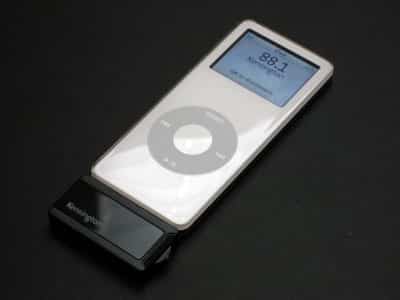
As FM transmitters have made fairly significant strides over the past six months, old models now appear comparatively flat and staticy, while newer models – especially ones released very recently – boast superior dynamic range (higher apparent treble response, lower apparent bass response) and cleaner audio. Available in iPod nano-sized white and black versions that happen to be compatible with other Click Wheel-equipped iPods, Kensington’s Pico FM Transmitter for iPod ($55) only stands out from other recent competitors in one way: at 1.57″ x .98″ x 1.9″, it’s small, roughly half the height of XtremeMac’s AirPlay2 and Belkin’s TuneFM for iPod nano, and a little thinner. Like TuneFM and Griffin’s iTrip for iPod nano, it uses your iPod’s screen for FM tuning, featuring a simple, intuitive three-position switch on its right side that tunes up or down, and selects with a press to the center.

Review: Kensington Pico FM Transmitter for iPod

The reason that we’re not giving Pico a longer review is this: it looks nice and works well, but other than its size, it’s not a standout in any of the categories we consider especially important for FM transmitters. On-screen tuning has been done before, and with several additional features not found in Pico, in each of the aforementioned transmitters.

Pico’s interface merely allows station tuning and selection from one of two preset stations, nothing more. Glaringly, there isn’t a Griffin-esque U.S./International toggle to let you move past Pico’s limited 88.1FM to 107.9FM tuning spectrum to the frequently empty 87.9FM station. And at $55, it’s more expensive than most of its competitors, most notably Belkin’s TuneFMs, which both come with car chargers and not incidentally allow your iPod to be recharged while they’re in use. When Pico connects to your iPod’s bottom, it blocks off the iPod’s only recharging port and provides no pass-through capability – something that Belkin, Griffin, and XtremeMac have included.


Kensington instead touts the transmitter’s low power consumption and hopes that you won’t feel the need to connect a charger to the iPod while Pico’s in use.


Review: Kensington Pico FM Transmitter for iPod

However, it’s important to note that connected charger cables tend to boost the FM transmitting power of Pico’s competitors, a boost that Kensington doesn’t benefit from. And as we noted when we reviewed the company’s earlier Digital FM Radio & Transmitter for iPod (iLounge rating: B+) back in February, Kensington’s radio technology could benefit from such a boost, a point felt even more sharply today given the strength of Belkin’s TuneFM offerings. In comparative testing against four other transmitters, we used our standard stations 88.3 – a fallback when a transmitter can’t use the empty 87.9 – and 103.3FM, giving Pico a shot on both easy and challenging stations. Indoors, Pico did pretty well for a portable transmitter on both stations – 10-15% static levels on both at 8-foot distances, climbing up to unacceptable levels at 12 feet, and then extinction at 17.



Latest News
The Apple Watch Series 11 42mm GPS is $100 Off
1 Min Read
Apple Launching A New Education Hub In India Teaching Robotics and Swift Programming
1 Min Read
Women’s and Men’s Golf Added to Apple Sports
1 Min Read
Apple Adding Civilization VII and Other Games To Apple Arcade
1 Min Read
AirPods 4 ANC Is $59 Off
1 Min Read
Apple Using 2NM Process For Their M6 and A20 Chip
1 Min Read
iPhone 18 Models Will Not Have a Big Redesign
1 Min Read
Launch of MacBook Pro M5 Pro and M5 Max Models is Approaching
1 Min Read
Get the iPad Mini 7 256GB Wi-Fi at $99 Off
1 Min Read
Mozilla Now Allows Turning AI Features Off
1 Min Read
Barcelona Passeig de Gràcia Apple Store Temporarily Closing
1 Min Read
Apple’s Plans to Enter the Smart Glasses Market is Changing the Industry
1 Min Read

iLounge logo

iLounge is an independent resource for all things iPod, iPhone, iPad, and beyond. iPod, iPhone, iPad, iTunes, Apple TV, and the Apple logo are trademarks of Apple Inc.

This website is not affiliated with Apple Inc.
iLounge © 2001 - 2025. All Rights Reserved.
  • Contact Us
  • Submit News
  • About Us
  • Forums
  • Privacy Policy
  • Terms Of Use
Welcome Back!

Sign in to your account

Lost your password?








