
iLoungeiLounge
  • News
    • Apple
      • AirPods Pro
      • AirPlay
      • Apps
        • Apple Music
      • iCloud
      • iTunes
      • HealthKit
      • HomeKit
      • HomePod
      • iOS 13
      • Apple Pay
      • Apple TV
      • Siri
    • Rumors
    • Humor
    • Technology
      • CES
    • Daily Deals
    • Articles
    • Web Stories
  • iPhone
    • iPhone Accessories
  • iPad
  • iPod
    • iPod Accessories
  • Apple Watch
    • Apple Watch Accessories
  • Mac
    • MacBook Air
    • MacBook Pro
  • Reviews
    • App Reviews
  • How-to
    • Ask iLounge
Font ResizerAa
iLoungeiLounge
Font ResizerAa
Search
  • News
    • Apple
    • Rumors
    • Humor
    • Technology
    • Daily Deals
    • Articles
    • Web Stories
  • iPhone
    • iPhone Accessories
  • iPad
  • iPod
    • iPod Accessories
  • Apple Watch
    • Apple Watch Accessories
  • Mac
    • MacBook Air
    • MacBook Pro
  • Reviews
    • App Reviews
  • How-to
    • Ask iLounge
Follow US

Reviews

Reviews

Review: Kensington Nightstand Charging Dock for iPhone

Last updated: May 15, 2021 10:36 am UTC
By Jeremy Horwitz
Review: Kensington Nightstand Charging Dock for iPhone

In the nearly eight years that we’ve been covering accessories at iLounge, we’ve seen a number of doozies, even in just the iPod and iPhone charging category. Cables that doubled as necklaces, batteries that damaged iPods, and connectors whose only differentiation from Apple’s was length or small cosmetic tweaks. As a general rule, these accessories have been inexpensive, and Apple has regulated chargers less aggressively than other types of Made for iPod and Works With iPhone products.

Review: Kensington Nightstand Charging Dock for iPhone

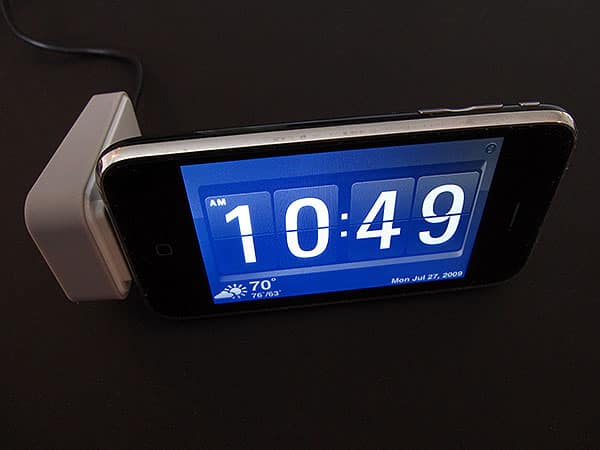
This week, Kensington released an accessory of first impression—a charger that is specifically designed and marketed as a way to transform an iPhone or iPod touch into a full-screen desktop clock: the Nightstand Charging Dock for iPhone ($40). In order to achieve this feat, Kensington developed both an accessory and a piece of clock software called Rise & Shine that can be downloaded from the App Store. Users are supposed to buy the accessory, then go to the App Store and get the clock for free.


It’s worth noting that Kensington had several choices: sell the accessory for $35 and the software for $5, more improbably give the accessory away with every software purchase, or give the software away to accessory purchasers—plus anyone else who happens to discover Rise & Shine in the app store. Because of Apple’s policies on App Store software, Kensington went with the latter model, a choice that effectively means that you can get Rise & Shine without a purchase. We’ve reviewed it here (iLounge Rating: B), leaving the Nightstand Charging Dock to stand alone, as it does in the box when you purchase it.


Review: Kensington Nightstand Charging Dock for iPhone

As an iPod or iPhone charging solution, the Nightstand Charging Dock is extremely straightforward. At one end of a black cable is a white and gray plastic dock with a rubberized bottom and sides; the other has a USB plug that can connect to your computer or an included black wall charger. Kensington has designed the dock with a slightly extended Dock Connector, enabling iPhones and iPods to connect to the charger without being removed from certain cases.

Additionally, due to its rubberized sides, the Charging Dock can be laid on its side or kept upright, depending on the orientation you want your iPod or iPhone screen to be on. Rise & Shine rotates its clock display to match either position.


Review: Kensington Nightstand Charging Dock for iPhone

The good news is that the Nightstand Charging Dock does exactly what it’s supposed to do, with or without use of Rise & Shine. Plug in an iPhone, iPod touch, or even virtually any other iPod—save the 2001-2003 models and iPod shuffles—and they’ll charge, without a nag screen or other complaint about incompatibility. Similar words can be said about Apple’s $29 charging cables and dozens of others that sell for a little bit less; thus, to be clear, we would not recommend this accessory’s purchase for users of non-touchscreen Apple devices. Activate Rise & Shine, and it will stay running whether or not the charger is plugged in, smoothly transitioning back in and out of focus when an iPhone’s telephone calls arrive, and continuing to run while providing familiar pop-ups for push notifications.



Latest News
The AirPods Pro 3 is $20 Off
1 Min Read
Exynos 2600 Chip 2nm Process Revealed by Samsung
1 Min Read
New Celebrity Ad Campaign Featuring Travis Scott Released by Beats
1 Min Read
Australia Getting Hypertension Notification Feature
1 Min Read
The 14-inch MacBook Pro with M5 Chip 16GB RAM/512GB is $250 Off
1 Min Read
Noise and Static on AirPods Pro 3 Still Unfixed
1 Min Read
New iMac with 24-inch OLED Display May be Brighter With 600 Nits
1 Min Read
The 15-inch M4 MacBook Air 256GB Is $250 Off
1 Min Read
Internal Kernel Debug Kit from Apple Reveals Tests for a MacBook with A15 Chip
1 Min Read
Apple Currently In Talks With Suppliers for Chip Assembly & Packaging of iPhones in India
1 Min Read
Apple Allows Easier Battery Replacement For M5 MacBook Pro with 14-inch Display
1 Min Read
The Apple Watch SE 3 44mm GPS is $50 Off
1 Min Read

iLounge logo

iLounge is an independent resource for all things iPod, iPhone, iPad, and beyond. iPod, iPhone, iPad, iTunes, Apple TV, and the Apple logo are trademarks of Apple Inc.

This website is not affiliated with Apple Inc.
iLounge © 2001 - 2025. All Rights Reserved.
  • Contact Us
  • Submit News
  • About Us
  • Forums
  • Privacy Policy
  • Terms Of Use
Welcome Back!

Sign in to your account

Lost your password?








