
iLoungeiLounge
  • News
    • Apple
      • AirPods Pro
      • AirPlay
      • Apps
        • Apple Music
      • iCloud
      • iTunes
      • HealthKit
      • HomeKit
      • HomePod
      • iOS 13
      • Apple Pay
      • Apple TV
      • Siri
    • Rumors
    • Humor
    • Technology
      • CES
    • Daily Deals
    • Articles
    • Web Stories
  • iPhone
    • iPhone Accessories
  • iPad
  • iPod
    • iPod Accessories
  • Apple Watch
    • Apple Watch Accessories
  • Mac
    • MacBook Air
    • MacBook Pro
  • Reviews
    • App Reviews
  • How-to
    • Ask iLounge
Font ResizerAa
iLoungeiLounge
Font ResizerAa
Search
  • News
    • Apple
    • Rumors
    • Humor
    • Technology
    • Daily Deals
    • Articles
    • Web Stories
  • iPhone
    • iPhone Accessories
  • iPad
  • iPod
    • iPod Accessories
  • Apple Watch
    • Apple Watch Accessories
  • Mac
    • MacBook Air
    • MacBook Pro
  • Reviews
    • App Reviews
  • How-to
    • Ask iLounge
Follow US

Reviews

Reviews

Review: Kensington KeyFolio Thin X3 for iPad Air

Last updated: May 16, 2021 7:55 pm UTC
By Nick Guy
Review: Kensington KeyFolio Thin X3 for iPad Air

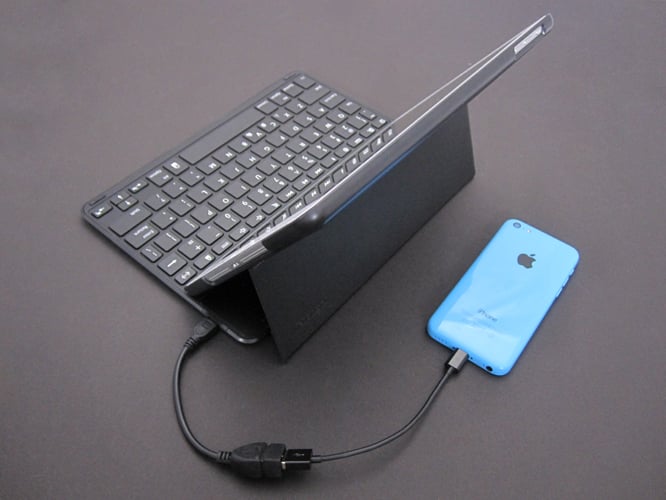
Kensington has released its fair share of keyboard cases in the past, including three last fall. But KeyFolio Thin X3 for iPad Air ($100) is the first from Kensington — or any other company we’ve covered — to feature a backup battery for an iPhone as well. Designed as an otherwise standard folio, with a shell for the tablet and the keyboard inside the front lid, the case is packing a 1650mAh battery that powers the keyboard and can juice up an iPhone at full 1-Amp speeds. To do this, a male Micro-USB to female USB adapter is included. You simply plug the adapter into the charging port, attach your own Lightning cable, and connect your iPhone. Of course, a Micro-USB cable comes with the case for charging the keyboard, which connects to the same port.

Review: Kensington KeyFolio Thin X3 for iPad Air

Set up in the traditional folio-format of most keyboard cases, KeyFolio Thin X3 is plastic, covered almost entirely with a black fabric material. The shell that holds the iPad offers the level of protection we’ve come to expect: border coverage, but openings for the headphone port, microphone, Sleep/Wake button, side switch and volume buttons, speakers and Lightning port. To preserve battery life, the keyboard only turns on when the iPad is nestled into a ridge above it, which holds it at a 55 degree angle with magnets maintaining the position.


Review: Kensington KeyFolio Thin X3 for iPad Air

Review: Kensington KeyFolio Thin X3 for iPad Air

The keyboard itself is virtually identical to those on the last batch of Kensington keyboards we covered, which is a good thing. Narrower than a standard keyboard, and with smaller keys, it’s still large enough that the typing experience isn’t uncomfortable or cramped. In our experience, one critical factor is key layout, and Kensington got that aspect totally right.

All of the keys are where we’d expect them to be, including the apostrophe, which for some reason, seems to be the one that’s moved around the most by competitors. We were able to type fluidly by touch, which can’t be taken for granted with any iPad-sized keyboard. iOS function keys spread across the keyboard are useful in quickly activating features such as Spotlight and app switching.


Review: Kensington KeyFolio Thin X3 for iPad Air

Again, the most noteworthy part of this accessory is its charging capability, which Kensington dubs PowerLift. The adapter included for this purpose is short, measuring 5.75” from end to end, and you must provide your own charging cable. Once it’s hooked up though, it works well. Kensington notes its “PowerLift feature will be disabled when the battery level is less than 20% to preserve power for keyboard use.” We were able to charge an iPhone 5 to 84 percent in one test before the battery switched off, and 79 percent in a second test.



Latest News
The 14-inch MacBook Pro with M5 Chip 16GB RAM/512GB is $250 Off
1 Min Read
Noise and Static on AirPods Pro 3 Still Unfixed
1 Min Read
New iMac with 24-inch OLED Display May be Brighter With 600 Nits
1 Min Read
The 15-inch M4 MacBook Air 256GB Is $250 Off
1 Min Read
Internal Kernel Debug Kit from Apple Reveals Tests for a MacBook with A15 Chip
1 Min Read
Apple Currently In Talks With Suppliers for Chip Assembly & Packaging of iPhones in India
1 Min Read
Apple Allows Easier Battery Replacement For M5 MacBook Pro with 14-inch Display
1 Min Read
The Apple Watch SE 3 44mm GPS is $50 Off
1 Min Read
20th Anniversary iPhone May Launch in Two Years
1 Min Read
Better Image Generation Capabilities and Apple Music Integration Coming to ChatGPT
1 Min Read
A20 Pro Chip Coming to Next Gen iPad Mini OLED
1 Min Read
Amazon has the AirTag 4 Pack Marked $29 off
1 Min Read

iLounge logo

iLounge is an independent resource for all things iPod, iPhone, iPad, and beyond. iPod, iPhone, iPad, iTunes, Apple TV, and the Apple logo are trademarks of Apple Inc.

This website is not affiliated with Apple Inc.
iLounge © 2001 - 2025. All Rights Reserved.
  • Contact Us
  • Submit News
  • About Us
  • Forums
  • Privacy Policy
  • Terms Of Use
Welcome Back!

Sign in to your account

Lost your password?








