
New iPad mini keyboard cases continue to appear at a rate of one or two per month, a welcome development as we’re still awaiting a design with the perfect combination of typing, protection, and pricing. If you’ve ever used one of the existing options, you already know that any iPad mini-sized keyboard’s going to be cramped — if not unusably so — and that the case is likely to have some idiosyncrasies as well. Kensington’s new KeyFolio Thin ($80) has just joined the fray with its own set of tradeoffs, and while it too is short of ideal, it has enough positives to satisfy some users.
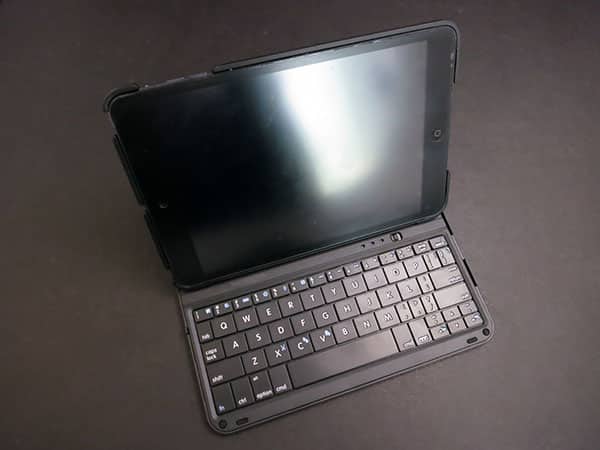
KeyFolio Thin’s single biggest selling point is explicit in its name: despite the fact that it’s roughly the same thickness as a regular iPad mini folio case, KeyFolio Thin includes a complete QWERTY keyboard with hard plastic keys, Bluetooth 3.0 wireless pairing, and a 110-hour active/40-day standby rechargeable battery for power; a micro-USB cable is included for charging. The rear shell is a thin but sturdy frame made from matte hard plastic, substantially covering the iPad mini’s sides, top, bottom, and back. A fabric-lined leatherette strip matches the plastic, attaching the shell to the identically matte-finished keyboard lid. It’s because of this flexible strip that KeyFolio Thin can open in a manner that lets the framed iPad mini tilt forward, lock into place on a recline relative to the keyboard, and sit stably on a flat surface during typing without occupying much space.
Kensington’s design isn’t terribly different from ones we’ve seen from other companies, but it’s nice; only the plastic’s tendencies to develop glossy scuffs and show fingerprints may bother some users.

Long time iPad keyboard case users will note a few surprises here. Oddly, Kensington has completely avoided the use of magnets in KeyFolio Thin, so the case doesn’t lock or unlock the iPad mini screen automatically, nor does the keyboard stay closed against the screen unless it’s actively held in place by a hand. Yet Kensington has designed the keyboard and rear shell to physically interlock in a manner that completely eliminates the keyboard jitter that—in cases with magnets—might accidentally unlock and lock the screen while the case is supposed to be closed. It’s as if the company figured out the right way to solve one long-standing problem with magnetic keyboard cases, but couldn’t get the magnets to work properly when completing the solution. Similarly, KeyFolio Thin includes a physical on-off switch rather than the automatic on-off functionality we’ve seen from top recent competitors; this isn’t a huge issue or surprise, but it’s one more step a user will have to take.

KeyFolio Thin is most unusual in including two physical pegs to hold the iPad mini on its recline above the keyboard. These pegs jut out a little from the edge of the closed case, and thankfully feel stiff enough not to break off, but they’re a bit backwards given that so many cases now use magnets or other tricks for iPad support.
Despite this use of extra plastic, however, KeyFolio Thin doesn’t provide top or side button or switch coverage, leaving reasonably large but respectably tailored holes for the controls, ports, speakers, and microphone. Some keyboard cases do a better job with protection, though they’re rarely as svelte as this one.

As important as the case elements are for some users, keyboard cases really live or die by the quality of their typing surfaces, and here, KeyFolio Thin gets more right than wrong. Like all iPad mini-sized keyboards, it’s small in a way that will initially disorient people familiar with full-sized keyboards, and there are compromises—punctuation keys have become half-width, the oft-used apostrophe key has shifted away from a place next to the Return key down to a slot near arrow keys, and the space bar is wonky. Too few springs make this critical key feel like it’s barely moving when it’s pressed, an issue we haven’t seen for years in other keyboard cases.

But despite these issues, typing on KeyFolio Thin is a better experience than we’d expected. All of the letter keys are large and responsive, and the half-height number keys work just fine when needed. There’s a small learning curve to adjust to the tiny delete key, repositioned apostrophe, and somewhat different function keys—including a bottom-of-keyboard button to call up iOS’s multitasking bar—but apart from the expected half hour of acclimation challenges, we were able to compose typical sentences and paragraphs pretty quickly.











