
Pros: A nicely designed iPod dock and remote control system with audio/video outputs and charging capabilities, including cables for both. Included remote uses RF (radio) technology to achieve 50-foot or through-the-wall control of dock, better than both standalone Infrared remotes and the one sold by Apple, and now includes iPod menu control buttons. Dock is now compatible with Apple’s Universal Dock Adapter inserts.
Cons: No Dock Adapters are included in package. Remote’s additional menu controls are hard to use unless you remember what’s on the screens, don’t mind navigating blindly, or walk over to the iPod. Unlike Apple’s competing AV Connection Kit, Dock 500 can’t be used for data purposes with your computer.
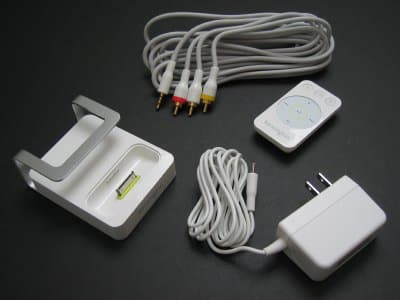
It was a given that Kensington would follow up its impressive Stereo Dock (iLounge rating: A-) with a superior sequel, and there’s no question that Entertainment Dock 500 ($100) is exactly that: in almost every way, it’s better than its lower-priced predecessor. Again, Kensington has packaged an iPod dock, remote control, power adapter and RCA cables into a single bundle. And they’re generally better than before, allowing you to dock, charge, and pull both video and audio from the iPod in a relatively compact, attractive package. So why would Entertainment Dock 500 rate a little lower than Stereo Dock? Two reasons: competition from Apple’s new iPod AV Connection Kit – itself a bundle of iPod dock, remote, cables, and wall charger – and a couple of related omissions.
On the positive side, three of the Stereo Dock’s familiar accessories have received upgrades. Kensington’s Entertainment Dock 500 now duplicates both the video and audio ports from Apple’s Universal Dock, allowing you to get RCA-style composite video and audio-out from a minijack port, S-Video-out from a dedicated video port, and power-in from a dedicated power port. Second, the dock now includes its own Apple-style Universal Dock well, so you can properly mount 5G iPods, nanos, and their predecessors on top of the Dock Connector plug; the well properly fits Apple’s Universal Dock Adapter inserts.
Additionally, Kensington has removed the chrome remote control holder tubing found on Stereo Dock’s sides and top, replacing it with a brushed metal piece that’s a bit more conspicuous. We’re generally neutral on this change, but think that the prior chrome mount better matched the backs of most iPods, and the rest of the Dock 500 is still larger than Apple’s elegant Universal Dock. Kensington also uses a new AV cable in the Dock 500 package: rather than just handling stereo audio, as its predecessor did, the new cable also has video output, just like Apple’s iPod AV Cable, which is included in Apple’s bundle.

Most importantly, Kensington’s new remote control is better. Both Stereo Dock and Apple’s iPod AV Connection Kit rely upon notoriously iffy Infrared technology, which doesn’t work through walls or unless the remote is at least vaguely in a line of sight from the dock. Dock 500’s remote now uses RF (radio frequency) signals, which allow the dock and remote to communicate at a maximum distance of 50 feet from each other. As is typical with RF remotes – except ABT’s iJet/Targus’s RemoteTunes standalone versions – we found the remote to work reliably to the edge of those 50 feet when uninterrupted, but less so (approximately 20 feet) when a wall and/or other objects were in the way. As such, you’ll find the new remote’s reliable radio transmitter useful if you’re trying to change songs, photos, or videos from an off-center angle or a room away, a limitation of Stereo Dock’s remote, and most other IR solutions, for that matter, but don’t expect it to work from a different floor of your home.

Kensington has also advanced its remote beyond the five usable buttons on Apple’s. In addition to preserving Stereo Dock’s red backlit play/pause, track forward/backward, and volume up/down face buttons – a feature we liked in Stereo Dock – the Dock 500 adds four iPod menu navigation features in three total buttons: “up,�? “select,�? and “down.�? For some reason, these buttons aren’t backlit, but they’re easy to find at the top of the remote. They’re a bit less easy to actually use, despite their simple appearance. Any time your iPod’s on a menu, pressing up or down will move you up or down through menu choices just like brushing your finger against the Click Wheel, while select will pick whatever you’ve selected.
Holding down select brings you back one menu. This is a nice addition in that none of these features – at least, at the time of this review – are accessible through the Apple Remote provided with Apple’s AV Connection Kit. Oddly, Apple’s Remote has a menu button – the equivalent of Kensington’s “hold down select,” which presently only works with Macintosh computers, and not with iPods.

But there’s a reason Apple hasn’t done anything with the menu button for iPods: since no iPod can display its own menus on a TV screen, you won’t be able to see the menu choices from a distance greater than roughly arm’s reach from the iPod’s own controls. That’s why we found Kensington’s three buttons tricky to use – sure, you can navigate menus with the remote, but unless you know what they say, it mightn’t do you much good to press the buttons. At best, you can blindly switch between video clips and photos, which is admittedly better than lacking the ability altogether, yet not entirely satisfying. As-yet-unreleased docks with menus (Griffin’s upcoming TuneCenter and DLO’s HomeDock Deluxe) will solve this, and of course, Apple could update iPod firmware to create on-screen menus, but for now, Dock 500 tantalizes a bit more than it delivers. Of course, this criticism applies almost equally to earlier multi-button remotes with buttons such as playlist forward and backward, which allowed you to skip haphazardly through playlists without seeing the iPod’s screen. For some people, this something feature will be better than nothing.

The other odd things about Entertainment Dock 500 are omissions: most notably, there are no Universal Dock Adapters in the package, which means that you’ll need to buy Apple’s packs of adapters ($9 each) if you have an iPod 3G, 4G, or mini – these adapters are included in Apple’s AV Connection Kit. (iPod 5G and nano owners get one of these adapters in their iPod boxes.) Additionally, Kensington has also neglected for the second time to add a standard Dock Connector data port to the dock’s back, precluding the Entertainment Dock 500 from being used with your computer. We didn’t mind this omission in Stereo Dock, and honestly don’t mind it too much here, but it must be mentioned that virtually every other dock now – including Apple’s Universal Dock, which is the core of Apple’s iPod AV Connection Kit – allows you to do this.











