
Pros: A single accessory with FM transmission and radio tuning capabilities, delivering especially strong, unassisted FM transmission quality and distance for a portable, iPod-powered device. FM radio reception is more than competent. Works with all Dock Connecting iPods.
Cons: No pass-through charging capability for in-car use, must connect headphones to its bottom for radio use. At least a little less impressive overall than top FM radio receivers we’ve tested on tuning range (88.1 to 107.9), static level and distance; no on-iPod tuning. Shape is odd. Steep price.
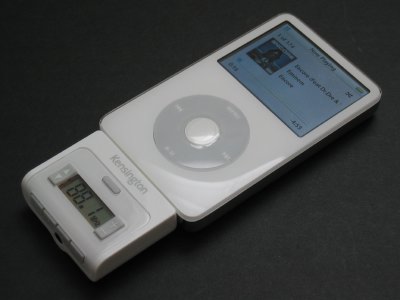
When it was released last Summer, Kensington’s Digital FM Transmitter/Auto Charger (iLounge rating: A-) unexpectedly made a major impression: using technology from a company called Aerielle, the long-named accessory provided the best-sounding in-car FM transmission we’d heard at that time, though it came at a steep price. So we weren’t shocked to learn in September that Kensington was working on a portable FM transmitter based on the same technology, but we were surprised that it would also include an FM radio tuner. As with BTI’s earlier TuneStir (iLounge rating: B-), the idea was to create one device that would let you broadcast iPod audio to any home, car, or office FM radio, or listen to radio programs when not indoors.
Fast forward to today and we finally have the device – Kensington’s Digital FM Radio and Transmitter for iPod ($80), which we’ll call the Duo FM for short.
Since Apple removed the iPod’s top accessory port, the Duo FM was redesigned after initial announcement as a Dock Connector accessory, today featuring a button-controlled, backlit LCD screen on its front, and a second headphone port on its bottom. You manually tune stations with a toggle button on the left of the screen, volume (00-20) for the headphone port on the right, and access four preset stations through separate buttons next to the headphone port. One last button above the screen toggles between the transmitter (“trn”) and radio (“rec”) modes. Like most similar devices, it draws on the iPod’s battery rather than its own for continued power, cutting each iPod’s standard run time in the process.

Coming as it does after the release of Griffin’s iTrip nano (iLounge rating: A-) and other FM transmitters that use the iPod’s screen for tuning, as well as Apple’s iPod Radio Remote (iLounge rating: A-) with on-screen radio receiver tuning, the initial advantages and disadvantages of Kensington’s design are fairly obvious. On a positive note, unlike these devices, Duo FM fully works with all Dock Connecting iPods, and it also combines two features that are typically reserved for separate products. Users of older iPods would need to buy both a transmitter and a radio receiver like Griffin’s iFM (iLounge rating: A/B+), or a not-so-great all-in-one device like BTI’s TuneStir to get similar functionality.

The other major positive is its FM transmission performance. Though our standard warnings on FM transmitters still apply, Kensington and Aerielle continue to tout their devices as offering “simply better sound” than competitors, and though others have come to rival Kensington’s in-car transmitter, Duo FM sounds very good by portable FM transmitter standards. Indoors, it’s capable of occupying open and challenging radio stations with comparatively good- to great-sounding audio from a distance of 30 feet away, cleanest and strongest at a sub-10 foot distance from your antenna.
By comparison, Griffin’s unassisted iTrip with Dock Connector (iLounge rating: B-) had a clean and bass-richer sound with empty stations at distances under 10 feet, but became virtually useless at greater distances, and when used on challenging stations. In other words, Duo FM will have the edge in radio-congested areas; iTrip may be better for some people elsewhere. We saw similar performance in in-car tests, though iTrip’s monaural broadcasting mode sounded cleaner than Duo FM when close to the car’s antenna on a good station (88.3FM), worse on a challenging one (103.3FM). Having said all of this, bear two important additional facts in mind: iTrip’s performance is radically improved by connecting a pass-through cable or car charger to its bottom, and you cannot do this with Duo FM.

Those are Duo FM’s strongest points; in other ways, it’s good but not great by comparison with the best similar products we’ve recently seen. We’ll mostly put aside the fact that it doesn’t have any sort of iPod on-screen tuning, because some people may prefer the convenience of its simple external screen – not the best or worst backlighting we’ve seen, incidentally – and its “works with everything” philosophy. The major consequence of this, however, is that Duo FM sits nugget-like under various iPods, not particularly fitting any of them perfectly. We remain less than convinced that this is the best shape or place for iPod accessories of this sort, but thankfully this one doesn’t feel as fragile as, say, XtremeMac’s AirPlay2.
Then there’s its FM radio reception, which is above-average, not great.











