
On the surface, Kee Utility’s Desk Phone Dock for iPhone 3G/3GS/4 ($150) seems like a neat idea for fans of traditional office phones: an accessory that converts Apple’s latest handsets into a stylish handset and speakerphone, providing charging at the same time. But like some of the other accessories that have attempted variations on the same theme, iOS limitations and developer oversights make the actual experience less than satisfying, and it’s hard to recommend the finished product as anything other than a curiosity.
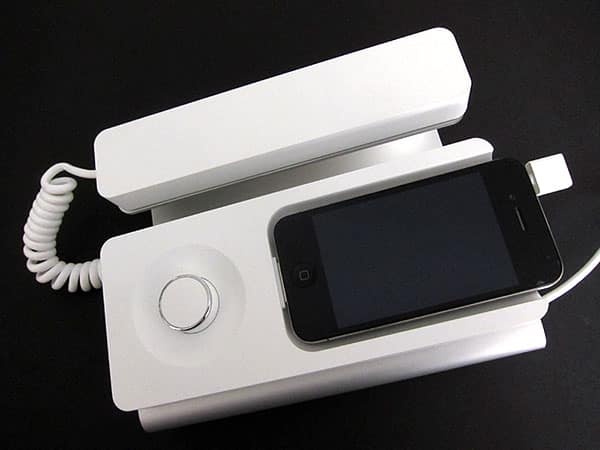
To start with the good news, Kee’s Desk Phone Dock looks as if it could have come out of Apple’s own labs in an alternate universe, blending cool white matte plastic blocks with a chrome-accented volume dial, speakers, a microphone, and an aluminum pedestal. On the left is a cabled phone handset with very modern lines, while the top right side has a dock with enough space for an iPhone 3G, 3GS, or 4, complete with a hidden rear dial that adjusts the height of a rubber supporting pad inside. Kee Utility includes a power cable and a USB cable to separately guarantee that the iPhone can get wall power even if it’s not connected to a computer, and uses a separate headphone port plug for audio connections to the iPhone.

That’s the first indication that this accessory hasn’t engineered around the iOS-imposed microphone challenges that other developers have struggled with for the past three and a half years; some have resolved these issues by making a Bluetooth connection to the iPhone rather than trying to use wires. The latter solution has been the best one, enabling speakerphone accessories to automatically re-pair with iPhones whenever they come in range; car and desk phones have pulled this off effortlessly. Instead, Kee has you plug the iPhone into the dock, then insert the headphone plug, a double process that needs to be repeated every time you come back to the unit. It doesn’t look great, and it’s inconvenient, too.

But it works. Mostly.
Ideally, after making these two connections, you can start to make phone calls either through the handset or the speakerphone. Impressively, the Desk Phone Dock toggles automatically between handset and speakerphone modes with its own integrated speakers and microphones merely by picking the handset up or putting it down. It’s nice that it can handle this, and the sound quality is fair—the speakers are a little louder than the ones in the iPhone 4, and the microphones only a little less clear than Apple’s. There was a modest difference in amplitude between the iPhone and Desk Phone Dock speakers, and an even smaller difference between the mics.

(Handset use aside, you don’t gain or lose much by making the connection, apart from one weird little novelty: there’s a 3.5mm port on the bottom of the docking block. On some versions of the Desk Phone Dock, you can’t use it at the same time as the handset or speakerphone; it just lets you connect headphones. Newer versions of the Dock apparently lets you record while making a call. On ours, it was a headphone port—basically useless.)

On the other hand, if things aren’t working, callers won’t be able to hear you (or vice versa) when you use the handset, and hitting the iPhone’s speakerphone button will be the only way to get bi-directional audio, then only through the iPhone itself.
Why does this happen? It took a while to figure out when we experienced it two or three times, but it turns out that there’s a power indicator light on the unit’s face that glows bright white when the unit is… wait for it… turned off. The light goes off when the power is on; you toggle them by depressing the volume button. Unless you figure out that oddity, the Desk Phone Dock will seem like an oversized $150 charging station. You’ll experience similar problems if you don’t connect both the power and USB cables. And sometimes, even when both are connected, our Mac’s iTunes crashed, or wouldn’t recognize that there was a syncable iPhone there at all. That’s just bad engineering.

In too many ways, the Desk Phone Dock is a kludge. Two connections on the iPhone side. A simple accessory that takes up a lot of space.











