
Although we weren’t totally sold on the concept when Kanex first announced it, the new meDrive ($99, formerly myDrive) has the potential to appeal to some iOS and computer users. The pitch: buy a white box with a USB port on one edge, plug in your choice of USB storage devices, connect it to your router, then share files from the USB device wirelessly across your network with iOS devices and computers alike. Ideally, you’d be able to easily wirelessly access the contents of any USB hard drive or flash stick directly from your iOS device — convenience that some people might be willing to pay for. But in reality, meDrive’s performance isn’t quite so ideal: we experienced so many issues with it during testing that we couldn’t recommend it to most people.
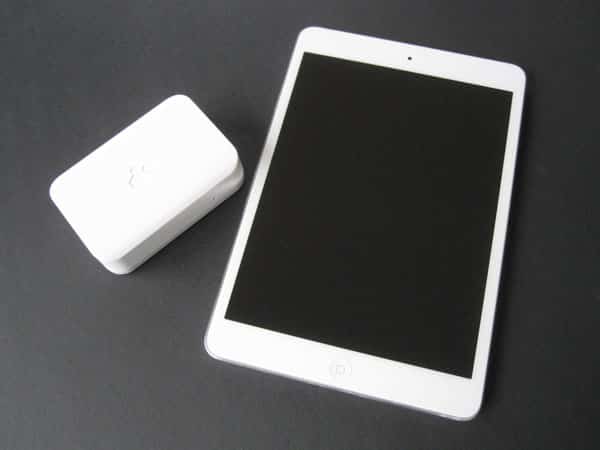
As wide as an iPhone 5 but roughly 1.5” shorter, and as tall as three iPhone 5s stacked atop one another, meDrive is made from matte white plastic, and ships with two matching cables: an Ethernet cable, and a mini-USB to USB cable. Each of these cables connects to a port on meDrive’s back, while a full-sized USB port is found on the unit’s side for connection of your chosen USB storage device. A small white light on meDrive’s front signals power and activity in a visually inoffensive way.
Though this might seem obvious to some users, it’s worth underscoring that all three ports must be used in order for meDrive to do anything—this is not, in and of itself, an even slightly wireless device. Rather than including its own Wi-Fi hardware, meDrive needs to be hard-wired to your router using the bundled Ethernet cable.
Then, the mini-USB port needs to be connected to both the included mini-USB cable and some self-supplied power source in order for meDrive to have enough power to turn on. If your router has a spare powered USB port, you can use that, otherwise you’ll need to locate and attach a USB power adapter. Finally, you connect your USB storage device, cross your fingers, and hope that everything works as expected. Apple’s Bonjour protocol is supposed to make storage device discovery ultra-easy once everything’s assembled.

Unfortunately, in our testing with two separate routers and a bunch of different USB storage devices, meDrive’s connectivity and file access results were so wildly unpredictable that we couldn’t call them “good” under any circumstances. After some tinkering—including steps that weren’t obvious from Kanex’s instructions—we were able to get meDrive to appear on each of our wireless networks, and then manually add it to our iOS devices using the free meDrive iOS app. This app is supposed to let you browse the contents of the connected storage device, view media and files in a wide variety of iOS-supported formats, and transfer content from your iOS device to the wireless drive. While it’s not as polished as it could be, it’s not a bad app for these purposes, and most of the file navigation features are intuitive.

The key problem was that seeing and sharing files with connected USB drives proved to be a complete crapshoot.
For reasons unknown, some of our flash and conventional drives didn’t mount at all with meDrive, despite working flawlessly with our computers. Other drives mounted but didn’t show any files, and couldn’t be properly written to; new filenames appeared, but with zero-byte contents. Still other drives mounted and showed files, but the MeDrive iOS app wouldn’t let us access any folder with a name containing a space. And even when things seemed to be working, we experienced seemingly random drop-offs of storage volumes. Consequently, users expecting a pure “just works” plug-and-play experience should not come knocking at this particular door. Between your router, your USB storage device, and software issues, there are just too many things that can (and did) go wrong here. Worse yet, when something does go wrong, MeDrive doesn’t use status indicators or error messages to help you identify and solve the problem.

Some of meDrive’s issues were attributable to Kanex’s limited instructions and its confusing last-minute name change—problems that might be resolved in subsequent revisions to the product.











