
iLoungeiLounge
  • News
    • Apple
      • AirPods Pro
      • AirPlay
      • Apps
        • Apple Music
      • iCloud
      • iTunes
      • HealthKit
      • HomeKit
      • HomePod
      • iOS 13
      • Apple Pay
      • Apple TV
      • Siri
    • Rumors
    • Humor
    • Technology
      • CES
    • Daily Deals
    • Articles
    • Web Stories
  • iPhone
    • iPhone Accessories
  • iPad
  • iPod
    • iPod Accessories
  • Apple Watch
    • Apple Watch Accessories
  • Mac
    • MacBook Air
    • MacBook Pro
  • Reviews
    • App Reviews
  • How-to
    • Ask iLounge
Font ResizerAa
iLoungeiLounge
Font ResizerAa
Search
  • News
    • Apple
    • Rumors
    • Humor
    • Technology
    • Daily Deals
    • Articles
    • Web Stories
  • iPhone
    • iPhone Accessories
  • iPad
  • iPod
    • iPod Accessories
  • Apple Watch
    • Apple Watch Accessories
  • Mac
    • MacBook Air
    • MacBook Pro
  • Reviews
    • App Reviews
  • How-to
    • Ask iLounge
Follow US

Reviews

Reviews

Review: Just Mobile UpStand for iPad

Last updated: May 15, 2021 8:34 am UTC
By Jeremy Horwitz
Review: Just Mobile UpStand for iPad

Achieving some appealing balance of style and functionality hasn’t been especially difficult for iPad stand designers — we’ve seen nearly a dozen new options since the iPad was released in April, and most look pretty good while offering at least a little user adjustability. Somewhat surprisingly, the established Apple device stand developers at Just Mobile have gone in a different direction with UpStand ($50), a new aluminum option that looks great, but doesn’t live up to the versatility of the company’s earlier products. Whether that’s an issue for you will depend largely on the ways you use your iPad.

Review: Just Mobile UpStand for iPad

Just Mobile’s first iPhone product was Xtand for iPhone, an iMac/Apple Cinema Display-inspired leg with a rotating iPhone mount in the center. The rotating feature let you watch videos in widescreen orientation, or charge and sync your device in landscape, using a rear thumbscrew and a modest height adjustment system to change the iPhone’s viewing angle.

Later, the company debuted the laptop-specific Xtand Pro, which was designed to elevate a MacBook at your choice of two heights above the surface of a desk while tilting it to a fixed angle that was convenient for typing.


Review: Just Mobile UpStand for iPad

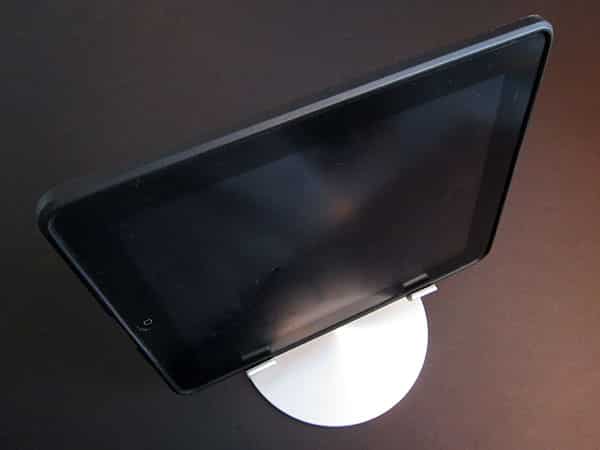
Though other companies have released Xtand for iPhone-alikes at iPad sizes, Just Mobile’s UpStand is instead based upon Xtand Pro, with three design changes. The prior oval base has been replaced by a roughly 5.9” radial-finished aluminum circle from which two thin, matching metal pipes stand 7” tall—replacements for the thicker single elevating tube in Xtand Pro.


Review: Just Mobile UpStand for iPad

Then there’s the iPad bracket, which has shifted from the X-shape used in both Xtands to an upside-down V with similarly rubber-tipped feet. This V-mount can safely support a reclining iPad regardless of whether it’s bare or inside of a case.


Two large screws connect the iPad bracket to the pipes; there’s nothing else in the package to attach to them.


Review: Just Mobile UpStand for iPad

Therein lies UpStand’s surprise: both Xtand and Xtand Pro could be adjusted in some way, but UpStand merely serves to lift the iPad 1.5” off of a flat surface and lean it gently back, nothing else. You can rotate the device on 90-degree angles by picking it up yourself and placing it back inside UpStand’s feet, but there’s no tilt adjustment, off-angle turning capability, or other frills; using the keyboard requires a cramped, upturned hand. It’s nearly as different as can be from Luxa2’s H4 iPad Holder, which has fluctuated in price from $50 to $60, and enables you to adjust the iPad to virtually any practical angle imaginable. Both H4 and UpStand are made from a mix of aluminum and rubber, with H4 losing style points only for its somewhat spidery iPad mount, most of which is invisible once the iPad’s placed inside.


Review: Just Mobile UpStand for iPad

While UpStand looks nice and does what it promises to do, there’s no escaping the fact that it’s an underachiever relative to almost all of the competing stands that have been released for the iPad, regardless of cost.



Latest News
The AirPods Pro 3 is $20 Off
1 Min Read
Exynos 2600 Chip 2nm Process Revealed by Samsung
1 Min Read
New Celebrity Ad Campaign Featuring Travis Scott Released by Beats
1 Min Read
Australia Getting Hypertension Notification Feature
1 Min Read
The 14-inch MacBook Pro with M5 Chip 16GB RAM/512GB is $250 Off
1 Min Read
Noise and Static on AirPods Pro 3 Still Unfixed
1 Min Read
New iMac with 24-inch OLED Display May be Brighter With 600 Nits
1 Min Read
The 15-inch M4 MacBook Air 256GB Is $250 Off
1 Min Read
Internal Kernel Debug Kit from Apple Reveals Tests for a MacBook with A15 Chip
1 Min Read
Apple Currently In Talks With Suppliers for Chip Assembly & Packaging of iPhones in India
1 Min Read
Apple Allows Easier Battery Replacement For M5 MacBook Pro with 14-inch Display
1 Min Read
The Apple Watch SE 3 44mm GPS is $50 Off
1 Min Read

iLounge logo

iLounge is an independent resource for all things iPod, iPhone, iPad, and beyond. iPod, iPhone, iPad, iTunes, Apple TV, and the Apple logo are trademarks of Apple Inc.

This website is not affiliated with Apple Inc.
iLounge © 2001 - 2025. All Rights Reserved.
  • Contact Us
  • Submit News
  • About Us
  • Forums
  • Privacy Policy
  • Terms Of Use
Welcome Back!

Sign in to your account

Lost your password?








