
Only a month and a half ago, JBL released OnBeat Venue, an all-in-one tabletop audio system that will likely be amongst the company’s last speakers to include Apple’s classic Dock Connector. As we noted in our review, “OnBeat Venue is a good value for its sub-$200 asking price, and hopefully will be the basis for an improved future model,” though we certainly didn’t expect to be reviewing the sequel so soon: OnBeat Venue LT ($200, aka OnBeat Venue Lightning) has arrived as the second Lightning connector-equipped audio system, and although it’s extremely similar to its predecessor, there are a handful of changes worth noting in this updated review. On balance, OnBeat Venue LT is good enough to merit the same general recommendation as the original OnBeat Venue, though it has preserved one noteworthy flaw and lost an arguably trivial set of features.
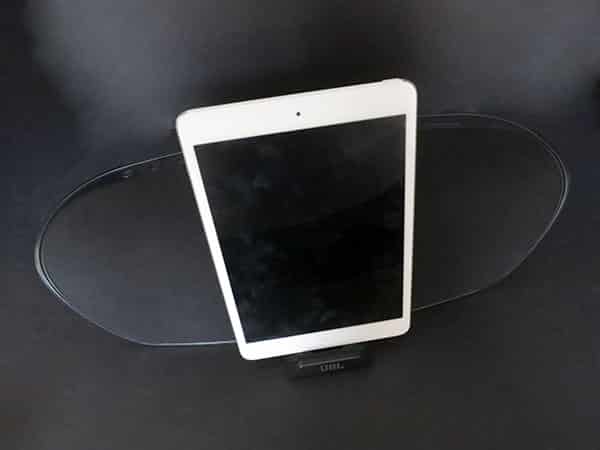
Like OnBeat Venue, OnBeat Venue LT operates in two modes: docking and wireless. First, it can accommodate Lightning connector-equipped iPads, iPhones, and iPods using a front-mounted, spring-loaded dock with a small and similarly spring-loaded Lightning plug. As with JBL’s earlier OnBeat Micro, the Lightning connector here is highly incompatible with most of the new iPad, iPad mini, iPhone 5, iPod touch, and iPod nano cases we’ve been testing, because the plug’s metal bottom is flush with the plastic rather than extended a little upwards. Cases with fully open bottoms may work, however, and it bears mention that OnBeat Venue LT’s open-sided dock enables this to be the first truly iPad- and iPad mini-compatible Lightning speaker, so long as you’re not using a case—or willing to go wireless. To that end, you can lock the dock inside the chassis if you don’t want to use it, converting the speaker into a purely Bluetooth streaming audio system. With a firm push, the dock slips so completely inside the chassis that you’d never know it’s there.

OnBeat Venue LT is a fairly sharp departure from the design themes we’ve seen from the company over the last five to ten years.
Vaguely reminiscent of certain Altec Lansing speakers released a couple of years ago, OnBeat Venue LT has a dark gunmetal body with a black fabric grille on the front, dropping the black and silver body colors of OnBeat Venue while retaining orange rubber padding on the bottom. Once again, our editors’ opinions were generally positive on the new design, but it doesn’t look anything like JBL audio systems we’ve known over the years. Roughly 16.5” wide by 4.5” tall by 5” deep at its maximum points, it bulges and tapers to form a decidedly modern but hard to describe shape – something that wouldn’t look out of place sitting anywhere except a really old home. It runs solely off of an included wall adapter, and has the substantial weight and footprint you’d expect from a non-portable system.

Even more than was the case with OnBeat Venue, OnBeat Venue LT’s controls and ports are a little unusual. The top includes illuminated power and non-illuminated volume buttons on the right, with illuminated “bass” boost and “movie” EQ buttons alongside a non-illuminated input select button on the left. Three lights in the center indicate whether the current input is line in, a docked device, or Bluetooth. On OnBeat Venue, the “bass” and “movie” buttons were intended to accompany rear-mounted component video out ports that let the older speaker serve as a video dock for some prior Dock Connector-based devices; one press of the “movie” button rebalanced the sound to make voices and sound effects stand out when you’re watching videos. But on OnBeat Venue LT, those video ports are gone, leaving only an aux-in port and power port on the back, sitting between two large bass ports in the chassis.
It’s obvious that JBL rushed the updated version to market but didn’t take the time to change the top controls. They don’t hurt the system in any way, but they don’t help, either.

As mentioned in OnBeat Venue’s review, there’s no remote control in OnBeat Venue LT’s box—a surprise for a $200 audio system. With Venue, JBL offered a free app called MusicBeat, which we described as not particularly compelling: basically just an alternate interface for creating playlists and playing back music. MusicBeat is no longer automatically offered when you connect an iOS device to OnBeat Venue LT, no great loss apart from the modest equalization features it offered.

Sonically, OnBeat Venue LT is most noteworthy—not impressive, but noteworthy—because of its high-volume performance for the price. There are a total of four speakers inside: two smaller tweeters and two mid-range drivers, though again, JBL doesn’t specify their sizes or performance characteristics. Nothing appears to have changed in the speakers or amplifiers from OnBeat Venue to LT: the new system was identical in balance and performance to OnBeat Venue when we placed the speakers next to each other with iPad minis, one using a Lightning to 30-Pin Adapter for connectivity. Once again, LT includes a 30-watt amplification package that can be turned up to dangerously loud, medium-sized room-filling levels, the system’s signature benefit; you’ll be amazed at how loud it was even at the 1/5 mark on a connected device’s volume slider. Unfortunately, OnBeat Venue LT continues to exhibit very serious bass clipping and distortion at its top volume levels.











