
Precious few speaker developers have the design chops to rival Apple’s products, but JBL is certainly one of them — Apple’s partner in developing translucent Mac speakers, then an early and influential leader in elegant, modern iPod dock styling. So it’s no surprise that the company’s first iPad-compatible speaker OnBeat ($150, aka On Beat) has the sort of beautiful looks that put earlier, same-priced iPad units to shame, but it’s also saddled with a collection of lingering issues that haven’t been fixed from prior JBL designs, plus a new one: some issues with high-volume bass performance.
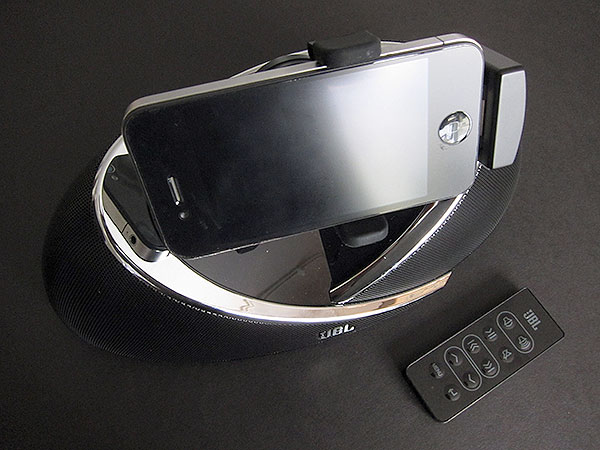
OnBeat continues and actually improves upon a new design theme JBL introduced last year: the “Weave.” Weave moves past the company’s earliest iPod and iPhone speakers, which used soft curves with alien-inspired shapes—saucers, alien pods, and the like—by replacing the alien elements with the look of layered fabrics, molded instead from attractive mixes of metal and plastic. On Stage IV and On Stage Micro III debuted the Weave look last year; OnBeat softens it further with two chrome-tipped arcs that form an almost heart-shaped center, from which a rotating iPod, iPhone, and iPad dock juts out. Most of OnBeat’s body consists of matte black speaker grilles, save for a glossy black bottom and similarly shiny buttons and ports on its right and back sides. It’s one of the nicest-looking speakers JBL has released in years, and for a company that routinely breaks molds with its designs, that’s really saying something.

Like most of JBL’s other speakers, OnBeat is packaged with a wall adapter and an Infrared remote control. The only notable thing about the adapter is its atypically long cord and centrally located electronics, which enable it to be easily plugged into any wall outlet without crowding the plate, and then situated at your preferred distance away. Unlike both On Stage IV and On Stage Micro III, On Beat has no ability to run off of battery power, lacking either a bottom panel for AA/AAA batteries or a rechargeable battery of its own. In this sense, it feels like the heir apparent to JBL’s prior On Stage 200/400 series: a little more squat at 10 3/4” wide and 5 1/4” deep, but still designed to be placed on a desk or nightstand and basically left there, rather than tossed into a bag and carried around.

OnBeat’s new dock is simultaneously the speaker’s major draw for new users, the primary limiter of its portability, and the biggest misfire in an otherwise sharp product.
Gone, arguably blessedly, are the usual array of plastic Universal Dock inserts and tiny little rubber pads that JBL has been augmenting them with for some time, in favor of a very simple floating dock with two included frame pieces. One fits iPod touches and iPhones without complaint. The other fits the original iPad properly, with some give on the sides for the iPad 2.

While OnBeat’s frame expands a little to accommodate some cases, the Dock Connector on the bottom is flush with the plastic surface, which effectively precludes OnBeat from working with lots of cases that other speakers—iPod, iPhone, and iPad alike—would connect through without problems. In other words, iPhone 4 users and iPad owners alike will need to strip their devices bare for insertion into this speaker, the sort of unnecessary aggravation that most people just don’t want to have to deal with.

The bigger oddity in OnBeat’s dock design is its incredibly half-hearted approach to rotation. For whatever reason, JBL enables the dock to be manually rotated from portrait to landscape mode when an iPod or iPhone is inside, but physically locks it into portrait mode using a pin in the iPad frame so that the tablet can’t be placed on its longer edge. Having seen quite a few rotating docks over the years, we were really confused and disappointed by this one, as the manual rotation isn’t particularly impressive by comparison with, say, iHome’s recent and less expensive iA63, and the lack of any sort of angle, rotation, or other adjustment puts OnBeat’s dock a beat or two behind pivoting and spinning options such as Altec Lansing’s Octiv Stage MP450. iPad users seeking nothing more than a fixed portrait position for their tablets mightn’t mind, but nightstand video viewing on the 9.7” screen is decidedly sub-optimal with OnBeat for a variety of reasons.
As much as we’d like to sum up OnBeat’s sonic performance in a quick word or phrase, the reality is more nuanced. The first point that needs to be made, and then emphasized, is that it follows JBL tradition in sounding quite good straight out of the box.
Though there’s no audio adjustability—no bass or treble buttons, for instance—you can just pop an iPod, iPhone, or iPad into it, start listening, and enjoy what you’re hearing. Almost everything we played through OnBeat, ranging from vocal-heavy tracks with little background music to hard-core dance music and rock, sounded respectably clear and powerful by $150 speaker standards; better, frankly, than what we’ve heard from same- or lower-priced iPad-specific audio systems released to date.

At average volume levels, OnBeat has at least a small edge over Altec’s Octiv Stage in several different dimensions of performance: it has no obvious amplifier noise, superior frequency response, and at least modestly better stereo separation. Music sounds clearer, static-free, and more lifelike through OnBeat, which presents songs with a relatively rich, warm slant that’s offset by fine treble detail. OnBeat is physically wider than Octiv Stage, but also sounds bigger, and has the ability to turn up its volume to a much higher maximum level. At its peak, you’d definitely want to be at least a few feet away from its twin front-firing drivers, using the remote control to handle track and volume adjustments; Altec’s system taps out at around 2/3 of JBL’s peak, a level that’s safe for near-distance listening.
On the other hand, OnBeat’s two drivers have a pretty serious issue with really low bass at higher volumes, an issue that may limit the system’s appeal to fans of bass-heavy rap and techno tracks. Since JBL has tasked only two speakers inside with handling as much of the audio spectrum as they can on their own, OnBeat doesn’t have dedicated hardware for bass, and is optimized for basically everything else. Consequently, though it’s warm enough for most music, this is not a system with thump, and low-end distortion begins to become at least a little apparent when the volume level jumps over the 60% mark—in other words, right around the point at which Altec stops Octiv Stage from going any further.

OnBeat’s other issue is one that we’ve really been waiting to see JBL resolve for a long time now, without satisfaction.











