
When we look back at the entire history of iPod speaker systems, a few designs stand out from the rest as particularly beautiful, and JBL’s early 2006 release On Time would be very near the top of the list. Developed by the company as a shrine to the then-iconic iPod, On Time’s industrial design was so widely praised before release that the company unjustifiably jacked up its price at the last minute, charging $300 for a clock radio when $100 models were surging in popularity. Months later, JBL dropped the price and released a clockless sequel called Radial, but the damage had been done — On Time had been relegated to relative obscurity. It has remained a museum piece on our shelves for years, the design never reused until now.
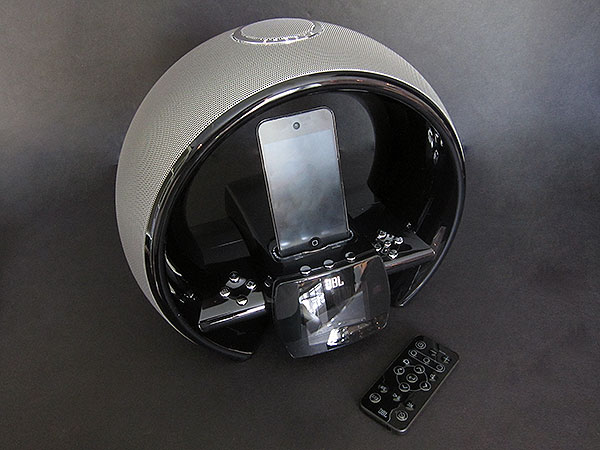
JBL’s new On Air Wireless ($350, aka OnAir) is the heir apparent to On Time, similar enough to obviously be from the same family, but updated with new features that are designed to appeal to a larger base of Apple users. Chief amongst them is support for AirPlay, the wireless streaming standard that enables iTunes and certain iOS devices—iPads, as well as third-generation iPhones and iPod touches—to start broadcasting music to the speaker with two clicks or taps. This is noteworthy because JBL is only the second company to release an all-in-one AirPlay speaker, following the March debut of Bowers & Wilkins’ Zeppelin Air, and despite the $350 price tag, On Air Wireless is at press time the least expensive AirPlay speaker option available. iHome has announced and delayed iW1, a wireless system slated to debut for $300, as well as less expensive sequels planned for later this year.

Like Zeppelin Air, On Air Wireless feels like it was rushed to market prematurely with a few weird little issues that may or may not be addressed in future firmware upgrades. As always, we look at this new speaker as it performs today, warts and all, so you can decide whether it’s right for you.
Body and Design
It’s obvious from moment one that On Air Wireless is the true sequel to On Time: beyond the fact that they’re both dual alarm clock radios with iPod docks, they share highly similar industrial designs. Each is shaped like a cross-sectioned globe, with a silver mesh arch serving as a partial canopy over the iPod dock that’s front and centered. Both have sets of backlit buttons arrayed like four-directioned joypads, straddling a bright clock that’s in front of the dock. A huge circular snooze button is at the top of each system, with antenna and power ports at the back. They’re both beautiful and glossy, though On Time’s design feels more pure, with some changes to On Air’s base complicating the smoother, simpler curves of the original model.

JBL’s changes to On Air are largely in the service of new features, fixing complaints about the prior model. The old white-on-blue screen has been replaced with a much higher resolution color version that now faces almost directly forwards, rather than reclining steeply as was oft-complained about in On Time.
There are now three context-sensitive buttons directly above the screen, the functions for which are clearly indicated with bright white text, allowing the five buttons off to the screen’s right to serve obvious navigation functions, while the four buttons to the left handle power, volume, and returning to On Air’s main screen. Now, the buttons are lit with white lights, matching the big white clock numbers on the display; their lights go off when the screen dims, blending into the rest of the glossy black unit.
A couple of changes make sense, though they don’t really improve the unit in any obvious way. On Air is taller than On Time, closer to 9” tall than the prior model’s 8”, providing the dock with enough clearance to accommodate both iPods and iPhones despite considerable elevation of the new unit’s plastic base. This was seemingly all done to accommodate the new and larger clock, and perhaps new wireless hardware inside the chassis, but it has the effect of creating what looks like a large cross-shaped platform that’s suspended inside the unit’s C-shaped arch.

Several small benefits are obvious. JBL has addressed the first unit’s lack of a remote control by including one—an Infrared remote with all the expected navigation, volume, track, snooze, and other buttons, plus the contextual ones. You’ll need to be within visual distance of the screen’s tiny text to know how to use them, though, at which point you’d probably be just as well off with the controls on On Air itself. On the other hand, the remote works well from 20-30-foot distances, so if you’re merely trying to start or stop music playback, it’s a strong performer.

The two alarms are now easier to set, with individual volume controls, gradual fades, buzzer/FM/iPod inputs, and 7/5/2 repeat options. And the FM radio is similarly easier to tune, with a scanning mode, simpler presets, and superior RDS text displays on the screen. You can detach the included wired FM antenna entirely if you don’t like how it looks, reducing your reception in the process, but removing an unsightly part of the original On Time design. The new antenna is even bigger than the last one, though; with it attached, FM radio tuning and performance are solid, and as low in static as most of iHome’s clock radios these days.

There are also a couple of noteworthy downgrades. On Air drops AM radio tuning support entirely. It loses the Dock Connector that used to allow iPod synchronization with a computer—the new USB port on the back is solely for On Air firmware upgrades, nothing more.
Less important are the removal of On Time’s “Sub-Out” port for connection of a subwoofer that never materialized, or the movement of its aux-in port to an awkward position behind the iPod/iPhone dock. The three AAA battery backup compartment for the clock is gone, as well; the system can now acquire clock information from the Internet. More on that in a moment.
AirPlay + Docked Sonic Performance
On Air Wireless’s performance as an AirPlay speaker is truly a mixed bag. On one hand, JBL has tackled the challenge of setting the unit up on an 802.11b/g Wi-Fi network with aplomb, avoiding certain out-of-the-box frustrations that we experienced when first testing Bowers + Wilkins’ Zeppelin Air. By leveraging the integrated color screen for device setup, JBL quickly shows you a list of available Wi-Fi networks that can easily be selected, providing an on-screen keyboard for what will presumably be a one-time pairing process. While we found On Air’s numeric keypad toggle to be a little tricky to access for password entry, this was solely traceable to JBL’s use of an old-fashioned carriage return icon as an “enter” key, and once we figured out how all the buttons worked, getting On Air onto the network was simple.

Using On Air with iTunes and iOS devices was similarly almost effortless. Just as with Apple TVs and Zeppelin Air, streaming music to On Air was as simple as clicking or tapping an AirPlay icon, selecting its name from a list of receivers, and pressing play on a song. On Air’s screen provides a wireless signal strength indicator with up to three bars, which fluctuated from one to three depending on which room it was being tested in: immediately next to our wireless router, it was at three bars, falling to two bars when it was one room away behind a closed door, and one bar when it was on the second floor of the same house, as far away as possible. Notably, we experienced signal drops in every room, and songs routinely stuttered briefly when they began to play, generally stabilizing thereafter.

That was just one of the oddities of On Air’s AirPlay performance. The other was album art: thanks in part to the color screen, JBL is the first company to support not only music streaming from iOS and iTunes devices, but also the display of full-color album art on the screen while the songs are playing. Unfortunately, the art often disappeared entirely from On Air’s display only seconds after it appeared, clearly a bug in the unit’s firmware. This happened regardless of the device we were streaming from, leaving the screen filled with a large musical note icon instead. It’s worth noting that for whatever reason, the album art displayed by On Air from a docked iPod or iPhone is much smaller and ridiculously lower in resolution, looking worse than whatever’s on the screen of the device itself—even if the device is an iPod nano.











