
iLoungeiLounge
  • News
    • Apple
      • AirPods Pro
      • AirPlay
      • Apps
        • Apple Music
      • iCloud
      • iTunes
      • HealthKit
      • HomeKit
      • HomePod
      • iOS 13
      • Apple Pay
      • Apple TV
      • Siri
    • Rumors
    • Humor
    • Technology
      • CES
    • Daily Deals
    • Articles
    • Web Stories
  • iPhone
    • iPhone Accessories
  • iPad
  • iPod
    • iPod Accessories
  • Apple Watch
    • Apple Watch Accessories
  • Mac
    • MacBook Air
    • MacBook Pro
  • Reviews
    • App Reviews
  • How-to
    • Ask iLounge
Font ResizerAa
iLoungeiLounge
Font ResizerAa
Search
  • News
    • Apple
    • Rumors
    • Humor
    • Technology
    • Daily Deals
    • Articles
    • Web Stories
  • iPhone
    • iPhone Accessories
  • iPad
  • iPod
    • iPod Accessories
  • Apple Watch
    • Apple Watch Accessories
  • Mac
    • MacBook Air
    • MacBook Pro
  • Reviews
    • App Reviews
  • How-to
    • Ask iLounge
Follow US

Reviews

Reviews

Review: iRSSFeeds by Gregory Desmaziers

Last updated: May 13, 2021 6:56 am UTC
By Charles Starrett
Review: iRSSFeeds by Gregory Desmaziers

This review originally appeared within iLounge’s iOS Gems series within the compilation article, iPhone Gems: Every RSS Reader, Reviewed. Additional details may be found in the original article.


iRssFeeds ($2) is yet another disappointing standalone RSS reader for the iPod touch and iPhone.
Review: iRSSFeeds by Gregory Desmaziers

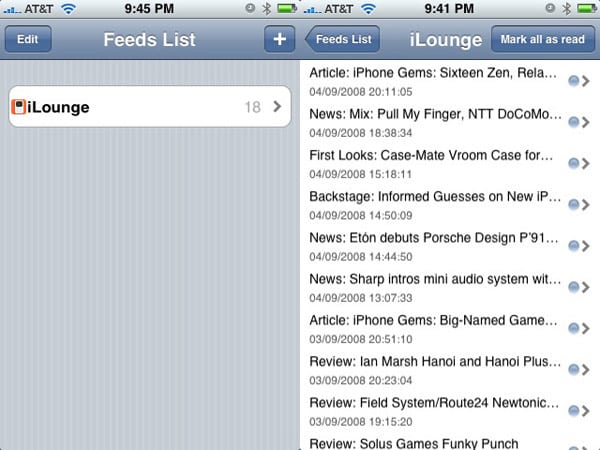
With no pre-installed feeds, the app at first presents users with a blank feeds list; an add button in the upper right hand corner lets users enter a description and feed URL. As the app doesn’t offer feed auto-discovery, users will need to remember and correctly enter the complete feed URL for it to work, otherwise the feed appears on the feeds list with a yellow caution symbol and must be deleted to remove it — the app wouldn’t allow us to edit a feed with an invalid URL.


Tapping on the feed loads the entry listing page, which features a mark all as read button at the top, the title, date, and time of each entry listed in small, cramped text, a grey dot to the side to denote unread status, and no lines between the entries, making choosing an item rather difficult.

The entry view itself is sparse, with an Open in Safari button at the top, the title in bold, and the summary underneath. Lacking nearly every feature we consider important for this type of application at this price point, iRSSFeeds falls well short of being worth its $2 asking price.



Latest News
The Apple Watch Series 11 42mm GPS is $100 Off
1 Min Read
Apple Launching A New Education Hub In India Teaching Robotics and Swift Programming
1 Min Read
Women’s and Men’s Golf Added to Apple Sports
1 Min Read
Apple Adding Civilization VII and Other Games To Apple Arcade
1 Min Read
AirPods 4 ANC Is $59 Off
1 Min Read
Apple Using 2NM Process For Their M6 and A20 Chip
1 Min Read
iPhone 18 Models Will Not Have a Big Redesign
1 Min Read
Launch of MacBook Pro M5 Pro and M5 Max Models is Approaching
1 Min Read
Get the iPad Mini 7 256GB Wi-Fi at $99 Off
1 Min Read
Mozilla Now Allows Turning AI Features Off
1 Min Read
Barcelona Passeig de Gràcia Apple Store Temporarily Closing
1 Min Read
Apple’s Plans to Enter the Smart Glasses Market is Changing the Industry
1 Min Read

iLounge logo

iLounge is an independent resource for all things iPod, iPhone, iPad, and beyond. iPod, iPhone, iPad, iTunes, Apple TV, and the Apple logo are trademarks of Apple Inc.

This website is not affiliated with Apple Inc.
iLounge © 2001 - 2025. All Rights Reserved.
  • Contact Us
  • Submit News
  • About Us
  • Forums
  • Privacy Policy
  • Terms Of Use
Welcome Back!

Sign in to your account

Lost your password?








