
iLoungeiLounge
  • News
    • Apple
      • AirPods Pro
      • AirPlay
      • Apps
        • Apple Music
      • iCloud
      • iTunes
      • HealthKit
      • HomeKit
      • HomePod
      • iOS 13
      • Apple Pay
      • Apple TV
      • Siri
    • Rumors
    • Humor
    • Technology
      • CES
    • Daily Deals
    • Articles
    • Web Stories
  • iPhone
    • iPhone Accessories
  • iPad
  • iPod
    • iPod Accessories
  • Apple Watch
    • Apple Watch Accessories
  • Mac
    • MacBook Air
    • MacBook Pro
  • Reviews
    • App Reviews
  • How-to
    • Ask iLounge
Font ResizerAa
iLoungeiLounge
Font ResizerAa
Search
  • News
    • Apple
    • Rumors
    • Humor
    • Technology
    • Daily Deals
    • Articles
    • Web Stories
  • iPhone
    • iPhone Accessories
  • iPad
  • iPod
    • iPod Accessories
  • Apple Watch
    • Apple Watch Accessories
  • Mac
    • MacBook Air
    • MacBook Pro
  • Reviews
    • App Reviews
  • How-to
    • Ask iLounge
Follow US

Reviews

Reviews

Review: iRSS by Boris Klaydman

Last updated: May 13, 2021 6:56 am UTC
By Charles Starrett
Review: iRSS by Boris Klaydman

This review originally appeared within iLounge’s iOS Gems series within the compilation article, iPhone Gems: Every RSS Reader, Reviewed. Additional details may be found in the original article.


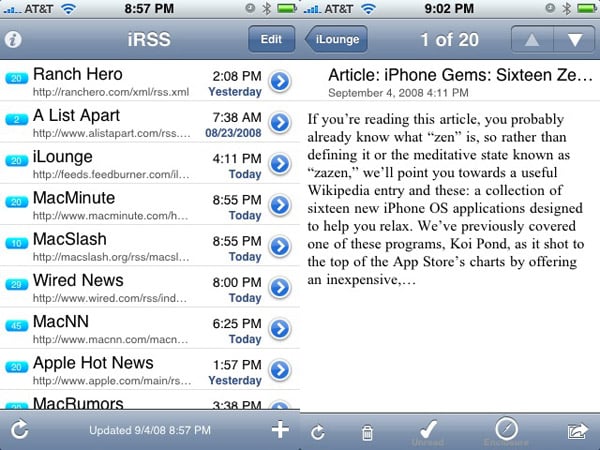
Taking nearly half a minute from launch to actually open and become usable (if it doesn’t crash beforehand, as it did for us more than 50% of the time), iRSS ($5) provides users with an early taste of the shortcomings they’ll find within. The app comes pre-loaded with a modest list of Mac- and Apple-oriented feeds, including iLounge, each listed in the main view with the title, a blue bubble containing the unread count, the time of the most recent update, and the feed URL, an unnecessary addition, in our view.

Review: iRSS by Boris Klaydman

A button for adding a feed takes the user to a rather unattractive page where they can enter a description, the feed URL (no auto-discovery here), and select how many lines of preview text to show and how many items to store. Tapping on a feed takes users to a list of entries, with a refresh button at the bottom and buttons for deletion of items and marking all as read at the top.

Selecting an entry takes users to a somewhat ugly individual item view, with a too-small trash icon to delete the entry, a button to mark the item unread, an “enclosure” compass button that did absolutely nothing in our testing, and an action button that automatically sends the user to a new email populated by the summary of the entry, but astoundingly, no link to the article, and no mention of what site it came from — not even the title. Likewise, for sites that don’t provide an extra link to the story in the summary of their feed, there is no way to view the item outside of the summary view — tapping on the title does nothing, and there is no other option for opening the item in Safari, meaning that iRSS is only good for reading the information found inside the feed itself.

We could go into further detail on iRSS’ shortcomings, but frankly, there’s no need. For free, this app wouldn’t be worth the download, but it instead sells for $5, making it the worst value of any reader app. iLounge Rating: F.

Our Rating

F
Abysmal

Company and Price

Company: Boris Klaydman

Website: N/A

Title: iRSS

Price: $5

Compatible: iPhones, iPod touches

.


Latest News
The AirPods Pro 3 is $20 Off
1 Min Read
Exynos 2600 Chip 2nm Process Revealed by Samsung
1 Min Read
New Celebrity Ad Campaign Featuring Travis Scott Released by Beats
1 Min Read
Australia Getting Hypertension Notification Feature
1 Min Read
The 14-inch MacBook Pro with M5 Chip 16GB RAM/512GB is $250 Off
1 Min Read
Noise and Static on AirPods Pro 3 Still Unfixed
1 Min Read
New iMac with 24-inch OLED Display May be Brighter With 600 Nits
1 Min Read
The 15-inch M4 MacBook Air 256GB Is $250 Off
1 Min Read
Internal Kernel Debug Kit from Apple Reveals Tests for a MacBook with A15 Chip
1 Min Read
Apple Currently In Talks With Suppliers for Chip Assembly & Packaging of iPhones in India
1 Min Read
Apple Allows Easier Battery Replacement For M5 MacBook Pro with 14-inch Display
1 Min Read
The Apple Watch SE 3 44mm GPS is $50 Off
1 Min Read

iLounge logo

iLounge is an independent resource for all things iPod, iPhone, iPad, and beyond. iPod, iPhone, iPad, iTunes, Apple TV, and the Apple logo are trademarks of Apple Inc.

This website is not affiliated with Apple Inc.
iLounge © 2001 - 2025. All Rights Reserved.
  • Contact Us
  • Submit News
  • About Us
  • Forums
  • Privacy Policy
  • Terms Of Use
Welcome Back!

Sign in to your account

Lost your password?









