
iLoungeiLounge
  • News
    • Apple
      • AirPods Pro
      • AirPlay
      • Apps
        • Apple Music
      • iCloud
      • iTunes
      • HealthKit
      • HomeKit
      • HomePod
      • iOS 13
      • Apple Pay
      • Apple TV
      • Siri
    • Rumors
    • Humor
    • Technology
      • CES
    • Daily Deals
    • Articles
    • Web Stories
  • iPhone
    • iPhone Accessories
  • iPad
  • iPod
    • iPod Accessories
  • Apple Watch
    • Apple Watch Accessories
  • Mac
    • MacBook Air
    • MacBook Pro
  • Reviews
    • App Reviews
  • How-to
    • Ask iLounge
Font ResizerAa
iLoungeiLounge
Font ResizerAa
Search
  • News
    • Apple
    • Rumors
    • Humor
    • Technology
    • Daily Deals
    • Articles
    • Web Stories
  • iPhone
    • iPhone Accessories
  • iPad
  • iPod
    • iPod Accessories
  • Apple Watch
    • Apple Watch Accessories
  • Mac
    • MacBook Air
    • MacBook Pro
  • Reviews
    • App Reviews
  • How-to
    • Ask iLounge
Follow US

Reviews

Reviews

Review: Irock! Wireless Music Adapter

Last updated: May 14, 2021 1:43 pm UTC
By Dennis Lloyd
Review: Irock! Wireless Music Adapter

Pros: Inexpensive, small, easy to use, unique design, cool red glow.


Cons: Noticeable static, must find the right placement for best reception.
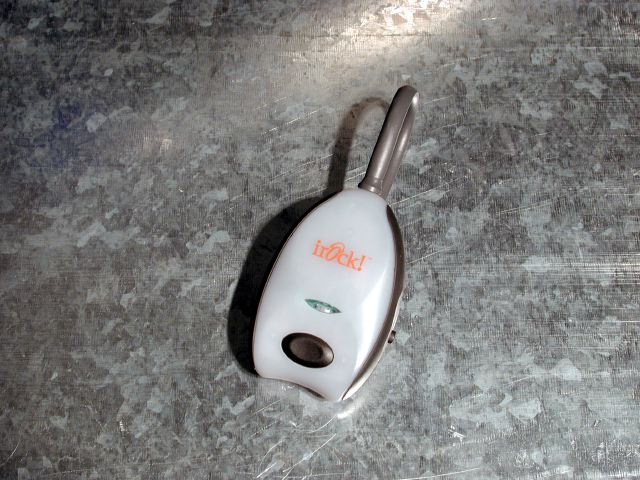
Review: Irock! Wireless Music Adapter

Since the release of the iPod, owners are trying to find the best solution to bring their iPod on quick trips to the market or long road trips in the car. In this review, we take a look at the Irock! Wireless Music Adapter (also known as a FM transmitter), one of many devices, which will enable you to enjoy your iPod in your car or at home on your stereo receiver.


Features

The small, alien-like pod is simple in form as well as function. View the photos for a closer look. There are only a few components in which to familiarize you with, the power-on button, frequency selector and a 1/8” stereo jack. The Irock! FM transmitter takes two AAA batteries. The power button looks cool as it emits a red glow when the unit is turned on. The frequency selector is a switch with four to choose from. These frequencys are: 88.1, 88.3, 88.5 and 88.7. There is also a 1/8” stereo jack to plug into the headphone port on your iPod.


The 1/8” stereo jack even has its own holder in the back of the Irock! unit. Kudos to all who were involved in the product’s design, the Irock! unit exudes future-geek modern looks. Now, if they had just paid all this attention to its reception capabilities, this product would truly i-rock.

Review: Irock! Wireless Music Adapter

Review: Irock! Wireless Music Adapter


Performance

Our test consisted of driving around town while trying to get the Irock! unit placed just right for optimum reception. I plugged the Irock! unit into the headphone jack on the iPod, pushed the power on button, as the red light glowed, and proceeded to turn on the iPod. After selecting a song, I turned on the car stereo receiver, tuned it to 88.1 and could hear the song pumping through my car stereo. So far, so good? Well, the reception on this particular FM transmitter left a lot to be desired. There is definitely noticeable static. It takes some time to place the unit just right until the static lowers to a tolerable level. Remember the days when you had an antennae on your T.V.


set? You had to hold it just right to get a descent picture. I placed the Irock! unit as far away as the back seat to get a descent, almost static-free reception. I also found out by holding the unit in my hand, that the reception was the best. So, here I am driving with one hand, while my other hand is holding the Irock! unit. But, at least my music was sounding good as my iPod rested in the back seat. Of course, your mileage will vary, no pun intended. Another tip is to increase the volume on the car stereo to drown-out the static a bit.

Review: Irock! Wireless Music Adapter

Conclusion

The Irock! FM transmitter isn’t perfect, but it does provide a moderately inexpensive method of getting all those illegally copied mp3’s to play in your car stereo. Just kidding. Officially, don’t steal music.



Latest News
The Apple Watch Series 11 46mm GPS Is $100 Off
1 Min Read
Clamshell Style iPhone Being Looked Into By Apple
1 Min Read
Foldable iPhones May Have the Largest Battery Ever
1 Min Read
Apple and TSMC’s 10-Year Collaboration May Be Ending
1 Min Read
The 13-inch M5 iPad Pro 256GB Wi-Fi Is $149 Off
1 Min Read
M5 Pro and M5 Max Chips for the MacBook Pro could Roll Out with macOS 26.3
1 Min Read
Mac Ordering Process Revamped
1 Min Read
Check Signed By Steve Wozniak and Steve Jobs Sold For $2.4 Million
1 Min Read
The Anker 140W 4-Port GaN USB-C Charger is $35 Off
1 Min Read
No iPhone Air 2 This Year, according to Latest Report
1 Min Read
New Report Corroborates Split iPhone Release Dates
1 Min Read
Apple Losing More Researchers As They Plan To Release 2 Siri Versions
1 Min Read

iLounge logo

iLounge is an independent resource for all things iPod, iPhone, iPad, and beyond. iPod, iPhone, iPad, iTunes, Apple TV, and the Apple logo are trademarks of Apple Inc.

This website is not affiliated with Apple Inc.
iLounge © 2001 - 2025. All Rights Reserved.
  • Contact Us
  • Submit News
  • About Us
  • Forums
  • Privacy Policy
  • Terms Of Use
Welcome Back!

Sign in to your account

Lost your password?








