
Pros: Performs as advertised; keeps the Click Wheel protected in a minimal way. The free included screen protector is a bit fiddly to fit but once on is not noticeable on the iPod mini, marginally so on the 4G iPod.
Cons: $9 per set seems steep, but not so bad given competing options and included shipping.
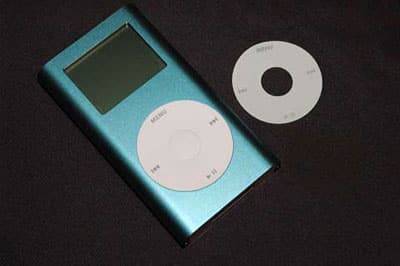
White Click Wheels can get dirty, as evidenced by iPods on display in stores and in our personal use. Having tested Power Support’s Crystal Film and Wheel Film already, we wanted to look at another minimalist way to protect current model iPods’ screens and Click Wheels, and opted to try the new iPoDonuts introduced by Japanese company Frontfield.
After six days shipping from Japan, a plain “donut” arrived for our test iPod mini, plus one for our 4G iPod’s Click Wheel. The two “donuts” and two screen protectors cost $18 in total, travelling from Japan in a 235mm x 120mm envelope. It’s no wonder the that packing and postage is included in the price.
The iPoDonut protectors for the iPod mini are made from silicone and stick on the Click Wheel using a silicone-based adhesive. They have a slight green tinge not especially noticeable under normal light, which is attributable to the luminescent material from which they are made. Once the lights go down, the iPoDonuts glow for some time; Frontfield claims that they will glow for up to eight hours after 30 mins of exposure to light.
On the 4G iPod, the donut covers up the grey Click Wheel quite nicely.
For those who wish they could have a 4G that’s stylistically more in keeping with the 3G iPod’s Scroll Wheel, the iPoDonut may be a good way to achieve this. The 4G donut has a very faint green tinge that’s not as obvious on the grey Click Wheel.
Fitting the iPoDonuts is fairly easy. A steady hand and eye is needed to get the donut shape to match precisely on the iPod’s wheel, and it took us two or three attempts to actually get one fitted to our satisfaction. The fact that the 4G’s Click Wheel depresses below the rim of the wheel opening can aid getting it on straight. On the iPod mini, the donut becomes almost flush with the mini’s metal body, while on the 4G it is raised very slightly above the front face of the iPod. If the iPoDonut is used with an accessory case, its raised edge is still below the actual Click Wheel opening.

The free screen protectors are small sheets which seem to adhere to the LCD screens using the same silicone-based adhesive as the iPoDonuts. On the iPod mini, the screen is slightly recessed below the front face of the metal shell, so sliding the screen protector squarely into place was easy – on our first attempt, it dropped into place.
A quick wipe with a soft cloth removed any bubbles, and it was done. With screen and Wheel covered, the delicate parts of the iPod mini were pretty much protected.
On the 4G iPod, the experience was different. As the screen on the 4G is actually encased underneath acrylic plastic, the film protector lies on top of the LCD screen. The actual protector is slightly taller than the iPod screen, so getting it to fit squarely was a slightly more fiddly and frustrating operation. We found that the slightest piece of dust caused the protector to bubble and not adhere properly to the iPod LCD screen, and had to find the offending speck of dirt and remove it. Next, a fine hair would appear. A sterile room may be the best place to fit this, as wiping the iPod gives it a slight static charge which will attract the slightest bit of fluff or dust.
Eventually, we fit the protector properly, and found that a small piece of scotch tape dabbed onto the sticky side of the protector was the best way to remove any dust or fluff.

So, are the iPoDonut accessories worth the money? Well, if you want Click Wheel protection that doesn’t detract from the look of the iPod, then they do the job well.











