
Ever since XtremeMac released the deluxe alarm clock Luna, we have been waiting for an iPhone-compatible sequel — unfortunately, due to problems at XtremeMac, the Luna X2 has been repeatedly delayed, and might never appear. So we were genuinely enthusiastic when iLuv’s iMM173 ($130) arrived at iLounge for testing, borrowing some of the styling from Luna X2, and offering not just iPhone compatibility but two top-mounted docks. Though iMM173 turned out to be more of a mixed bag in performance than we had hoped, it’s still a good option for iPhone users.
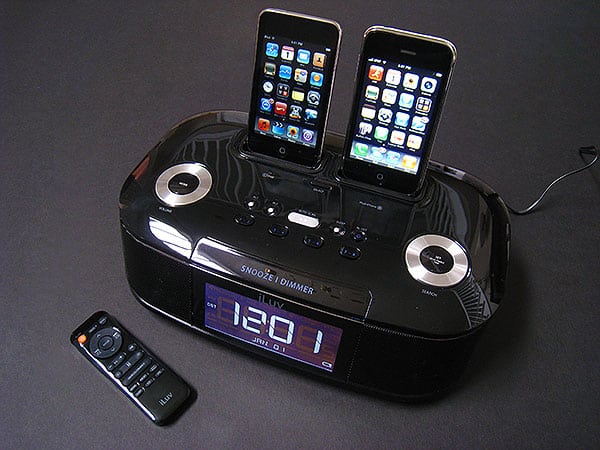
The single best feature of iMM173 is its styling. Measuring roughly 11.1” wide by 6.5” deep by 3.3” tall, the system is mostly glossy black plastic with metal speaker grilles and silver accents—most notably twin silver dials on its top, but also in four of its 13 top buttons, and in a thin stripe that runs across the front and sides above the large central clock. iLuv has actually done a surprisingly great job with the look and feel of this system; the non-silver buttons are topped with transparent plastic for the illusion of added depth, like 1G/2G/5G iPods, and the clock face is extremely impressive, with 10 brightness settings and superb contrast. This is amongst the most readable and attractive clock faces we’ve ever seen on an iPod audio system; the clock is the best-looking of the iPhone-ready ones we’ve tested, as well.

While the top-mounted twin Universal Docks may strike some as a gimmick, we actually liked them, and so will any person or couple with either an iPod and an iPhone, twin iPods, or twin iPhones. Both docks charge whichever device is sitting inside, though only the right one is officially iPhone authenticated, so placing an iPhone in the left dock will lead to the infamous nag screen.
Still, it’ll work just fine for charging and audio in either dock, and a switch on the top toggles between the docks for audio purposes. Our only complaint is that iLuv’s included dock adapters aren’t Universal Dock standard, and were unusually cheap-feeling and unusually shaped, with attached rubber pads already coming off straight out of the package. Thankfully, the rest of the system was more solidly made.

Other cool features are found in the system’s Infrared remote control, which is the best we’ve yet seen from iLuv on size and design relative to functionality. It includes a wide variety of wisely positioned buttons, ranging from iPod and iPhone menu navigation to bass and treble controls, control over snooze and dimmer features of the iMM173, and the ability to toggle between playing audio from the left or right docks. We were pleasantly surprised to find that it uses a magnet to secure itself to the back of the iMM173 system, conveniently staying out of the way but nearby when it’s not needed. While we wouldn’t want to leave the magnet around hard disk-based iPod classics, the feature is nice anyway.

So given all of the nice design, dock, and remote functionality, and the system’s reasonable $130 price point—cheaper than a single-dock iHome iPhone-ready system, and only $30 more expensive than the least expensive iPhone-compatible clock radios—what are the real issues with iMM173? Here’s the list.

Audio quality. Though the iMM173 has a twin-speaker array similar to the ones in iHome’s iH9 and iP99 systems, the speakers don’t sound as if they’re ideally equalized from the start.
Similarly, despite the remote’s equalization buttons, the speakers couldn’t be tuned in a way that impressed us relative to competitors we tested alongside them. That said, they’re fine, and we’d describe the system’s sound quality as acceptable for the price, rather than bad or great; it’s on par with the $100 Sony system and less impressive than iHome’s $100 and $150 radios. Yes, you can boost the bass to outperform the Sony’s maximum level, and that of other competing options from companies such as Logitech, but you won’t be comparatively impressed by the clarity.

Radio functionality. iMM173 includes only an FM radio, leaving AM behind. While we don’t mind this, and are actually never thrilled by the size and awkwardness of large external AM antennas, the radio again rates in the “fine” category in terms of clarity, with an awkward 0.1 slow tuning mechanism that’s exacerbated by the default use of a dial for top-of-system tuning. You can use an auto scan feature on either the iMM173’s top or the remote, however, to speed up tuning, and eight presets are available through dual-setting buttons on the top of the unit.


Alarm functionality. While you can set either of the two alarms to play either the left or the right docked iPod or iPhone, the FM radio, or a sufficiently annoying chirping buzzer, the timer settings are on the simple side: you just set a time for an always recurring alarm, and don’t get iHome-style control over which days of the week it will go off.











