
iLoungeiLounge
  • News
    • Apple
      • AirPods Pro
      • AirPlay
      • Apps
        • Apple Music
      • iCloud
      • iTunes
      • HealthKit
      • HomeKit
      • HomePod
      • iOS 13
      • Apple Pay
      • Apple TV
      • Siri
    • Rumors
    • Humor
    • Technology
      • CES
    • Daily Deals
    • Articles
    • Web Stories
  • iPhone
    • iPhone Accessories
  • iPad
  • iPod
    • iPod Accessories
  • Apple Watch
    • Apple Watch Accessories
  • Mac
    • MacBook Air
    • MacBook Pro
  • Reviews
    • App Reviews
  • How-to
    • Ask iLounge
Font ResizerAa
iLoungeiLounge
Font ResizerAa
Search
  • News
    • Apple
    • Rumors
    • Humor
    • Technology
    • Daily Deals
    • Articles
    • Web Stories
  • iPhone
    • iPhone Accessories
  • iPad
  • iPod
    • iPod Accessories
  • Apple Watch
    • Apple Watch Accessories
  • Mac
    • MacBook Air
    • MacBook Pro
  • Reviews
    • App Reviews
  • How-to
    • Ask iLounge
Follow US

Reviews

Reviews

Review: iKeyboard iKeyboard for iPad

Last updated: May 17, 2021 9:56 am UTC
By Nick Guy
Review: iKeyboard iKeyboard for iPad

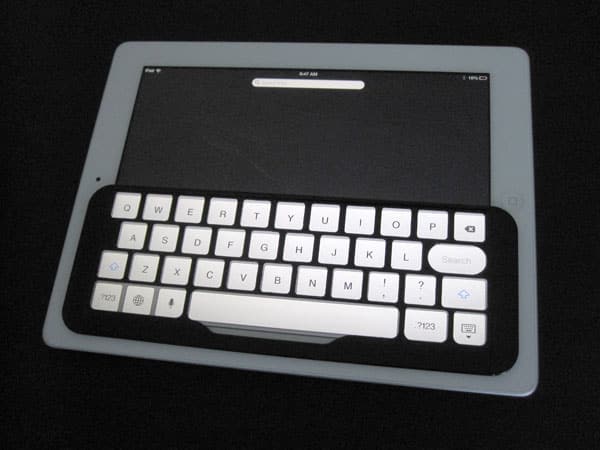
There’s no question that typing on the iPad’s digital keyboard just isn’t the same as using a physical one. Developed by the company of the same name, iKeyboard ($35) is an attempt to make it easier to type on the glass display. The plastic frame physically delineates the keys, supposedly offering “all the advantages of an iPad wireless keyboard without the footprint.” While the size claims are true, the actual benefits of the accessory were truly marginal.

Review: iKeyboard iKeyboard for iPad

The two-layer plastic frame uses strips to adhere to the screen, placing atop the iPad’s glass screen an opaque black frame with holes for key-shaped clear plastic membrane surfaces. It measures in at 8.75” long and just over 3” tall, but is thin enough that a Smart Cover fits on top, and still magnetically locks the iPad. The adhesive strips can be repositioned as necessary, with scotch tape recommend as the best way to clean them.


Review: iKeyboard iKeyboard for iPad

Obviously iKeyboard is only useful when typing; it otherwise obscures about half the screen. The cutouts line up properly with the English keyboard and number/symbol selector, but don’t fit properly over international keyboards, making this an accessory only native English typists will consider. Conceptually, having physically separated keys might make it easier to type, and improve your results when touch typing. In reality, however, we found the results to be a big letdown. While the plastic frame does provide a guide for your fingers, the clear membrane inhibits the touch controls to a degree that’s unacceptable.


You have to press slightly harder to get the raised plastic bubbles to touch the glass display, and they sometimes stick, causing extra letter presses. We actually moved slower with iKeyboard in place than when typing directly on the iPad’s screen.


Review: iKeyboard iKeyboard for iPad

If iKeyboard offers any real benefit, it’s being able to type a bit easier without looking at the iPad’s on-screen keys. Yes, you’ll have to press differently than you’re used to, but you’ll at least have a guide so that your fingers stay where they should be. Other than that, we found no reason to recommend this accessory.



Latest News
The AirPods Pro 3 is $20 Off
1 Min Read
Exynos 2600 Chip 2nm Process Revealed by Samsung
1 Min Read
New Celebrity Ad Campaign Featuring Travis Scott Released by Beats
1 Min Read
Australia Getting Hypertension Notification Feature
1 Min Read
The 14-inch MacBook Pro with M5 Chip 16GB RAM/512GB is $250 Off
1 Min Read
Noise and Static on AirPods Pro 3 Still Unfixed
1 Min Read
New iMac with 24-inch OLED Display May be Brighter With 600 Nits
1 Min Read
The 15-inch M4 MacBook Air 256GB Is $250 Off
1 Min Read
Internal Kernel Debug Kit from Apple Reveals Tests for a MacBook with A15 Chip
1 Min Read
Apple Currently In Talks With Suppliers for Chip Assembly & Packaging of iPhones in India
1 Min Read
Apple Allows Easier Battery Replacement For M5 MacBook Pro with 14-inch Display
1 Min Read
The Apple Watch SE 3 44mm GPS is $50 Off
1 Min Read

iLounge logo

iLounge is an independent resource for all things iPod, iPhone, iPad, and beyond. iPod, iPhone, iPad, iTunes, Apple TV, and the Apple logo are trademarks of Apple Inc.

This website is not affiliated with Apple Inc.
iLounge © 2001 - 2025. All Rights Reserved.
  • Contact Us
  • Submit News
  • About Us
  • Forums
  • Privacy Policy
  • Terms Of Use
Welcome Back!

Sign in to your account

Lost your password?








