
Apple’s iOS devices, particularly the iPad, have taken on a prominent role in music creation, editing, and production tasks, and a wide range of audio, music, and DJ accessories and apps have been created to help musicians and audio professionals interact with these devices. However, the capabilities and unique user interfaces on Apple’s devices have also sparked the imaginations of some developers, with whole new categories of interactive accessories beginning to emerge. IK Multimedia’s new iRing ($25) is an example of an accessory that pushes the envelope and provides musicians and DJs with a whole new paradigm for interacting with iOS devices.
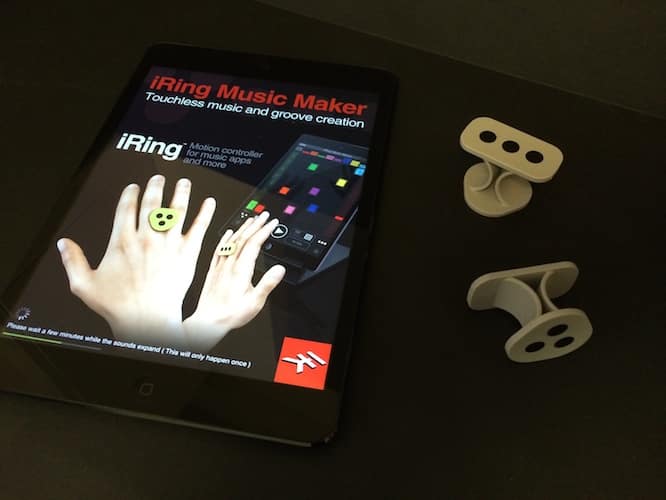
iRing is a motion controller that uses the iOS camera to detect hand motion across three axes. The package includes two moulded plastic “rings” that are actually designed to sit between the fingers on each hand, rather than around the fingers. The front and back of each ring include one of two different dot patterns that are read by the appropriate app on the iOS camera. The concept here is to place one iRing on each hand with opposite sides facing outward, and then move your hands in front of an iPad, iPhone, or iPod touch camera in order to send instructions to the appropriate applications. The box also contains a product registration card with a QR code and serial number that users will want to hold on to in order to register the iRing to use with IK’s various apps.
This code is required to actually “unlock” iRing mode in these apps, a requirement which isn’t really made clear in the otherwise good visual documentation included in the package – the “registration card” simply encourages users to register the product in the same type of wording as most other consumer products.

IK Multimedia has provided a pair of companion apps on the App Store which provide translation of these iRing motion commands into something more useful. The first of these, iRing Music Maker, is more of a fun “proof of concept” app that allows users to create real-time dance grooves and effects simply by hand movements. The other app, iRing FX/Controller provides a control interface designed to interact with other apps, instruments, and studio hardware using standards such as Audiobus, Apple’s own inter-app audio, and MIDI commands. In one mode, the FX/Controller app can act as an audio effects processor, taking an audio stream from another iOS app or external audio source and allowing the user to add up to two effects from a collection of 16 possibilities and control three parameters for each of those effects using hand motions and sending the results to another iOS app or directly to the device’s audio output.

FX/Controller can also work as a MIDI controller, allowing a user to assign virtually any MIDI control or program change message to the available hand motions, allowing MIDI adjustments for existing iOS apps or external MIDI devices connected through a Core MIDI compatible adapter. Three continuous control change (CC) messages can be assigned to each hand, mapped to movements along the three axes (up, down, left, right, in, and out), which can be very useful for things like modulation, pitch bend, and volume controls. Additional gestures can be assigned to other MIDI control messages, such as hand rotation (left and right), punching, showing and hiding the iRing, and exiting the screen from each of the four sides. The app also allows users to create multiple presets to store their assigned MIDI command sets for instant recall later, and can even send MIDI messages via Wi-Fi to a computer or other device.

In addition, IK has updated its GrooveMaker 2 and DJ Rig apps to include direct support for iRing motion control. For example, in DJ Rig, users can adjust any of the standard DJ Rig FX options simply by waving their iRing-equipped hands over their device’s screen, allowing some DJs to add a certain artistic flair to their performances. The company also has an SDK to allow other third-party developers to easily integrate iRing support into their own apps, although like many of the other non-standard game and motion controller accessories we’ve witnessed over the years, we’re a bit skeptical as to what the uptake will really be from third-party developers.

In actual, practical use, the iRing works quite well and pretty much exactly as you would expect. In fact, the device almost feels somewhat magical in a way that can only be experienced rather than explained, with the ability to control effects and make music simply by moving your hands through the air feeling somewhat like a modern day, and significantly more advanced, Theremin. That said, iRing isn’t without its limitations. The front camera range is limited to just over 2 feet, which may be a problem for some use cases, although in our testing it didn’t feel like a serious issue, since it’s the hands that need to be within two feet of the device, not the body. Rear camera range pushes this up to almost 5 feet, but we really found iRing much more awkward to use from the rear side since we were deprived of the visual preview, although this could probably be improved simply through practice. Since the visual controls are based on the contrast with the dot patterns, users will also need to be conscious of things like lighting, clothing, and other backgrounds; we found that high contrast checkered and striped shirts tended to seriously affect iRing’s performance.











